
zagarskas
Known Participant
November 25, 2024

Photoshop 2025 LIBRARIES keep disappearing

  • November 25, 2024
  • 1 reply
  • 308 views

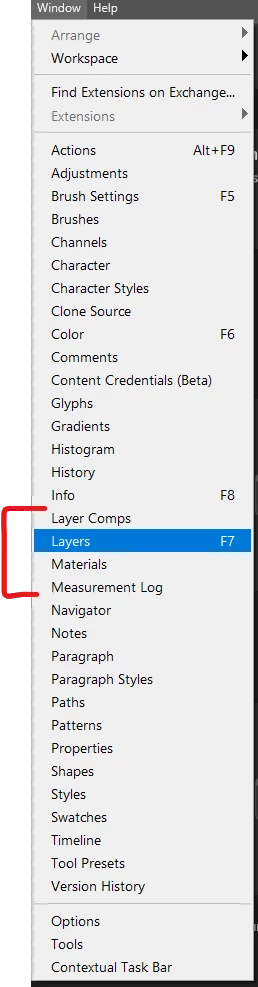
Libraires dissappear from the WINDOW menu and from where we have SAVED them in the tool bar.


Login, log out, clear data, uninstall, reinstall EVERY DAY has to be done to get them to come back, sometimes that does not work.


LIBRAIRES should always be right here in the menu:


1 reply

Anshul_Saini
Community Manager
Community Manager
November 26, 2024

Hi @zagarskas,


Thank you for sharing the details of your experience. Having Libraries disappear so frequently is indeed disruptive. Would you mind sharing a few details so we can investigate this further:

1. Open the Creative Cloud Desktop App, go to Preferences > syncing, and confirm syncing is enabled.

2. Ensure both Photoshop and the Creative Cloud Desktop App are fully updated to their latest versions.

3. Have you tried Adobe Creative Cloud Cleaner Tool to uninstall Photoshop & Creative Cloud Desktop app completely, clearing any corrupted installation files?

4. Sometimes external factors, like system policies or third-party software, can interfere:

• If possible, test Photoshop in a new or guest user account on your computer.

• Ensure no system or network level restrictions (e.g., IT-managed security or firewall policies) are affecting Adobe services.


We will be looking forward to your response.


Best,

Anshul Saini