
cindic48128273
Known Participant
August 13, 2026

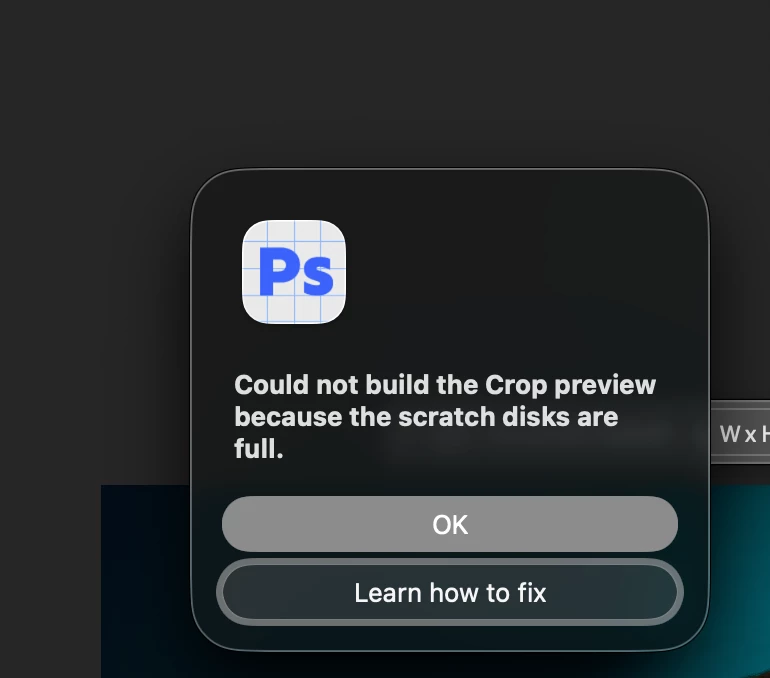
Photoshop Beta says scratch disks are full when they are not

  • August 13, 2026
  • 2 replies
  • 16 views

Photoshop Beta stopped alllowing certain tools to work like the crop tool as it says the scratch disks are full. They are not. 215gb on the hard drive - 565Gb on the external. Photoshop 2026 is working.

Mac OS 26.5.1

photoshop beta 27.11
 

    2 replies

    Claire H.
    Community Manager
    Community Manager
    August 13, 2026

    Hi ​@cindic48128273, Welcome to the Photoshop Community! Let's try a few things to resolve the issue with Photoshop Beta incorrectly indicating that the scratch disks are full:

    1. Check Available Disk Space: Please make sure that there is enough free space on both your hard drive and external drive. You mentioned having 215 GB on the hard drive and 565 GB on the external drive, which should be adequate.

    2. Free Up Space: Even if you have enough space, it’s recommended to have at least 50 GB of free space on your OS hard drive while working with Photoshop. To free up space:

      • Delete unnecessary files from your hard drive.

      • Move files from the scratch disk to another location (e.g., from your hard drive to the external drive).

    3. Change Scratch Disk Preferences:

      • Open Photoshop.

      • Go to Preferences > Scratch Disks.

      • Ensure that your external drive is selected as a scratch disk if your internal drive is getting full or not performing well.

    4. Restart Photoshop: After making changes, restart Photoshop to see if the issue persists.

    If none of these steps help resolve the issue, we can continue troubleshooting. I hope this helps! ^CH

    cindic48128273
    Known Participant
    August 13, 2026

    I have 215Gb free on the main hard drive and 565 free on the external. I did all this already. Restarted - the program, the computer. I’ve been using Photoshop daily for work since 1997. LOL

    This does not resolve the problem. It is only with Beta,  and I updated it today in hopes it would fix it. Photoshop 2026 is not having this issue - yet.