





Photoshop forces AI-generated label even after AI layers are removed or hidden
Once a photoshop project is flagged behind the scenes as having used generative AI (where it says “An AI-generated image was used in this image” when exporting, and embeds a content credential), it apparently never re-evaluates this flag. Even if those layers are removed later.
For example, I made a copy of a project where it said this and literally deleted every layer and made a blank white layer, yet it still said it when exporting:
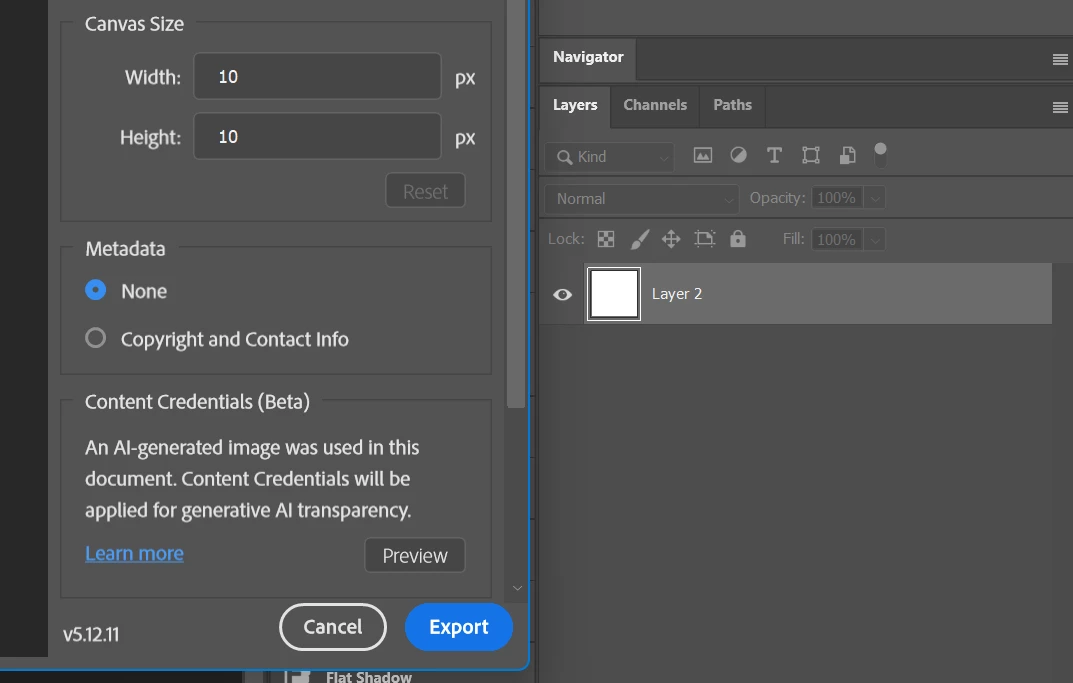
I also think this “ai generated” flag should not be at the project level, but rather the layer level. So that if you export the project with the AI generated content hidden, it doesn’t add that flag.
It would also be useful to know exactly which layers are causing the flag, because even some with the AI badge don’t seem to trigger it, like using generative fill for example. While “generate image” does.
So basically:
- Bug: “AI Generated” flag persists even after all AI generated layers are removed
- Probably Bug / Suggestion: “AI Generated” flag should not apply if all individual AI-generated layers are hidden during export, even if they still exist in the project.
- Suggestion: Some way to see exactly which layers or smart objects triggered the flag.
System Specs:
Photoshop Version: 27.6.0 20260422.r.11 4804c18 x64 (final, Release)
Windows Version: Windows 11 Enterprise 25H2 (Build 26200.8313)
System Hardware:
CPU: Intel 13900KS
GPU: Nvidia 5090 FE
GPU Driver Version: 595.79
RAM: 128GB
Storage: NVMe SSD - Optane 905P 1.5TB
 AdChoices