


Participant
September 27, 2024

Photoshop sometimes takes up two spots in my dock, including a "ghost" icon.

  • September 27, 2024
  • 3 replies
  • 409 views

I posted about this when it first happened to me with Photoshop Beta . When I minimize Photoshop (most recent, updated version) on my 2019 intel iMac (Sonoma 14.6.1), a second "ghost" icon appears as well. Clicking either one opens the real one and they both go away:
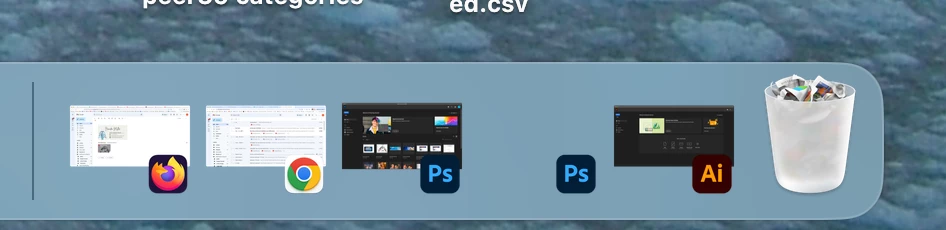

It was suggested that I check my dock settings and uncheck "Show suggested and recent apps in Dock". I don't recall if that is what fixed it last year (somehow it did stop), but it recently started happening again and I feel like I accidentally clicked something in Photoshop to make it happen. I do not have "show recent apps" checked and, as you can see in the screenshot, it only happens with photoshop. It never happens with any app other than photoshop. I've closed it and reopened it. I feel like it must be something simple I am missing.

3 replies

mglush
Community Expert
Community Expert
September 29, 2024

That is great to hear! Thanks for letting us know.

Participant
September 27, 2024

Hi Michelle!

When I right click on it, it only gives me the option to open. It doesn't give those usual options:

However, I took your advice of closing it up (had to force quit) and opening it up from the applications folder and now it's working normal again! Thank you!

mglush
Community Expert
Community Expert
September 27, 2024

Hi!

Sorry to hear you are having this issue!

Have you tried deleting the pop-up version while you are running Photoshop?

With Photoshop open, select the the Photoshop icon that pops up second in the dock and choose Options>Remove from Dock. Does that work? Does it remove just the one, or both? If it does remove both, start Photoshop from your Appications folder and once Photoshop is open, click on the icon and move it somewhere else in your dock to set it in place.

Let us know if that works?

Michelle