


Participant
November 12, 2024

Photoshop using too much memory since last update

  • November 12, 2024
  • 13 replies
  • 1019 views

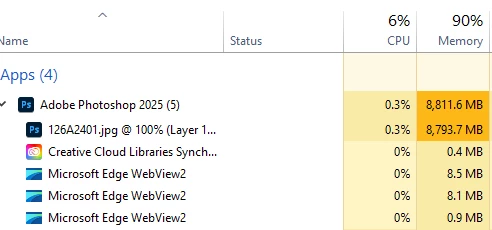
I keep wondering why my other programs are running so slow now whenever I edit with photoshop (since last update a few weeks ago) and it's currently using over 8000mb memory which is ridiculous, no wonder everything else barely works. It's taking about 88-90% of my memory every time I use it.
 

13 replies

Known Participant
March 18, 2025

I'm having the same issue. Even if I set the amount of memory allocated for Photoshop lower, it still uses far more (often times more than double) and then my brand-new Mac Studio with 64GB of RAM runs out of memory, requiring I quit applications.


Photoshop has killed multitasking. 

Inspiring
February 6, 2025

I can confirm this issue.

I let for PS 38 GB RAM from 64 GB as always and it was okay until yesterday, when I must rewert to an older version.


"Could not complete the Performance command because of a program error." - Got this error while cutting out a fourth product photo. Than I've checked and this piece of wonder has eaten up all of my ram. ( With my workflow, this has never occured before, maybe the software has slowed down after the 10+ images, when I had to restart the software, which is ok. )


The funny thing is, that before this error, I had to leave my computer in the middle of cutting out the image for a couple minutes and when I came back, the software started to stutter very hard, like with 5 FPS.


So it filled the RAM when I wasn't even working. Thats what I call nonsense. 


I can't belive, that they are testing their software on the working public, damaging valuable time and money.

Participating Frequently
January 31, 2025

any recommended smoother version?

Participating Frequently
January 31, 2025

im on newest version of it, and it still doing that, high mem usage with no reason. 
this program now cant run photomerge for sure, when doing this, always freezing even with small pixel size. 
memory always at 99% usage. even when i set mine to 70% on ps preference. and i have 128gb memory installed now.

Participant
January 29, 2025

There seems to be an issue with Photoshop not purging the memory but just adding to it until it gets completely maxed out. Rolling back the version is the only solution until Adobe fix this.

Participant
January 16, 2025

The only solution I found was to download an older version.

mooboohAuthor
Participant
January 16, 2025

I don't think so, no one has replied back, I just barely edit anymore cause it's extremely frustrating.

Participant
January 16, 2025

I'm also having this issue. Has there been a solution?

mooboohAuthor
Participant
December 17, 2024

I don't even think that matters. The remove tool is just horrible right now even with AI turned off. I know other photographers in my area that can't even use it, it crashed their photoshop every time. Just gonna go back to an older version and wait until it's fixed on a newer update eventually.

D Fosse
Community Expert
Community Expert
December 16, 2024

Please post the full Help > System Info.


Also open Task manager > Performance when this happens, select "Memory" and post a screenshot of the graph.