


Preference Corruption: Shortcuts and Tools Resetting Automatically During Active Session
Hi, I'm experiencing a frustrating issue where Photoshop 2026 settings and shortcuts change or reset to defaults randomly while I am actively working.
I want to be very clear: Completely resetting the application and the preference files DOES NOT solve the issue. The problem recurs almost immediately after a reset, even in the same session.
Specific Examples of the Glitch:
-
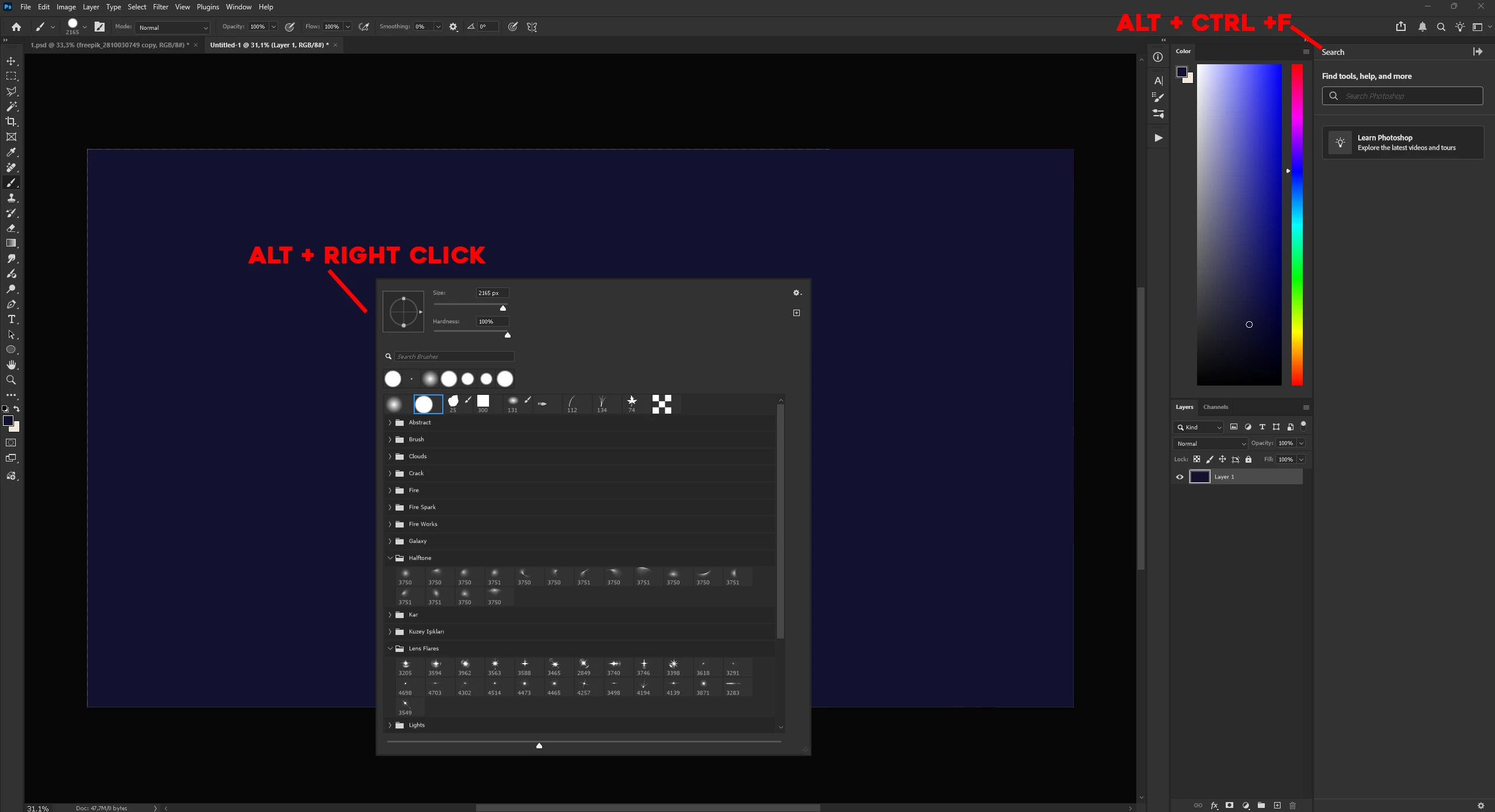
Alt Key Behavior: While using the Brush tool, holding the
Altkey opens tool settings or UI pop-ups instead of switching to the Eyedropper for color picking. - Filter Shortcut: The
Ctrl + Alt + Fshortcut (assigned to Last Filter) spontaneously starts opening the "Discover" panel instead of applying the previous filter.
This happens mid-work without any manual changes. Since standard preference resets are useless in this case, I am looking for a permanent solution to prevent these spontaneous overrides.
Photoshop Version: 2026 / 27.5
Windows 11
 AdChoices