


Regression: Direction-based brushes render incorrect angle on first stroke in Photoshop 2025/2026 (works in 2024)
Issue summary: Since Photoshop 2025 (exact version unknown, but after 25.12.4) direction-based brush strokes, when set in the brush settings (Shape Dynamics - Angle Jitter - Direction), are not working properly. The very first 'pixel' of nearly every stroke is angled about 90 degrees perpendicular, before correcting itself immediately as the stroke continues. This breaks a previously working workflow.
The problem is only mitigated by using external stabilisation (I’m using Lazy Nezumi Pro with light smoothing), which suggests the issue is related to how initial pen input samples are handled at stroke start. I also ideally need to have 1% smoothing enabled in Photoshop, or the bug can lightly reoccur occasionally.
Using older Photoshop versions avoids the issue, but this is not a viable long-term solution due to other compatibility and stability concerns. I have used these brushes for years with no issues until recently.
Product and version:
25.12.4. (laptop) the bug does not occur in this version.
26.11.0 (laptop) the bug does occur in this version. Same system and setup, just different version.
26.11.5 (PC), the bug happens.
27.6.0 (PC) the bug happens.
Operating system:
Windows 11, both desktop PC and laptop.
Cintiq 24 Pro and Surface Pro 8
Steps to reproduce:
I have attached an image below. Just using any brush that has Shape Dynamics - Angle Jitter - Direction enabled causes this issue.
Expected result, right side. Actual result, left side. No other settings changed.
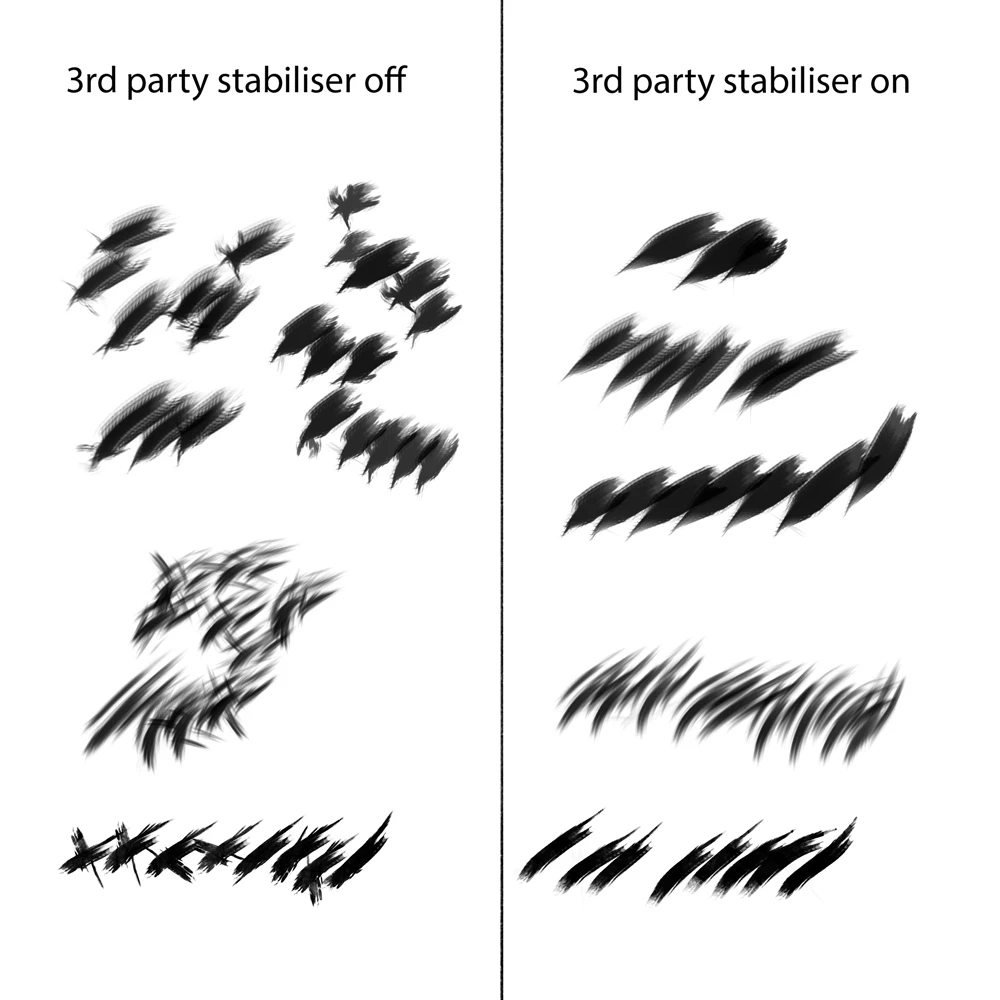
Things I have tried and any brushes with Direction settings are still not working on multiple devices, so this should rule out a hardware issue.
Windows Ink on/off, and multiple Windows Ink related settings
PSUserConfig.txt
Restarting tablet services/PC
Up to date drivers (Wacom, GPU, etc.)
Photoshop GPU settings
Display scaling (multiple monitor setup, happens in both)
Using Photoshop in either monitor
Different files sizes, speed of brush strokes
 AdChoices