

Regression: Photoshop 27.5+ permanently displays Adobe Fonts that are not synchronized
Summary
A regression was introduced between Photoshop 27.4 and Photoshop 27.5 affecting Adobe Fonts integration.
Starting with Photoshop 27.5, Photoshop permanently displays a fixed set of Adobe Fonts in the font picker, even when those fonts are not synchronized.
The issue is isolated to Photoshop and does not occur in Illustrator, InDesign, or other Adobe applications.
The regression is still present in the latest Photoshop release (27.8.x) and in Photoshop Beta.
Environment
Operating System
- Windows 11 (clean installation)
Adobe Applications Tested
- Photoshop 27.4.x → Works correctly
- Photoshop 27.5.x → Regression introduced
- Photoshop 27.8.x → Issue persists
- Photoshop Beta → Issue persists
- Illustrator → Works correctly
- InDesign → Works correctly
Creative Cloud Desktop
- Latest available version
Adobe Fonts
- Enabled only for manually synchronized fonts
Expected Behavior
Photoshop should display:
- Locally installed fonts.
- Adobe Fonts that are currently synchronized.
If a synchronized Adobe Font is removed (deactivated), it should immediately disappear from Photoshop's font list, matching the behavior of Illustrator and other Adobe applications.
Actual Behavior
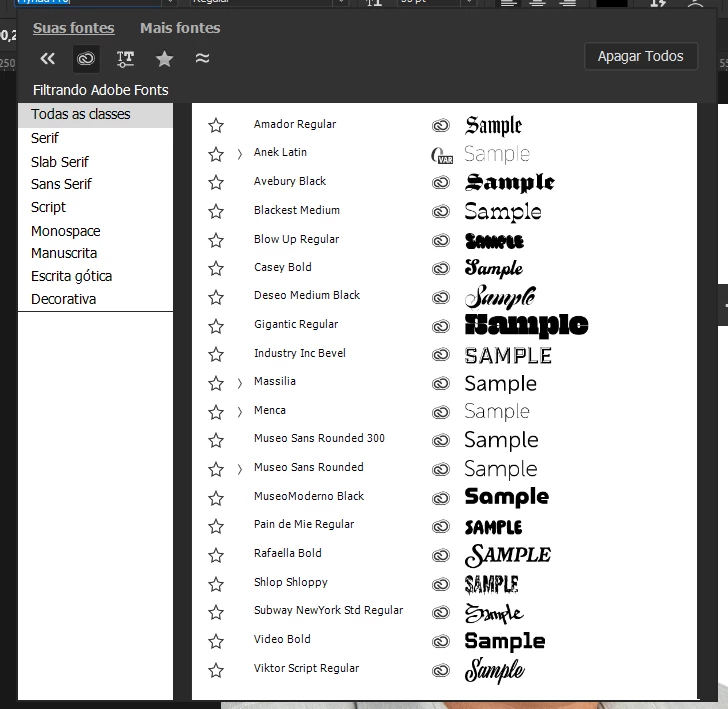
Photoshop permanently displays the following Adobe Fonts, even though they are not synchronized:
- Amador
- Avebury
- Blackest
- Blow Up
- Casey
- Deseo
- Gigantic
- Industry Inc.
- MuseoModerno
- Pain de Mie
- Rafaella
- Shlop
- Subway NewYork
- Video
- Viktor Script
These fonts remain permanently listed in Photoshop regardless of their synchronization state.
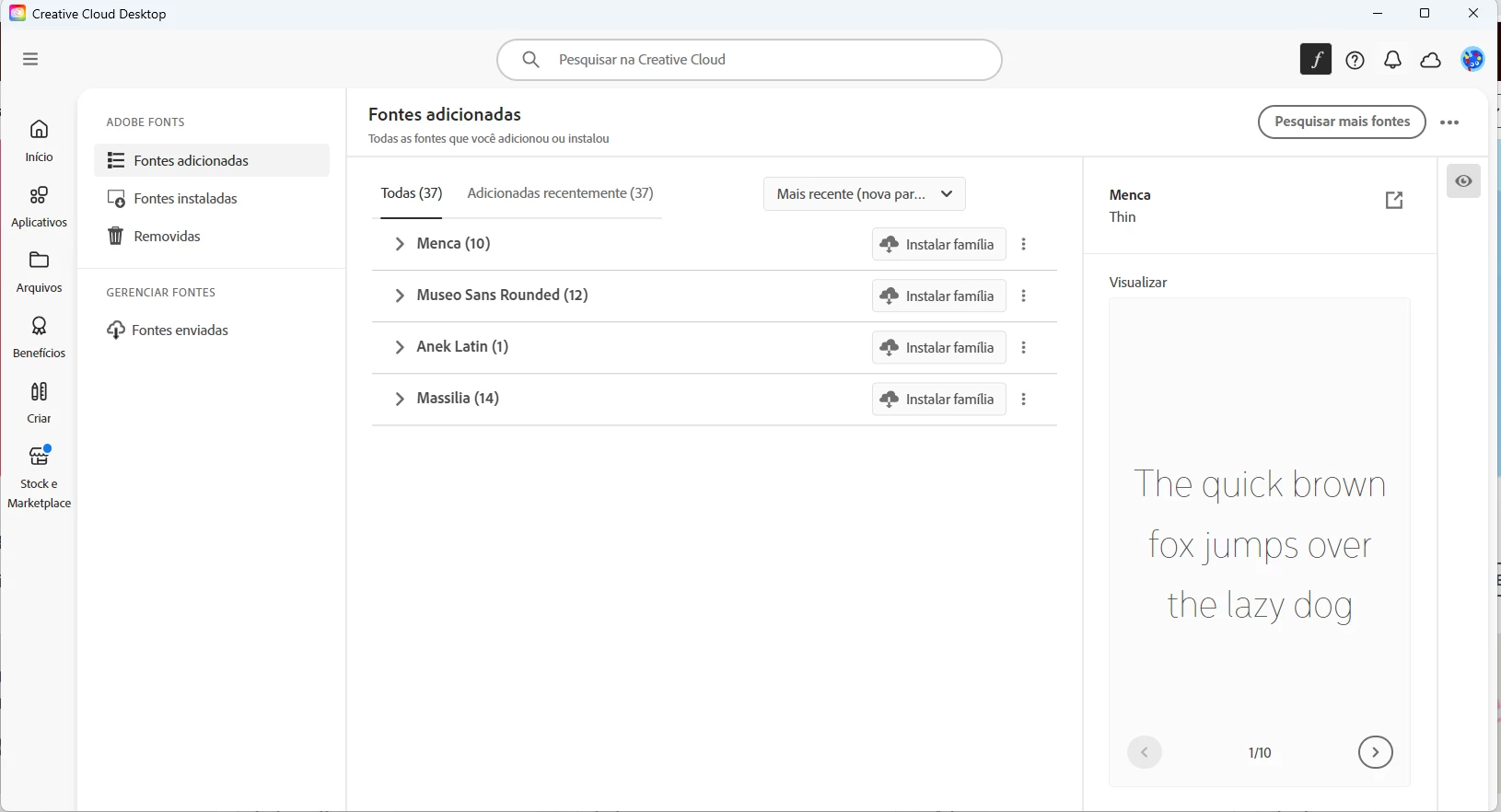
The Adobe Fonts panel correctly displays only the fonts that I explicitly synchronized.
However, Photoshop always displays the persistent fonts listed above in addition to my synchronized fonts.
Although these persistent fonts are not synchronized, Photoshop allows them to be selected and used immediately.
As soon as one of these fonts is used, Creative Cloud automatically activates (synchronizes) that font through Adobe Fonts.
If the font is then removed (deactivated) from Adobe Fonts, Creative Cloud correctly reports that the font is no longer synchronized. However, Photoshop continues displaying that font permanently in the font list as if it were still synchronized.
This behavior can be reproduced indefinitely with every font listed above.
Cross-Application Comparison
This issue occurs only in Photoshop.
Illustrator behaves correctly under the exact same conditions.
When opening a document that uses one of these fonts in Illustrator:
- Illustrator reports the font as missing.
- Illustrator offers to activate the font through Adobe Fonts.
- The font cannot be used until it has been synchronized.
Photoshop, however, displays these same fonts as immediately available before synchronization.
This results in inconsistent behavior between Photoshop and the other Adobe applications.
Regression Analysis
I tested multiple Photoshop versions under the exact same environment.
| Photoshop Version | Result |
|---|---|
| Photoshop 27.4.x | ✅ Works correctly |
| Photoshop 27.5.x | ❌ Regression introduced |
| Photoshop 27.8.x | ❌ Issue persists |
| Photoshop Beta | ❌ Issue persists |
The only variable changed during testing was the Photoshop version.
This strongly indicates that the regression was introduced between Photoshop 27.4 and Photoshop 27.5.
Troubleshooting Performed
Before identifying the regression, I performed the following troubleshooting steps.
Adobe Account
- Tested using my original Adobe account.
- Created a completely new Adobe account.
- Reproduced the issue using both accounts.
Result
The issue is not account-specific.
Windows
- Performed a complete clean installation of Windows 11.
- Installed Adobe Creative Cloud and Photoshop from scratch.
Result
The issue persists.
Photoshop
- Reinstalled Photoshop multiple times.
- Reset Photoshop preferences.
- Installed and tested Photoshop Beta.
Result
The issue persists.
Adobe Creative Cloud
- Reinstalled Creative Cloud Desktop.
- Verified that Adobe Fonts synchronization was working correctly.
- Confirmed that only manually synchronized fonts appeared in the Adobe Fonts panel.
Result
Creative Cloud behaves correctly.
Only Photoshop displays the persistent font list.
Adobe Fonts
- Synchronized multiple Adobe Fonts.
- Successfully removed (deactivated) them afterward.
Result
Fonts that I intentionally synchronize behave normally.
The persistent fonts listed above remain permanently displayed in Photoshop regardless of whether they are synchronized.
Local Font Verification
I searched the system for matching font files (.TTF and .OTF).
No matching font files were found installed locally.
Cross-Machine Verification
This issue is not limited to a single computer.
I reproduced the exact same behavior on a second Windows PC, using:
- a clean Windows installation;
- a clean Creative Cloud installation;
- a clean Photoshop installation.
Both computers exhibit exactly the same behavior.
Attachments
The attached screenshots demonstrate:
Image 1
Photoshop's font picker displaying the persistent Adobe Fonts that remain available even though they are not synchronized.
Image 2
The Adobe Fonts panel displaying only the fonts that I intentionally synchronized.
The persistent fonts shown in Photoshop do not appear in Adobe Fonts unless I actually use one of them inside Photoshop.
When one of these persistent fonts is used:
- Creative Cloud automatically synchronizes it.
- The font appears in the Adobe Fonts panel.
- If I remove (deactivate) it from Adobe Fonts, it disappears from Adobe Fonts as expected.
- However, it remains permanently listed in Photoshop's font picker.
Conclusion
Based on all testing performed, this appears to be a regression introduced between Photoshop 27.4 and Photoshop 27.5.
The issue is:
- Reproducible.
- Isolated to Photoshop.
- Independent of the Adobe account used.
- Reproducible after a clean Windows installation.
- Reproducible after a complete reinstallation of Adobe Creative Cloud and Photoshop.
- Reproducible on multiple computers.
- Still present in Photoshop Beta.
Furthermore, Photoshop behaves inconsistently compared to Illustrator and other Adobe applications, which correctly respect the Adobe Fonts synchronization state.
I would be happy to provide additional logs, Photoshop System Information reports, perform additional testing, or verify a potential fix if required.


 AdChoices