


Inspiring
July 4, 2024

Right click layer name identification in Photoshop

  • July 4, 2024
  • 5 replies
  • 449 views

Got a new layer? Hover the mouse over of some pixels on that layer and you can identify what layers exist at that point. - You all know this!
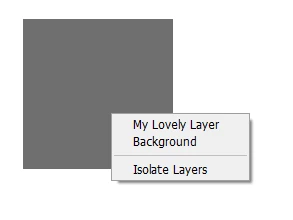


Background + My Lovely Layer. All is good


However, when you rename the layer to "-" (hyphen minus without the quotes) you get this:
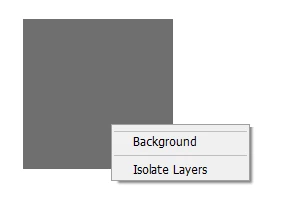
 

Any other layer names that are ignored by Photoshop??


This topic has been closed for replies.

5 replies

Pete.Green
Community Manager
July 16, 2024

Thanks for the report on this Ghoul -- it's definitely interesting and has workarounds (add any other character to the layer name), however there are likely very few workflows that this affects. I don't suspect there will be a fix for this any time soon but we'll keep an eye on it.


Cheers

Inspiring
July 4, 2024

It's not an obvious choice of layer name (nor will it ever replace the time honoured classic Layer 1 copy copy copy) but I was creating some glyphs for a typeface and voilà!

Ged_Traynor
Community Expert
Community Expert
July 4, 2024

Could be, I've never used the - sign in naming layers

Inspiring
July 4, 2024

I suspect it's gone unnoticed for years. Just booted up an old hard drive - it's also in version 5.0.2, as in pre CC.

Ged_Traynor
Community Expert
Community Expert
July 4, 2024

@Ghoul Fool just tested with Photoshop version 25.9.1 and can confirm the issue