

Jqqerry
Inspiring
Feb 1, 2023 1:33 AM UTC
Open for Voting

Sometimes, Pentool Path shape mode change Combine to Subtract

OS : Window10
Phtoshop Version : 24.0 ~ 24.1.1 (I sometimes had this problem in Photoshop 2022. The exact version is not certain.)
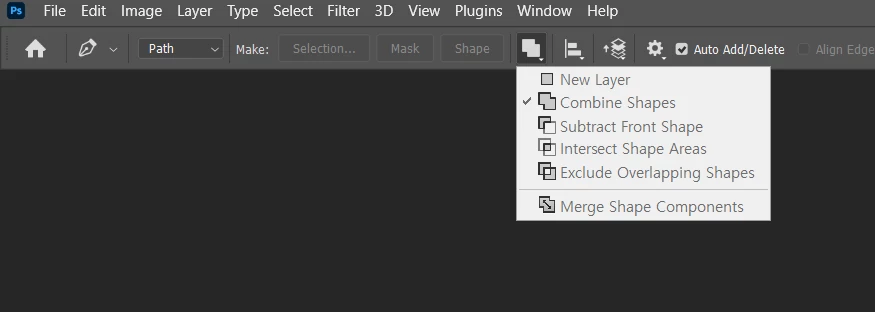


I usually use Pentool path to get the selection needed for image adjustment.
This is because it is more convenient to use a layer mask than a Vetor Mask. Of course, the flexible operation of the Pentool is one of the reasons for using it.

Therefore, the action that I take while using the pen tool is very simple. 
1. Extract Subject or Something use Pen tool
2. Run Action (Which is Covert Path to Selection in Photoshop function)
3. That's all

I didn't mix any functions, I just use the functions inside Photoshop.
Therefore, my Shape Mode should not be changed.

However, when you use Pentool + Action and check the selection area, it is sometimes Invert.
Then, when such a bug occurs, I went into my Pentool and checked the Shape Mode, and it was confirmed that it was changed from Combine to Subtract.

The stage of reproduction of this is unknown.
But I think I use the pen tool at least 2 to 30 times in one image.
And as the stack builds up, it seems that such a bug occurs at some point.
The only way I could fix that was to change the shape mode directly from the pen tool.
It's not a serious problem, but I'm reporting it because it's also a bit of a bothersome bug.

Btw, Photoshop reset, Nvidia driver check, Windows update check, Photoshop reinstall is something I do regularly about once or twice a week and had nothing to do with this.


6 replies

Jqqerry
JqqerryAuthor
Inspiring
Oct 30, 2024 11:33 PM UTC

Btw, I also remembered this thread I've been reporting before, someone pressed vote.
The current version is 26.0 and still hasn't been fixed. (The thread I reported was 24.0) 😃

Translate
Participant
Aug 10, 2024 12:15 PM UTC

I have had this issue for 7 or 8 years without solution. It's an incredibly annoyance. Any solution? Thanks

Translate
Jqqerry
JqqerryAuthor
Inspiring
Aug 10, 2024 12:36 PM UTC

No. I've also experienced this for a long time (even with Ctrl+Enter), but this thread that reported this bug has been moved to the Discussions tab.
There is no solution to this. I just need to change the Combine Shape again every time.
The bug is correct, but I don't think it will be fixed.
If you want to fix the bug, you might want to write it again.

Translate
Jqqerry
JqqerryAuthor
Inspiring
Feb 28, 2023 3:07 AM UTC

PS 24.2 is same issue. (if i use Ctrl enter without Action what i made)
If the action of making the path created using the pentool into a selection is repeated, that bug will occur at some point.
I'm not sure, but if you open Photoshop once, open two to three images, work on them, save and close them, and open another two to three and work again, that kind of bug seems to occur.
And as I said before, the solution to the bug was simple.
Manually clicking on the Combie Shape on the tab to restore it to its original state.

Translate
Jqqerry
JqqerryAuthor
Inspiring
Feb 1, 2023 1:56 AM UTC

@jane-e  Hi! Thanks for reply.

That's it. There's nothing special.

I don't use Ctrl + Enter. (I'm left-handed user, so that makes hand gestures uncomfortable.)
It's the same function but it's recorded as an action, and it's unusual that a bug like that (or just happening?) happens when it repeats.

Translate
jane-e
Community Expert
Community Expert
Feb 1, 2023 1:49 AM UTC

@Jqqerry 


Two questions:

  • Can we see your action? Expand the steps and resize the panel wider and taller.
  • Does the same thing happen when you use the keyboard shortcut Ctrl+Enter to convert from a path to a selection?


Jane

Translate