

Inspiring
September 2, 2024

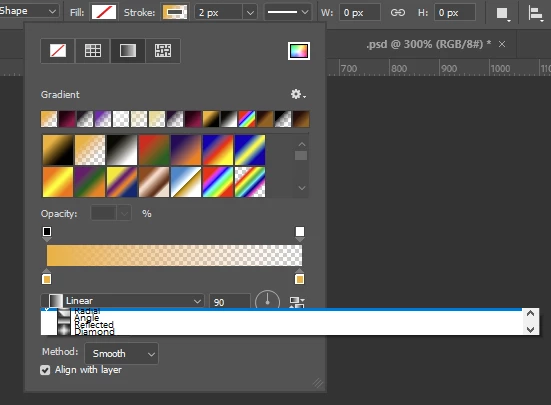
Stroke Gradient Pulldown Menu is broken

  • September 2, 2024
  • 2 replies
  • 261 views

For me, the pulldown menu to select the gradient type of a stroke is hard to read, since all the entries seem to be bunched up in this menu. Tested with PS 25.11.0 on Windows 10.

 

2 replies

Inspiring
September 2, 2024

@Ged_Traynor My colleague has the same problem, and he has different preferences than I have. I tried resetting my preferences, and the result is the same.


The identical looking menu in the shape fill gradient options works as expected by the way.


Maybe it has to do with Windows UI scaling that you're not experiencing this issue? I'm using a 2560x1440 resolution with scaling in Windows set to 100% and scaling in Photoshop set to Auto (so it should be at 100% as well).

Ged_Traynor
Community Expert
Community Expert
September 2, 2024

@Hannes Drexl it's showing up fine for me with Photoshop version 25.11, have you tried manually resetting your Photoshop preferences
https://helpx.adobe.com/ie/photoshop/using/preferences.html#Manually
Remember to back up your settings before doing the preference reset
https://helpx.adobe.com/ie/photoshop/using/preset-migration.html