


Known Participant
October 2, 2023

Stroke is broken for multiple subpaths per shape layer
  • October 2, 2023
  • 7 replies
  • 496 views

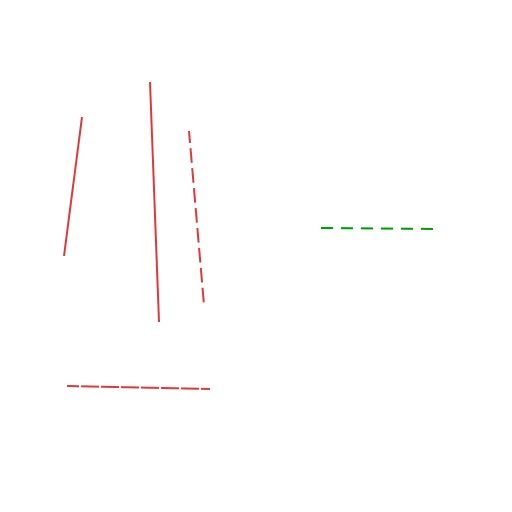
Red is an example of multiple open-ended subpaths in a single shape layer.
Green is an example of a single open-ended subpath in a single shape layer.

As you can see: multiple sub-paths completely break dashing.

This may be related to another issue:
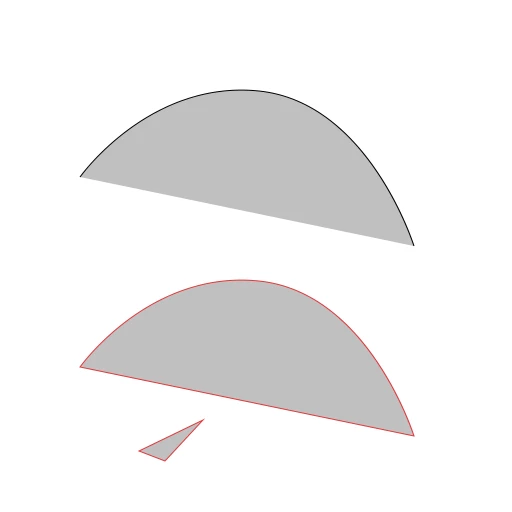
Upper version is a single open-ended sub-path on a single shape layer
Lower version are two open-ended sub-paths on a single shape layer. The shapes seems to act as though it were closed, however: it's not actually closed. There are no edges linking the end vertices of that path, and likewise, the triangle is constructed of 3 verts and 2 edges - the bottom-right edge shouldn't exist.

7 replies

Known Participant
June 5, 2024

still an issue in 25.9

Known Participant
January 3, 2024

Still an issue in 25.3.1

Known Participant
November 1, 2023

still an issue in 25.1

Known Participant
October 4, 2023

Correct. That's what I meant by "multiple subpaths per shape layer"

Bojan Živković11378569
Community Expert
Community Expert
October 4, 2023

Problem is not visible with only one path or subpath on my side, it appears when second subpath is drawn on existing shape layer.

Known Participant
October 4, 2023

A clearer illustration of the self-closing symptom when multiple subpaths exist on a shape layer:


Note that the red is the actual path, and the blue is the stroke that results.


This is really hampering my workflow.

davescm
Community Expert
Community Expert
October 2, 2023

Confirming that is reproducible here on V25.0 and Windows 11

Dave