
Participant
Sep 6, 2024 6:34 PM UTC
Open for Voting

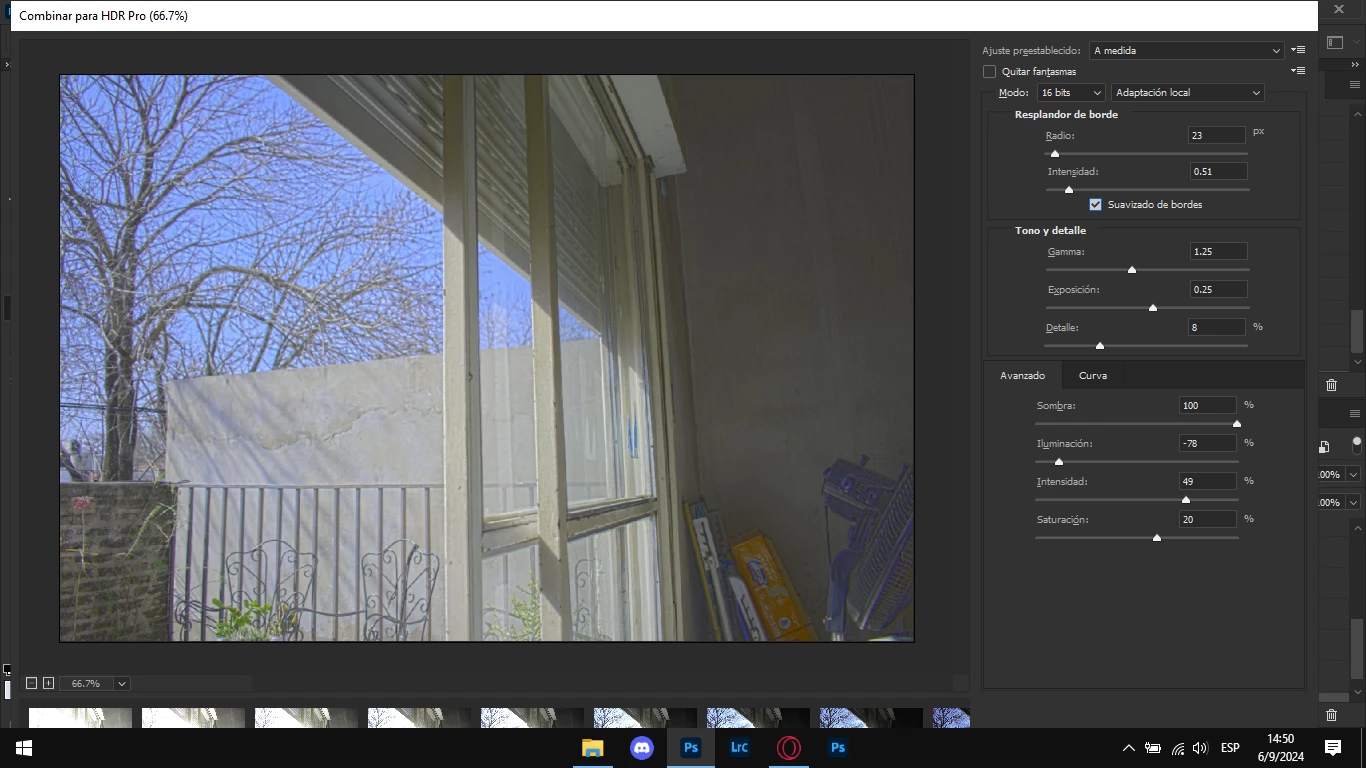
Ventana grande no se ajusta a la resolucion de mi pantalla y no me deja verla en su totalidad

Intento hacer una prueba de HDR pero la pantalla se muestra asi cortada, puedo moverla o estirarla hacia los lados pero no puedo achicarla entonces no puedo ver la EV de cada foto ni deseleccionarlas ni ver los botones de, supongo yo, son "ok" y "cancelar"

supongo es por la resolucion del monitor de mi laptop que es 1366x768 pero ese es el maximo y ni bajando la resolucion se arregla este problema, tambien probe tocando en las preferencias de interfaz en photoshop y nada, alguna idea? 
 

4 replies

davescm
Community Expert
Community Expert
Sep 13, 2024 11:04 AM UTC

The minimum screensize for Photoshop (in the system requirements) is 1280x800, which explains why some dialogues will not fit on your screen.

That said, the Cancel and OK buttons can be replaced by pressing Esc or Enter on your keyboard. (note that is the Enter key on the alphabet part of the keyboard not the numeric part)


Dave

Translate
Participant
Sep 13, 2024 1:07 AM UTC

Yes, I already tried that

Translate
Jeff Arola
Community Expert
Community Expert
Sep 6, 2024 9:13 PM UTC

Have you tried Auto-hiding the Taskbar?

Right click on the Taskbar, then click Taskbar settings.


Translate
MassC
Legend
Sep 6, 2024 8:07 PM UTC

¿Ya has intentado reiniciar Lightroom? Consulte esta publicación: https://adobe.ly/3TnLjs3


^CM

Translate