
Participating Frequently
August 28, 2024

Adobe Premiere Pro 2024 Not Importing Multi-Track Audio Properly - Need Help

  • August 28, 2024
  • 6 replies
  • 2023 views

Hi everyone,

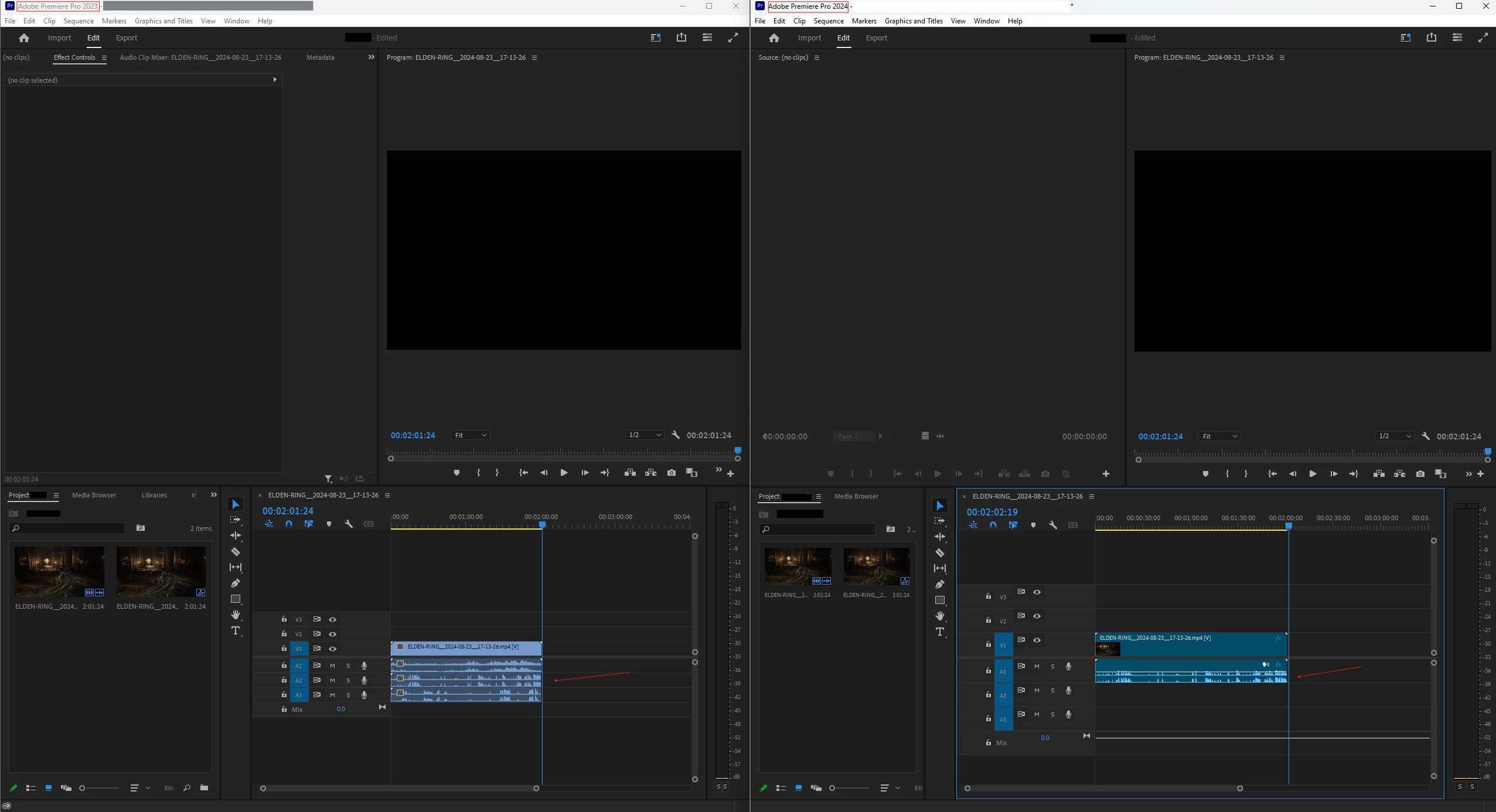
I’ve recently upgraded to Adobe Premiere Pro 2024 and encountered a frustrating issue with multi-track audio. When I try to import a video file with multiple audio tracks, only the first audio track appears on the timeline. Dragging the source file onto the timeline just doesn't bring in the other tracks, even though they are definitely there.

I’ve tried searching for a solution but haven’t found anything that works so far. Interestingly, this issue didn’t exist in Adobe Premiere Pro 2023. When I import the same file into the 2023 version, all the audio tracks come through without any problems.

I’ve attached a screenshot showing a comparison between the 2023 and 2024 versions to illustrate what I mean.

Has anyone else run into this problem or found a workaround? Any advice or suggestions would be greatly appreciated!

Thanks in advance for your help!

Attachment: Screenshot showing the difference between Adobe Premiere Pro 2023 and 2024 in handling multi-track audio.
This topic has been closed for replies.

6 replies

jamieclarke
Community Manager
Community Manager
November 15, 2024

Updating Status to Acknowledged

Participant
November 1, 2024

Is there any solution to this - I am using a Tascam for audio for a video Project and using latest version of Premiere Pro and it wont let be import all the files to to a Multicam set up and I have no audio, Please HELP

Participating Frequently
August 30, 2024

Here are the audio channel settings on both.  I even tried setting Stereo to Mono, due to suggestions in another forum for other uses.  That did not work.


Here is what it looks like if I import the project from 2023 to 2024 version.  However, the additional audio tracks are blank/mute/empty.


Here are the preferences side by side.  


I am familiar with the troubleshooting methodologies and have been in the tech field for 30+ years.  Typically I can solve these issues without posting in forums.  But this one has me scratching my head.  My son and my daughter brought the attention to me and we can replicate it across 3 different desktops, accounts, and multiple videos. I've seen other posts here and on reddit that seem to show others are seeing the same problem.  Maybe with the communities help we can solve it. 

R Neil Haugen
Legend
August 30, 2024

And what are your Preferences set to for audio files ... which have options like mono, stereo, "use file" ... 

Everyone's mileage always varies ...
Participating Frequently
August 30, 2024

I did post to another forum some details of my issue.  However, I am not completely sure it is related to that other thread.  Here are some more details.
I have tried 24.6 and Beta versions.  Both have this problem.  Spent hours with support trying to solve it with no resolution.  I was hoping it was an easy fix, like some flag or setting in the application to get the audio tracks to import. Support was trying to convince me there was only one track in the video. You think if that was the case, I would not have 3 tracks show up in the 2023 version, with Actual audio that plays. 

  • VLC shows three streams.
  • Handbrake shows all audio. I tried doing a remux as suggested here, but that just forces all the tracks onto 1, which makes separating audio pointless for editing.
  • I've used OBS Studio and Steel Series Sonar for capturing.  Both have the same results.  Tracks show in the older 2023 version, but not in the 2024. 
    Here is an image comparing the versions. 
  • I've tried saving the project in Adobe Premiere Pro 2023 v23.6.9 and loading in Adobe Premier Pro 2024 v24.6.1.  Something loads into those audio slots, but there is no audio in the 2024 version.

Averdahl
Community Expert
Community Expert
August 30, 2024
quote

I was hoping it was an easy fix, like some flag or setting in the application to get the audio tracks to import.


By @Timothy25956871urf9


What do you see if you select the clip in the Project panel, right click on it and select Modify > Audio Channels? (Post a screen dump)

Ishan Y
Inspiring
August 29, 2024

Hey Tim,

Sorry for the issue. Would it be possible for you to share a sample file with me in a private message? Please also let us know if this source file was created using a screen-recording app like OBS.


Thanks,

Ishan


Participating Frequently
August 30, 2024

I sent you a private message.

Ishan Y
Inspiring
August 31, 2024

Thanks for sharing the files. I can see the three tracks on VLC and mediainfo, and Premiere Pro 24.6 is picking one of those three tracks. Please allow me some time to look into this for you.