
Theodoros Tziatzios
Participating Frequently
December 13, 2025

ArriRAW HDE compatibility in Premiere 25.6 and 26.1 (beta) is broken

  • December 13, 2025
  • 6 replies
  • 685 views

When ArriRAW HDE footage (from Alexa35) is imported, some clips appear with different (longer) durations.

HP Z8 G4/Dual Xeons/Windows 10/Nvidia RTX A5000/footage on mirrored WD NvME's.
Turning on/off hardware acceleration makes no difference.
No number of clearing caching/database/restarts solves the issue.
No extra panels, no plug-ins.

The "extra fictional" duration of the clips causes of course "Frame substitution recursion attempt aborting after multiple attempts/inserting black" errors. Up to the real duration of the clip, play/decode is ok. When the playhead reaches the "extra" frames, all hell breaks loose: failed transcodings on Media Encoder, errors on Premiere and After Effects.


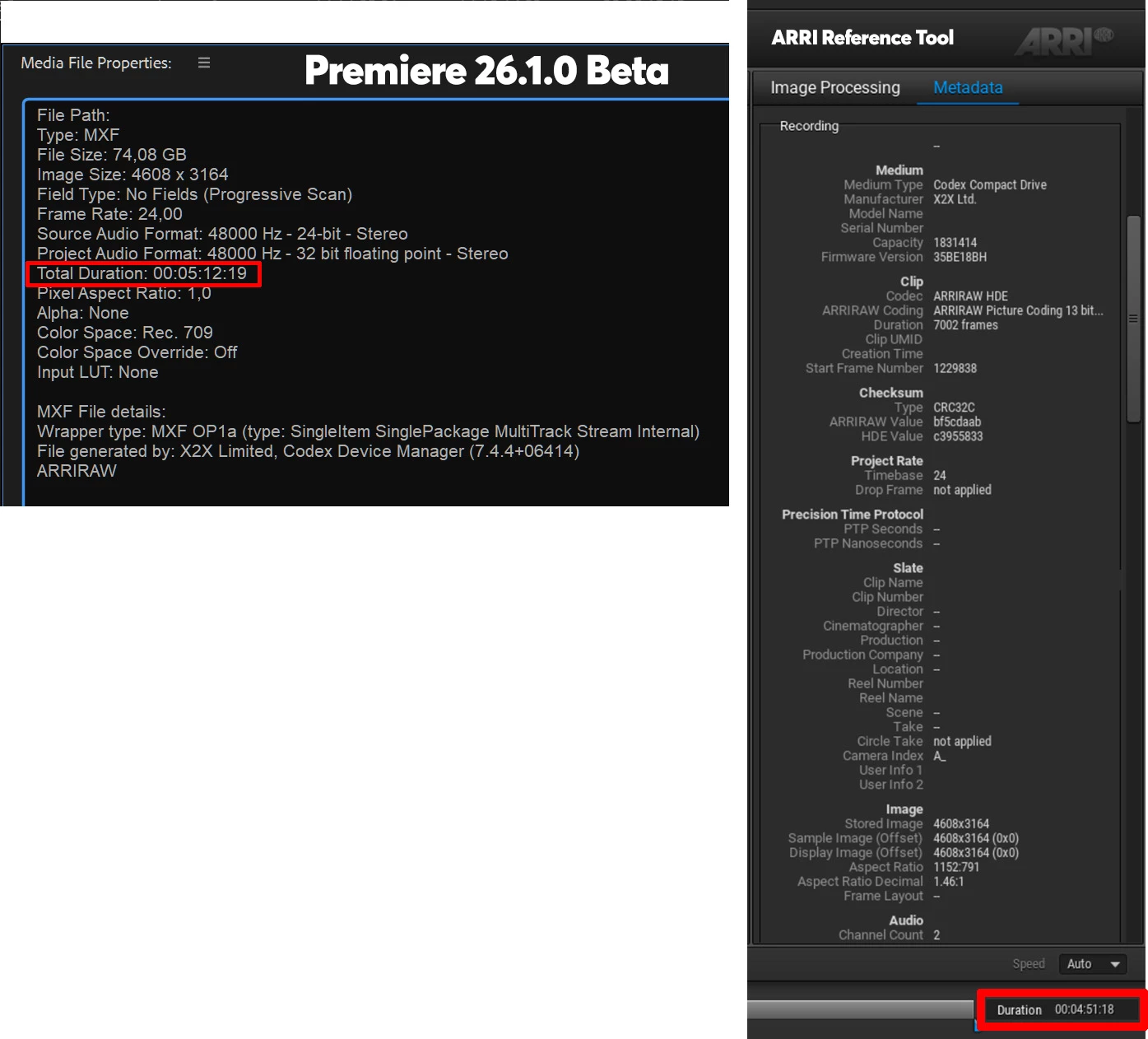
For example: a clip loaded in After Effects (by the way, problematic clips do load successfully), appears as having a duration of 2381 frames. After a few moments the clip changes duration and now has a duration of 2477 frames. The actual real duration of the clip, on the ARRI Reference Tool is shown as being 2313 frames!

Here is another example of the properties of the same clip shown on Premiere and the ARRI Reference Tool on the same workstation.
arriHDE.jpg

Re-downloaded the footage twice, to verify that it is not, some sort of file corruption.
Tried on a second workstation (again with Premiere v25.6 and v26.1 beta), same issue.
The issue is global and happens on Premiere, Media Encoder v25.6 and After Effects v25.6

Loading the same "problematic" .MXF files, on the ARRI Reference Tool, on the same workstation, results in proper clip durations, flawless playback and transcodings. (tried transcoding to Prores4444XQ and Prores422 LT for proxies with no issues).

For some reason Premiere/AE/Media Encoder, cannot interrogate some .MXF files correctly, thus the wrong calculated clip durations and all the issues that follow.

Wasted three whole days troubleshooting.
I'm done.

Theodoros

6 replies

Participating Frequently
January 3, 2026

Hi @Theodoros Tziatzios,

Thank you for confirming the resolution in the Premiere Pro beta build. The same update is also available in the beta builds of AME and AE.

The fix is expected to be included in the next official update of all these products.
Thank you again for highlighting this issue.

Best regards,
Mayjain

Theodoros Tziatzios
Participating Frequently
December 26, 2025

Hello Mayjain,

I do confirm that on the new v26.1.1 Beta (Build 5) of Premiere, all the Arri Alexa35 .MXF files that I tested report the same duration as the Arri Reference Tool. I do hope that this fix eventually trickles down to the new versions of AE and Media Encoder as well.

Cheers.

Participating Frequently
December 19, 2025

Hi @Theodoros Tziatzios,

Thank you again for reporting this issue, and apologies for the inconvenience.

We’ve fixed this issue in the latest beta versions of Premiere Pro (build 26.1.1 build 1 and later), which can be installed via the Creative Cloud Desktop app. This fix is expected to be included in the next official update of Premiere Pro.

While we don’t recommend using beta versions for production work, beta builds install separately from release versions and can be used to test the fix. If you choose to try the beta, your feedback would be greatly appreciated.

Thank you for your patience and continued support.

Best regards,
Mayjain

Participating Frequently
December 15, 2025

Thanks, @Theodoros Tziatzios,

We’ve been able to reproduce the problem and are currently investigating it.
I’ll keep you updated as we make progress.

Thanks,
Mayjain

Theodoros Tziatzios
Participating Frequently
December 15, 2025

Hello Mayjain,

I really wish I could send you some files to investigate further.
We are in the middle of post-production and we will have to go through a lot of hoops to get permission to do so.

I would be happy to help in any other way possible, though.


Participating Frequently
December 14, 2025

Hi @Theodoros Tziatzios ,

Thank you for reporting this issue.
We are currently investigating it and will update you as soon as we have more information.
If possible, please share a problematic media file.

Thanks,
Mayjain