
Audio waves displays not sync but video and audio on reproduction it's sync
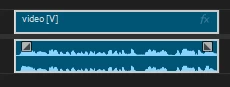
When I'm editing I look at the bars waves on the timeline to cut and see when some sounds happens. In this situation audio and video are sync and they work perfectly. The problem is that the audio waves on the timelione are not sync, yet when you play the video it is synced and works perfectly.
For example: In this part, you can see on the timeline that there is no sound, but if you play the video there is audio and it's perfectly sync with the video. Yet, the timeline is telling me that here is muted, but it's not. (I already zoom in at max to see if maybe the audio was to low and it wasn't showing but still turning up the volume as much as I could there was nothing there)

Another example is here: You can see the waves but it doesn't match with the actual sound that the video is reproducing. Yet, if you play the video, the audio and video is synced. But the waves doesn't match. It's like the timeline is telling me that the audio is not synced but when you play it, it's ok.
How can I fix this? Is it posible without having to re-import the video? I already edited and I will lose a lot of progress.
I already tried to close and open again. And Restart the PC, and open Premiere.


 AdChoices