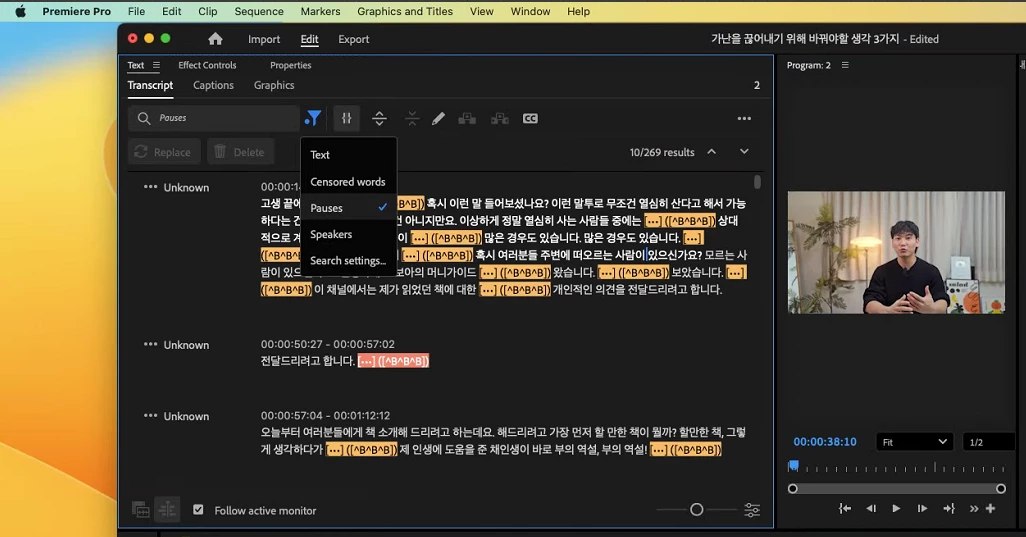
@이98A6 This can happen if you have done a static transcription of your sequence. In this state the transcript is not linked to the source clips and therefore cannot do text-based editing actions like deleting words or pauses. You can still find them in the transcript, but that transcript can't act on the sequence.
You can go to the "..." menu in the transcript window, and if you see "Generate text-based editing transcript" as an option, that confirms you are in a static transcript.
If you click "Generate text-based editing transcript", the following will happen:
Your current sequence transcript will be removed, including any edits you have made to the text
A new transcript is generated, this time from the transcripts attached to each audio file in your timeline. If those files aren't transcribed yet, there will be a button to transcribe them
After all of that, you will now have a "live" text-based editing transcript. With this you can make a selection in the transcript and press delete, and it will perform the edit in the timeline. And, you'll be able to delete pauses.
That is very odd. I have never seen the pause indicated with anything more than [...]. You are in sequence view and a pause is selected. The Delete button should be active.
What version of PR? What version of Mac OS?
Do you see the same with a re-transcribe? Only this one clip or others?
With any odd appearance, I would reset Workspace, then Preferences.



 AdChoices