



Captions - Close Gap Between Caption Segments
I thought this was an early stage bug, but it's been present since launch.
Inside the Create Captions dialog, selecting "0 frames" leaves gaps between caption segments. Has been a bug since Captions was introduced. Bug occurs with all frame rates (23.976, 24, 25, , 29,97, etc.).

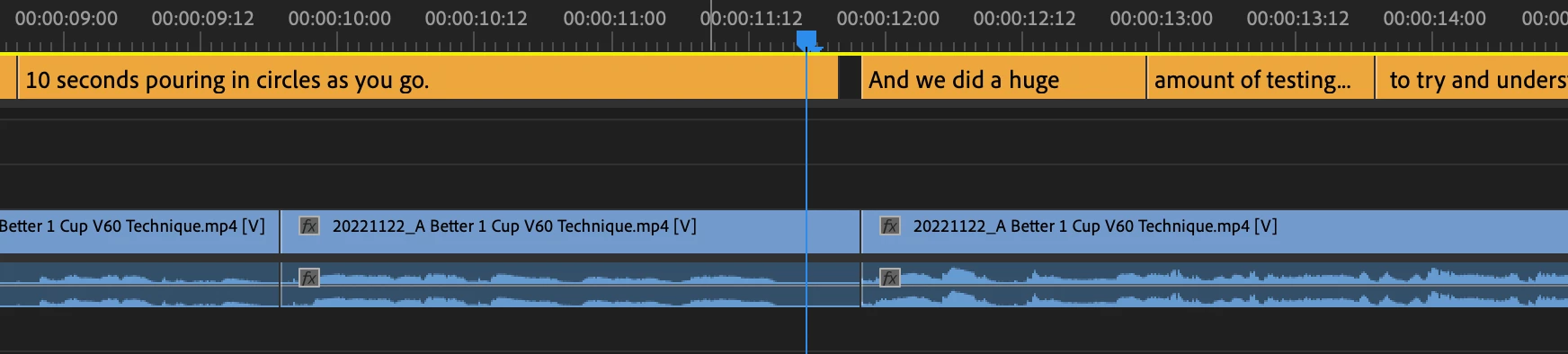
There is no built in way to eliminate gaps in Captions, aside from manually dragging each clip edge.
Solutions below:
1. Selecting "0 frames" should result in 0 frames of gaps
2. Add Sequence > Captions > Close Gaps dialog
- Auto-extends each caption segment to hit the next caption segment
- If last caption segment, do not extend
3. Add Timing dialog inside Text > Captions panel
- Stopwatch symbol next to the pencil
- Modeled after Aegisub Timing Post-Processor
- Options for: Lead-in/lead-out, make adjacent captions continuous


 AdChoices