

smilex1961
Participant
Nov 23, 2026 7:08 PM UTC
In Development

Clip Grid icons don't display S-log3 clips in combination with Inverse Tone Mapping

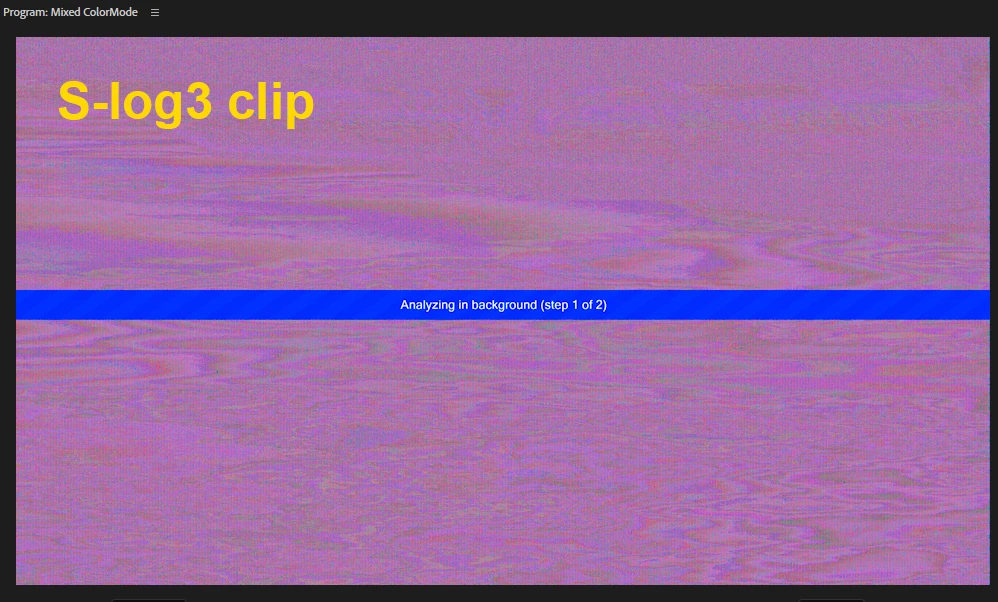
Clip Grid icons and style previews don't display slog3 clips when Inverse Tone Mapping is active on a UHD sequence. Happens also when calculating in background (e.g. warp stabilizer). Display in Program Monitor works fine. Rendering to UHD also works fine.
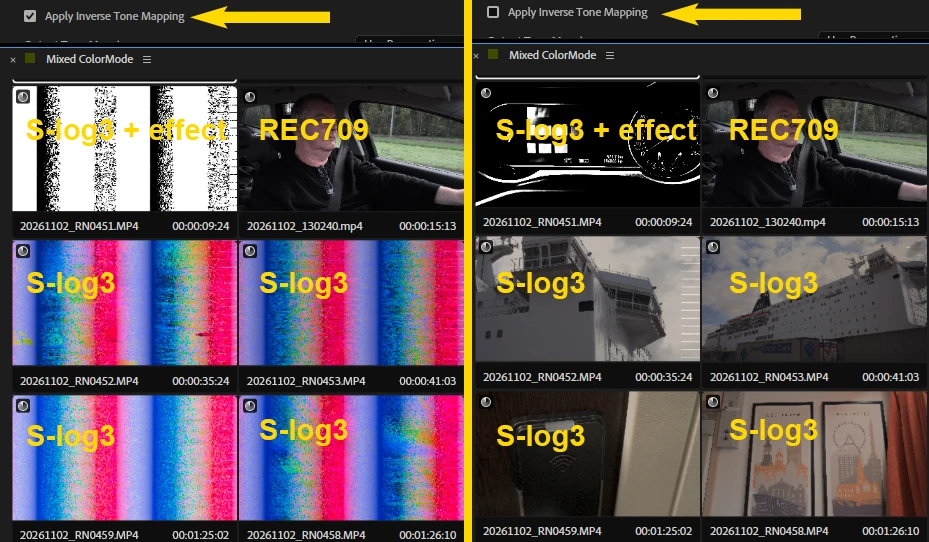
Left shown with Inverse Tone Mapping active
Display during analysis phase of warp stabilizer

Steps to Reproduce:

  1. Create new project, no template
  2. Import UHD S-log3 clips
  3. Drag to create new sequence or create sequence manually
  4. Sequence settings wide gamut, tone mapped

Expected Result:
View in color mode tab: S-log3 clips are displayed correctly

Actual Result:
View in color mode tab: S-log3 clips are not displayed (just a pattern, see screenshot)

Screen Recording: included

Software/Hardware info:
Application: Adobe Premiere Pro 2027.0 (Windows) 27.0.0 (Build 88)
Operating system: Windows 11 27H2
OS architecture: x64
Processor: AMD Ryzen 9 5900X 12-Core
Memory: 43,3 GB available of 63,9 GB
Graphics: NVIDIA GeForce RTX 3090 (driver 32.0.16.2124)
Display 1: DELL U2719D - 2560 x 1440
Display 2: DELL U2412M - 1920 x 1200

Notable Settings
Media Cache Files: C:\Users\Public\Documents\ [Local]
Transmit Enabled: False
  Adobe Desktop Audio [Enabled]
  Adobe SRT [Disabled]
  Adobe Monitor 1: 2560 x 1440 [Disabled]
  Adobe Monitor 2: 1920 x 1200 [Enabled]

Compatibility Report: no issues

Video Format: MPEG-4 AVC/H.264, XAVC Ver2.1 (Sony A7v)

Project Size: 2MB (every new project, even when 1 clip involved)

Does it affect all projects or only some? All
Does it affect new, empty projects? Yes
When did the problem first begin? After upgrading to R27

Launching Premiere while holding the Shift key and checking all four options in the dialog did not make any difference.

    5 replies

    smilex1961
    Participant
    Nov 23, 2026 9:24 PM UTC

    Additional info: when I scale down an S-log3 clip individually (using the motion effect control in the effect panel), it displays well in the clip grid at 50% scale or lower. Ofcourse that's not a useful work-around, but perhaps it can help pinpointing the cause.

    Translate
    B/R
    KatieToo
    Community Manager
    Community Manager
    Nov 23, 2026 7:40 PM UTC

    Hi ​@smilex1961 

    Thanks for stopping by the Premiere forums and giving us those detailed steps and screenshots. The fact that the Program Monitor and UHD export look correct is useful, it seems the problem may be limited to the Clip Grid/style previews and the frame displayed during background analysis.

    Could you clarify a few things?

    • After Warp Stabilizer analysis finishes, do the Clip Grid preview and style preview remain not displaying properly, or do they correct themselves?
    • Does switching out of Color mode and back, or resizing the Clip Grid thumbnails, make the previews redraw correctly?
    • Could you share a screenshot of the sequence’s color-management settings, including the working color space and the Inverse Tone Mapping setting, plus the clip’s reported color space?
      • Please include the exact Sony camera model if available.


    If possible, could you upload one affected source clip and a small project containing the sequence through our private upload link? I can DM you that next and once we receive that, we’ll try testing it over on this side.

    Hope to help!
    Katie

    Translate
    smilex1961
    Participant
    Nov 23, 2026 9:20 PM UTC

    Hi Katie,

    Thanks for your quick reply! I have uploaded a clip and a project in the dropbox. The camera model is Sony Alpha 7 M5 (ILCE-7M5).

    Here are the answers to your questions:

    • After Warp Stabilizer analysis finishes, do the Clip Grid preview and style preview remain not displaying properly, or do they correct themselves? No, they don't
    • Does switching out of Color mode and back, or resizing the Clip Grid thumbnails, make the previews redraw correctly? No
    • Could you share a screenshot of the sequence’s color-management settings, including the working color space and the Inverse Tone Mapping setting, plus the clip’s reported color space?
    Color settings, sequence
    ​​​​​​
    Color settings, S-log 3 clip settings
    Color settings, REC709 clip

    Hope you can reproduce it.


    Best regards,

    Rene

    Translate
    B/R
    KatieToo
    Community Manager
    Community Manager
    Nov 23, 2026 10:36 PM UTC

    ​@smilex1961 Thank you for those additional details and screenshots! Yes, I did see this same issue happening in v27 Premiere with your clip, when Inverse Tone Mapping is active. Then, when testing in v27.1 Premiere latest updated Beta build 56, I did not see that issue linger. 

    Could you confirm for us with that same clip you sent if it’s working okay for you on the latest updated v27.1 Beta with those settings? If it is, that is at least one temporary workaround.

    Let us know, and much appreciated!
    Katie
     

    Translate