
jgerlachcm
Participating Frequently
August 11, 2023

Clip/sequence flashing thumbnails in timeline makes editing impossible [major bug]

  • August 11, 2023
  • 22 replies
  • 2400 views

So I've been having this terrible issue recently where a whole bunch of clips have been flashing in the timeline. CPU usage starts to go up and Premiere becomes unresponsive, requiring a force close. As you can see in the GIF below, a certain subset of clips will sit there and flash (this recording is in realtime).
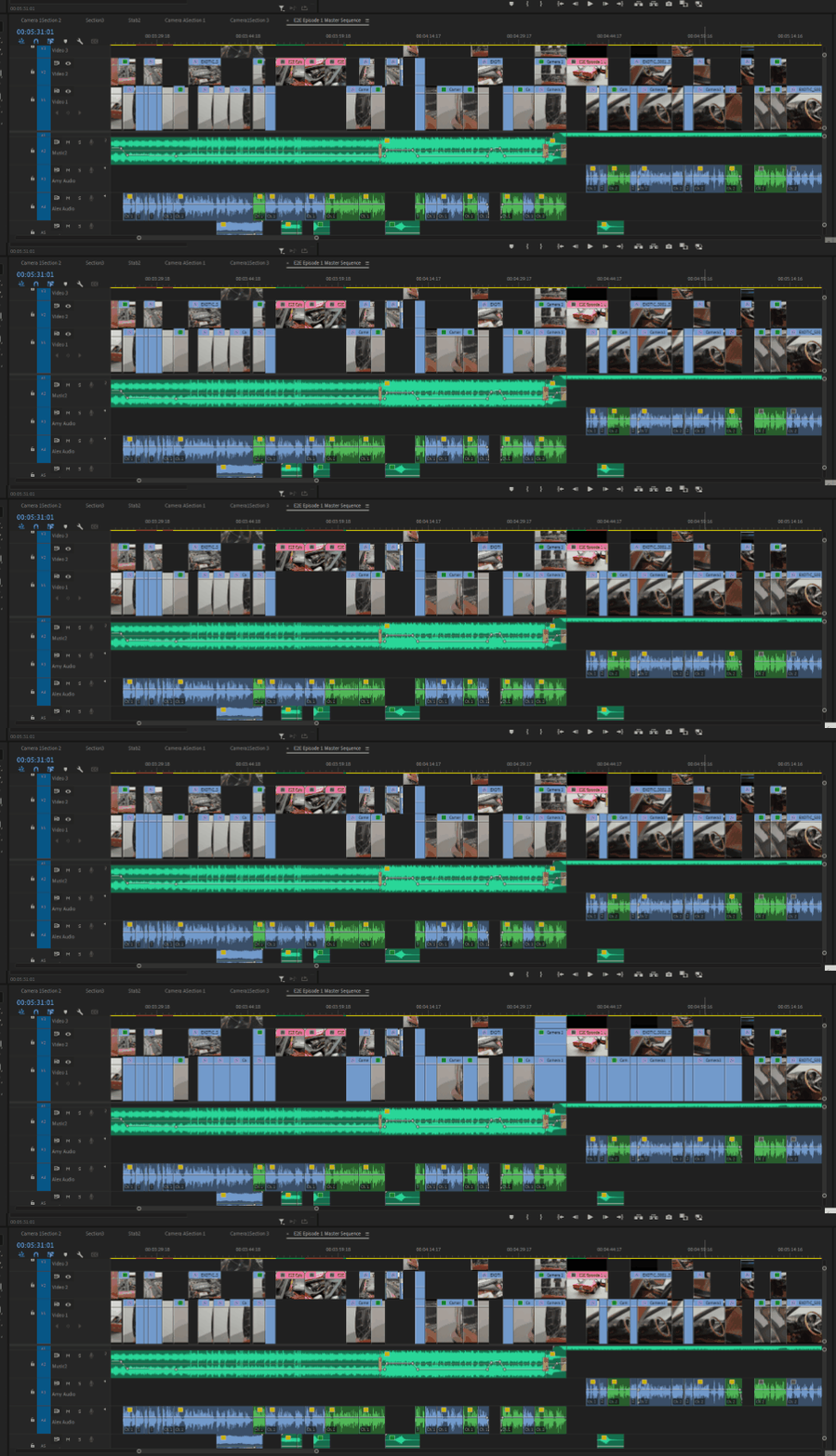
 

Flashing thumbnails in the timeline


The issues started with a multicam sequence. Whenever I would trim or edit the embedded multicam sequence, it would cause all the corresponding clips to start flashing like this. My last resort was to attempt to flatten the multicam sequence into the individual clips, but as you can see they're still stuck flashing even as non-nested clips.


I'm running the latest version of Premiere (23.6.0), I have the latest version of Windows 10 (22H2) and NVIDIA Studio drivers (536.99),


I've tried:

  • resetting Premiere preferences
  • clearing media/disk cache
  • copying sequence into a new timeline
  • importing the existing project into a brand new project
  • Flattening the multicam sequence
  • Changing thumbnail views from head only to continuous and back
  • nothing seems to work.


Any ideas? This has pretty much caused my entire editing workflow to grind to a halt. And please don't tell me I need to uninstall and reinstall Premiere or the OS. 


Specs:

Core i8-10850K
64GB Ram
RTX 3090 Ti 24GB VRAM
2TB m.2 SSD OS drive
4TB m.2 SSD Media Drive

22 replies

Participating Frequently
August 27, 2024

Forgot to mention is also seems to be triggered when using the multi-cam view in the progmra monitor

Participating Frequently
August 27, 2024

Hi Kevin,

FYI, here are my settings (dealing with this problem again currently)-


Issue may have something to do with timeline audio render, as everytime I have to restart PP, I have to re-render the audio waveform. Footage is multicam with 2 video/audio and 1 add'l audio


System:

Mac Studio

Apple M2 Max

64GB Ram

Sonoma 14.5
Premiere 24.5.0 (Build 57)


Footage:
MP4, 3840 × 2160

Codecs: Linear PCM, H.264

Color Profile: HD (1-1-1)

Kevin J. Monahan Jr.
Community Manager
Community Manager
July 23, 2024

The team requires more info. The status of the bug report has been updated.

Kevin Monahan - Sr. Community and Engagement Strategist – Adobe Pro Video and Audio
Known Participant
July 23, 2024

Same issue here. I think you're onto something by noticing it's created through multicam clips. I've found using v22.2.0 is the only way I've been able to solve this.


I recently updated to v24.5 thinking it'd hopefully have a fix, but the problem still persists.

Kevin J. Monahan Jr.
Community Manager
Community Manager
July 23, 2024

Hello jgerlachcm,

I'm Kevin, a moderator here from the support team. I've seen this in the past sporadically, but sorry to hear that this bug is happening again to some people. May we have more details about your system and media so the team can assist you? See, How do I write a bug report?


If you are on PC and have not already updated your GPU studio driver, please try that. If on macOS, please try updating the OS. Sorry for the hassle.


Thanks,
Kevin

Kevin Monahan - Sr. Community and Engagement Strategist – Adobe Pro Video and Audio
Participating Frequently
March 18, 2024

Yo! 

Been having the same issue here across multiple builds, also seems to only affect multicam. It happens on about 50% of the multicam projects I do. The fix is to close Premiere and open it back up, though sometimes just closing the project will do it I think.


I'm on 

Mac Studio

Apple M2 Max

64GB Ram

Sonoma 14.2.1
Premiere 24.2.1

jgerlachcm
Participating Frequently
August 23, 2023

Yep pretty much the only way I can work now is by downgrading using the online Premiere Pro project downgrader to PP2022, then editing a multicam sequence, then opening that project in PP2023 (for things like warp stabilizer that doesn't require pre-rendering and transcripts). As long as I don't touch any of the nested clips it'll work. But then the bug will kick back in and I'll have to rinse and repeat and downgrade again. It's a huge pain in the ass.

Participant
August 23, 2023

I have the same problem and it has made Pr completely unusable. Completely. Adobe needs to address this NOW

jgerlachcm
Participating Frequently
August 12, 2023

Morning update for anyone who is watching this... now it appears to be completely arbitrary as to what is flashing. I edited the audio from one clip (back in PP2023) and now not only are some parts of those clips flashing but now clips from a completely disconnected multicam sequence are flashing too. What's weird is that if you look at the timeline when I scroll, the blue clips to the right are from the same camera source as the ones flashing, but they're not flashing. And there are clips to the left completely disconnected from the source that I made an edit on (the steering wheel thumbnails) that are now flashing even though they were not edited in any way.


Is there anyone from @adobe that might be able to check in on this?

jgerlachcm
Participating Frequently
August 12, 2023

So crazily enough... the part that's flashing here was the stuff I edited in Premiere 2022 (22.6.4) where I had absolutely ZERO issues doing a multicam sequence and cutting it together with no hiccups or problems whatsoever. After editing multicam, just for the heck of it I flattened the sequence, saved a copy of the project, then opened it in Premiere 2023 (23.6.0) where the very edit that had been created in multicam was now flashing right on project open. 


You can see my mouse highlight it, where it briefly stops flashing, but then starts right on flashing again. Can't play or make any changes to the timeline while it is flashing. I have to force quit Premiere then reopen. As soon as I make any edits to any (formerly) multicam sequence, that whole section will start flashing. It's got to be related to the clip itself but it's clearly not corrupted as it worked just fine in Premiere 2022.


ugh.

jgerlachcm
Participating Frequently
August 12, 2023

Well, a little update. After trying all the 2023 versions of Premiere, when I got to Premiere 2022 (22.6.4) the problem went away. So there's some code or logic for Adobe to check on... apparently Multicam sequences in 2023 versions get some sort of bug where they attempt to continuously update thumbnails in the timeline even when the multicam sequence is flattened.


At least now I can continue to work... and I'll just try and get back to 2023 version whenever I finish the main edit. Missing the transcription features a lot though, that made editing so much easier. 😕😕