

CRITICAL Memory Leak: Premiere Pro v26.0 on macOS 26 (Tahoe) - 89GB+ VM_ALLOCATE Exhaustion Summary: I am reporting a severe memory leak in Adobe Premiere Pro 2026 (v26.0.0.72) running on macOS 26.2 (Tahoe).
CRITICAL Memory Leak: Premiere Pro v26.0 on macOS 26 (Tahoe) - 89GB+ VM_ALLOCATE Exhaustion
Summary: I am reporting a severe memory leak in Adobe Premiere Pro 2026 (v26.0.0.72) running on macOS 26.2 (Tahoe). The application progressively consumes all available physical RAM and exhausts swap space until the system becomes unresponsive or forces a hard crash.
This is not a standard "high usage" scenario. System logs confirm that Premiere is allocating untagged virtual memory without releasing it, forcing a SIGKILL or manual termination.
System Specifications:
-
Hardware: Mac mini (M4 Pro)
-
Memory: 48 GB Unified Memory
-
OS: macOS 26.2 (Build 25C56)
-
Premiere Pro Version: 26.0.0 (Build 72)
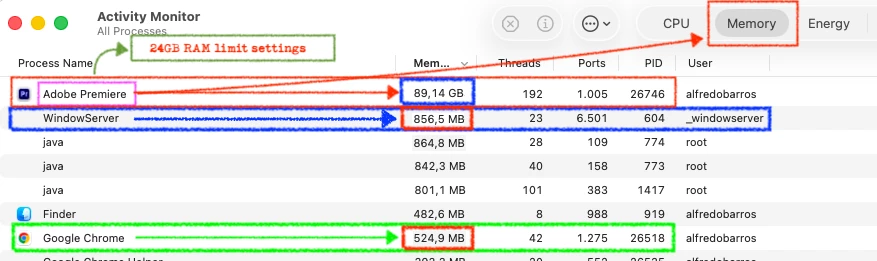
The Issue: While performing standard editing tasks (proxy workflow, no heavy VFX), Premiere Pro's memory footprint expands uncontrollably. In my most recent crash, the application reached 89.14 GB of memory usage on a 48GB machine, forcing the macOS kernel to create an 80 GB Swap file.
Technical Analysis (from sysdiagnose/footprint logs): I have analyzed the footprint-all.txt and JetsamEvent logs generated during the freeze. The culprit is undeniable:
-
Untagged Memory Allocation: The logs show 84 GB categorized as
untagged (VM_ALLOCATE). This indicates that the Premiere engine is requesting raw memory pages from the kernel and losing the reference/pointer to release them. -
Swap Thrashing: The system was forced to swap 80 GB to the SSD to keep the process alive.
-
Kernel Response: The system triggered a
vm-compressor-space-shortageJetsam Event.
Troubleshooting Steps Taken (Issue Persists): To rule out external conflicts, I have performed the following:
-
Clean Environment: Removed all third-party Endpoint Security software / Antivirus.
-
macOS UI Tweak: Enabled "Reduce Transparency" in System Settings > Accessibility to mitigate potential WindowServer memory overhead. While this slightly lowered system pressure, the specific
VM_ALLOCATEleak within Premiere remained unaffected. -
Peripherals: Disconnected all DisplayLink adapters and monitors (suspected WindowServer conflict, but the leak persists purely within the
Adobe Premiere Proprocess). -
Preferences Reset: Cleared Media Cache and Preferences.
-
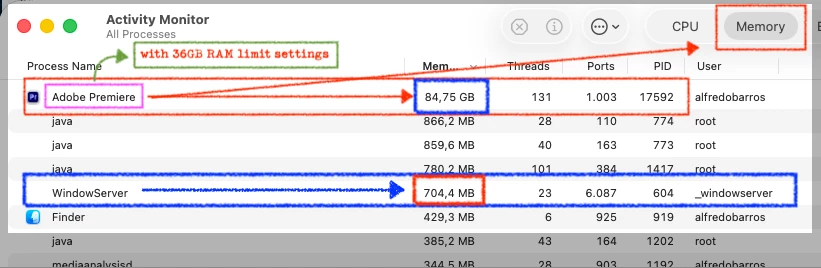
Memory Limiter: Setting the "RAM reserved for other applications" to a higher value (leaving only 24GB for Premiere) temporarily delays the crash by forcing more aggressive garbage collection, but it does not stop the leak.
Conclusion: There is a fundamental regression in memory management between the Premiere Pro 2026 engine and the macOS Tahoe memory compressor. The application is failing to release VM_ALLOCATE pages.
I am available to provide the full .ips and sysdiagnose logs to the engineering team if required. This is a production-blocking issue.
Regards,
Alfredo Barros
Professional Editor


 AdChoices