

Direct Manipulation Overlay Does Not Update After Timeline Resolution Change
Changing the timeline (sequence) resolution updates the displayed image correctly, but the Direct Manipulation overlay (transform bounding box) remains at the previous resolution, resulting in an incorrect frame position and size.
Steps to Reproduce
- Have sequence with some footage.
- Change the sequence/timeline resolution (either upscale or downscale).
- Select a clip and enable Direct Manipulation.
- Observe the Direct Manipulation overlay.
Expected Result
The Direct Manipulation overlay should immediately update to match the new timeline resolution and remain correctly aligned with the displayed footage.
Actual Result
The displayed image updates to the new timeline resolution, but the Direct Manipulation overlay retains its previous dimensions and position.
- When the timeline resolution is increased (upscaled), the overlay appears much farther away from the footage.
- When the timeline resolution is decreased (downscaled), the overlay appears smaller and is positioned inside the footage instead of around its boundaries.
The footage scaled correctly; only the Direct Manipulation overlay is using stale geometry. Also this bug is %100 reproducable with every clip type.
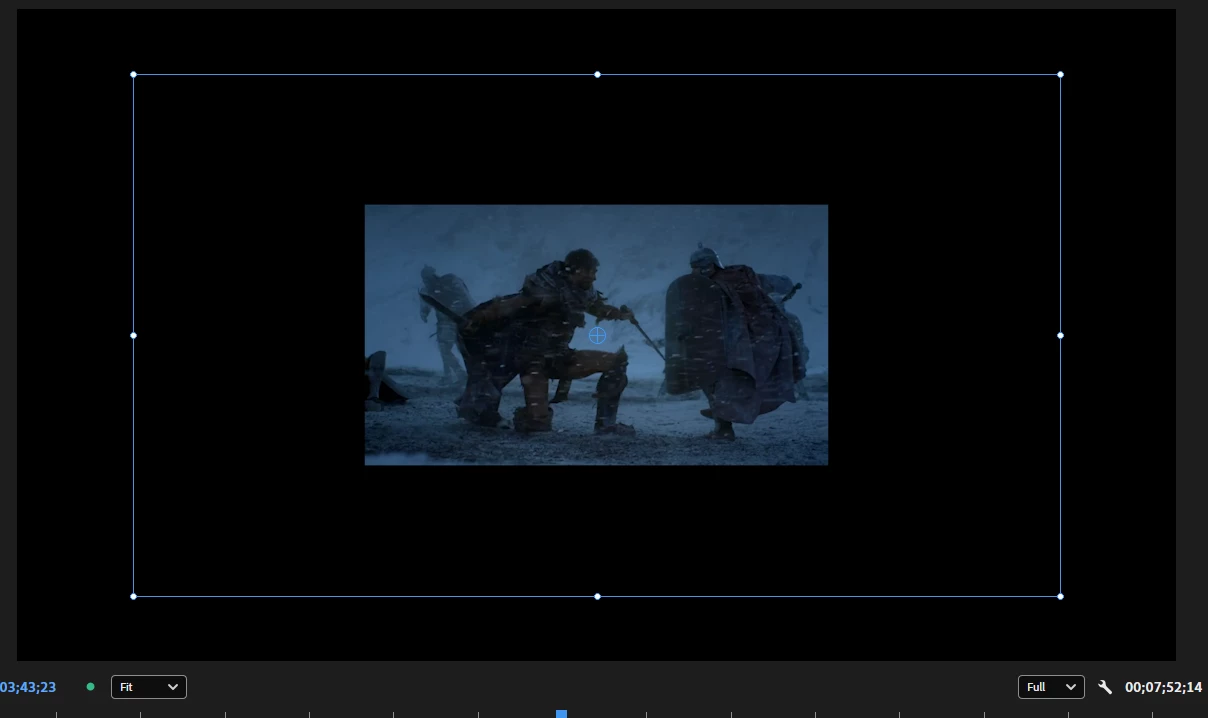
There also seems to be a flicker happening in addition to incorrect overlay as well. If you try to change the position via direct manipulation, footage flickers to the corners of the frame.
Also in some cases when you adjust the position after reopening the same sequence/project timeline becomes red and it falls back to software encoding rather than hardware encoding. But i can’t reproduce that everytime and don’t know what triggers it.
System info
Application: Premiere v26.3
GPU: RTX 3060 Ti with Nvidia Studio Driver ver. 610.47
OS: Windows v10.0.26200, RAM: 31.82 GB GB, CPUs (logical): 24


 AdChoices