Known Participant
Mar 28, 2024 5:50 PM UTC
Open for Voting

Drive Mapping Issue

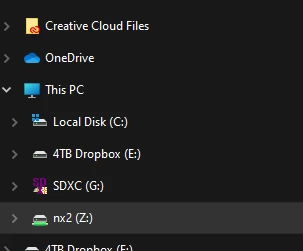
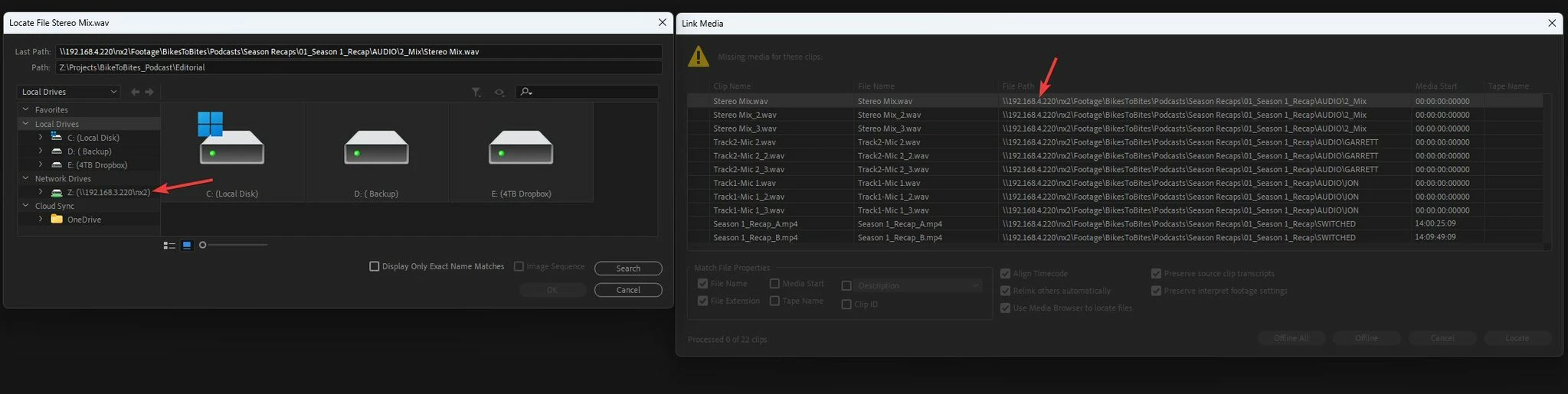
The network drive is mapped as "Z," yet Premiere sees both. Some footage connects to "Z" while others are mapped via the drive's IP address.

I don't understand how some go as mapped to Z and others the IP. And also, if Windows sees the drive as Z, why does the Premiere default to the IP? This causes problems across multiple machines sharing projects as each time its opened the media is offline completely or just some is offline.  Makes no sense as to why some footage has a Z file path and others the IP.

See the images below.
 

This topic is closed to new replies. Start a new post to keep the conversation going.

7 replies

Bruce Bullis
Legend
Jun 3, 2024 7:13 PM UTC

Offlining and re-linking won't purge the saved-up references to those other paths, within that same project. 

Recreating the template projects with known-correct paths, sounds like the safest approach.

Translate
Participant
Jun 3, 2024 5:51 PM UTC

So to clarify, could I offline and relink everything in the project using the proper drive letter (in this case, P) and then it won't revert back to the IP address after that assuming everyone who tries to open it thereafter has the same server mapped to the letter P? OR, are you saying it doesn't matter if you relink it, what matters is how it was initially imported? Wondering if I'd have to recreate this template projects from scratch, reimporting everything now that the server is mapped to P or can I simply offline and relink instead? Thanks for your help!

Translate
Bruce Bullis
Legend
May 23, 2024 12:26 PM UTC

Media imported while the drive was mapped, will get the drive letter; media that was imported from the server while it was mounted with an IP address, will get the IP address. 

PPro will also cache previously known good paths, in the project; if the same media has been used from a mapped network drive and a UNC path, and the drive mapping is not available during a given PPro session, PPro will 'fall back' to the UNC path.

Translate
Kevin J. Monahan Jr.
Legend
May 22, 2024 11:19 PM UTC

Hi @Two_River and @Makena C at TMG,

Sorry for the issue. I have asked engineering to take a look at this case. Sorry for the frustration!

Take Care,
Kevin

Translate
Kevin Monahan - Sr. Community and Engagement Strategist – Adobe Pro Video and Audio
Participant
May 21, 2024 10:34 PM UTC

Having the same issue! Any solutions?

Translate
R Neil Haugen
Legend
Apr 22, 2024 7:07 PM UTC

If it imported any clips before the drive was mapped to Z or whatever, it will maintain the original links. Remember, all parts of a project are merely text metadata about what assets are involved, where they are located, what sequences you've created et al.


To fix this, you would need to offline the files on each computer, then locate to the mapped drive.

Translate
Everyone's mileage always varies ...
Participant
Apr 22, 2024 5:28 PM UTC

Having the same issue. I got all of my editors to map the server to the same drive letter so we won't have relinking issues and yet Premiere still considers the IP address for some but not all of our footage. Does anyone know how it determines this?

Translate