

Ducking broken in Pr 26.2.2? Is unsuable unless sensetivity is lowest
I’m working of a project of a documentary which contains a lot of music in the background. The music itself is to gradually get lower once the voiceover is in and rise when it finishes. I made a lot of such projects in thew past and never had any problems with ducking but now in Pr 26.2.2 it feels like the Ducking feature is broken because with the same settings I’ve worked with for a decade, it makes music rise up in the volume when the speaker is still speaking their part.
Here’s an illustration:

The upper track is the voiceover. It’s a studio record, so it’s crystal clear and perfect in volume. The lower track is the ducked music. You can see it begins alright with a higher volume and then just jumps back and forth over the voiceover.
These are my settings:
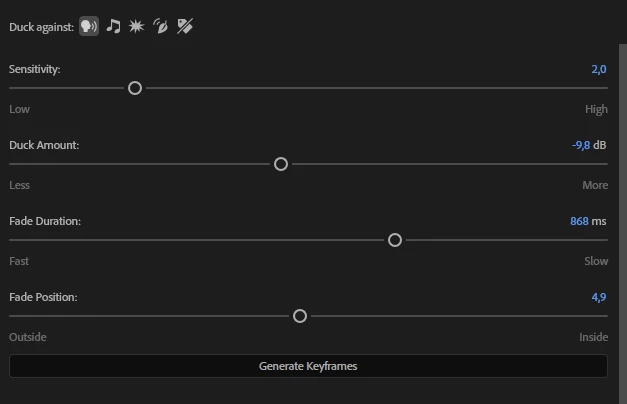
These settings have worked for me for years now they don’t. I need the msuic volume start changing before the voiceover starts and end changing right after it that is why my fade position is in the middle. I need slow fades that is why fade duration is 800 ms. I need small changes that is why the duck amount is -10.
Then comes the sensitivity. I tried setting it to 3 and then I have just a flat line of -9,8 dB. But I need the music to fill in the pauses and no matter what I do it’s either a flatliner or these leaps. The voiceover itself has a Podcast preset on which in its turn has a compression quite high so it’s out of question that the voiceover volume is jumping and that’s why there are these music leaps.
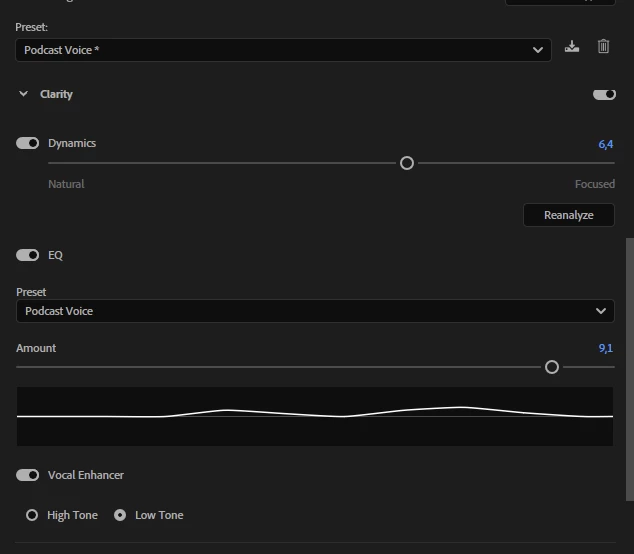
The music is an mp3 file, the voiceover is a 48000 Hz - 24-bit - Stereo wave


 AdChoices