
Known Participant
August 16, 2026

Edit Guide... does not work for Program Monitor Guides

  • August 16, 2026
  • 3 replies
  • 16 views

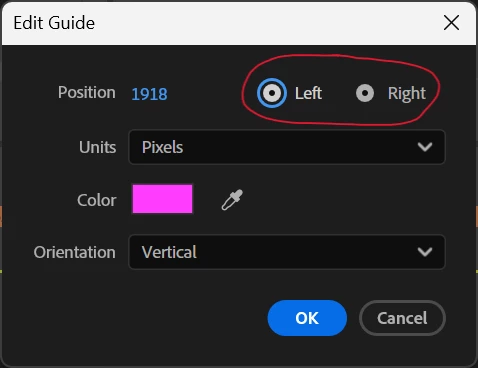
With “Show Guides” turned on in the Program Monitor, right-clicking a guide and choosing “Edit Guide...” opens the Edit Guide dialog. Modifying the Position value and clicking OK does not affect the guide. Likewise, changing the Units or Orientation doesn’t have any effect on the guide. Clicking the “Left” and “Right” radio buttons results in both buttons being selected (see screen shot). They act like checkboxes rather than radio buttons. The only parameter that appears to properly affect the selected guide is Color.
 

    3 replies

    Ann Bens
    Community Expert
    Community Expert
    August 17, 2026

    Quote from 

    Annika Koenig

    Starting with beta build 26.5x30 you should see this fixed! 

    Stan Jones
    Community Expert
    Community Expert
    August 17, 2026

    @aambrose,

    This bug was also reported to prevent creating vertical guides. As Jonathan says, turning on rulers and dragging allows creating and adjusting guides. To get precise control, zoom in. When zoomed in, you can drag one pixel at a time.

    Stan


    Community Manager
    August 17, 2026

    Hi ​@aambrose,

    Welcome back to the Premiere forums and thank you for reporting this occurrence. This is a known issue that the team will hopefully have a fix for soon.

    • The team suggests trying the latest Premiere Beta.
    • Please note when the Rulers are enabled on the Program Monitor, you should be able to create and adjust the position of edit guides by dragging.

    Sorry for your frustration!

    Best,

    Jonathan