
🤭 emoji invisible in Program Monitor despite rendering in Properties panel
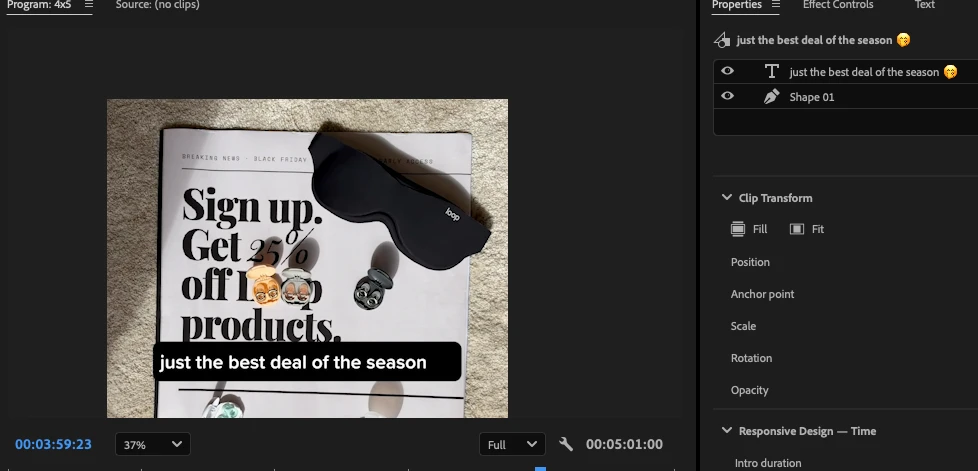
Title: Premiere Pro 26.5.2 – 🤭 emoji invisible in Program Monitor despite rendering in Properties panel
Issue:
Premiere Pro 26.5.2 on macOS fails to render the 🤭 emoji (U+1F92D, Face with Hand Over Mouth) in text graphics.
Steps to reproduce:
-
Create a new text graphic in Premiere Pro.
-
Enter:
just the best deal of the season 🤭 -
Observe that the emoji displays correctly in the Properties panel but is completely invisible in the Program Monitor.
-
Create a new text graphic containing only 🤭. The issue persists.
Expected result:
The emoji should render in full color in the Program Monitor, just like other Apple Color Emoji characters.
Actual result:
The emoji is invisible in the Program Monitor, although it appears correctly in the Properties panel. All other emojis tested render without issues.
Troubleshooting already performed:
-
Tested the emoji in a standalone text layer.
-
Tested Unicode variations.
-
Reset Premiere Pro.
-
Confirmed that other colorful emojis render correctly.
-
Confirmed that the issue is not caused by text box clipping.
Application: Adobe Premiere Pro 26.5.2
Operating system: macOS (26.6.2)
 AdChoices