edit58989569
Inspiring
August 16, 2023

End of Clip Indicator Not Displaying

  • August 16, 2023
  • 7 replies
  • 1001 views

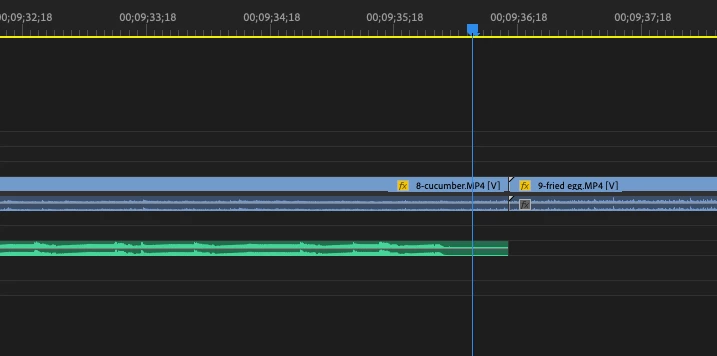
Sequence is 29.97 Below I pulled an entire music track onto my time and the End of Clip Indicator does not display.


I've noticed this issue since moving up to 23.4, but I'm currently on 23.5, Mac Ventura


This topic has been closed for replies.

7 replies

Participant
July 22, 2024

Make sure the magnet icon 'Snap in timeline' is turned on.. this solved the issue for me. If it already is then it's most likely a bug

edit58989569
Inspiring
July 18, 2024

Thanks for the response @Kevin-Monahan. The issue does still happen when the frame rates match. 

Kevin-Monahan
Community Manager
Community Manager
July 18, 2024

Thanks for the reply. I'll leave the bug open here and add your comments to the internal notes. I hope they can take another look at your case. Sorry for the hassle.


Cheers,
Kevin

Kevin Monahan - Sr. Community and Engagement Strategist – Adobe Pro Video and Audio
Kevin-Monahan
Community Manager
Community Manager
July 17, 2024

The status of this bug report has been updated.

Kevin Monahan - Sr. Community and Engagement Strategist – Adobe Pro Video and Audio
Kevin-Monahan
Community Manager
Community Manager
July 17, 2024

Hi edit,

Thanks for filing this bug report. I can reproduce this on macOS Ventura and an M1 MacBook Pro. What is your hardware and source media? How do I write a bug report? I hope the team can fix this one for you. Sorry for the frustration.


Cheers,

Kevin

Kevin Monahan - Sr. Community and Engagement Strategist – Adobe Pro Video and Audio
Kevin-Monahan
Community Manager
Community Manager
July 18, 2024

Hi,

Thanks for all the notes. I located some internal notes on this issue. Does this sound like your problem?

Result:

  • White corner icons used to indicate Media End are missing when a clip is added to the Timeline.

Expected:

  • White corners should be visible when a clip is added to the Timeline.

What happened?

  • This may occur if the clip's frame rate is different from the sequence frame rate in the Timeline Panel.

You do not likely see the end-of-clip indicator (white corner) because it's not at the end of the clip due to the frame rate change. If you zoom in to frame level and pull the end of the clip out to the right, you will see there is one more frame that is the end of the clip. Now, you will see the white corner end-of-clip indicator.


This is "expected behavior." See if that is the case for you, as well. Sorry for the frustration.

Take Care,
Kevin

Kevin Monahan - Sr. Community and Engagement Strategist – Adobe Pro Video and Audio
Community Expert
June 28, 2024

did you try to reset the preferences?

system specs and premiere pro version could help here

edit58989569
Inspiring
June 28, 2024

@championchampion Finally, someone else noticed! Basically, it doesn't show when zoomed-out, and you can't pull the clip out to the full duration. If you zoom-in all the way, you can pull the clip out. It's very annoying!

Participant
June 27, 2024

I have noticed this too and it's driving me crazy.  Currently using version 24.5.
