

Red Rover Videography
Participating Frequently
June 6, 2024

Enhanced Speech Restarts After Every Cut

  • June 6, 2024
  • 3 replies
  • 1696 views

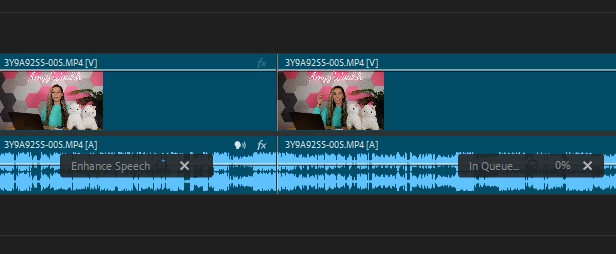
I'm LOVING the enhanced speech feature in Premiere Pro 2024. However, I've run into an issue where, after enhancing the audio from one of my clips, if I make a cut anywhere on that clip (splitting the audio into two separate clips), both of the clips restart the enhanced speech queue. 

1. Enhance the speech of a clip

2. Cut the clip

3. Both parts of the clip restart enhance speech


The only way around this is to enhance the speech of the entire sequence and then to nest the clips before cutting (or to enhance the clips after making all necessary edits). 
3 replies

Participant
July 16, 2025

Next that clip then cut it without it recalcualting the audio enhancement.

Bruce Bullis
Legend
June 6, 2024

Thanks David!

David Polk
Community Manager
Community Manager
June 6, 2024

Hello,

Thanks for bringing up this issue. We're aware of it and are thinking of ways to reduce the rendering time of clips that use enhanced speech in a future version of Premiere Pro. In the interim, you could also "render and replace" your clips to prevent rerendering in the future.

All the best,

David Polk

Product Manager, Audio