
Todd_Morgan
Legend
March 20, 2026

Export adds several seconds to render even though out is marked

  • March 20, 2026
  • 3 replies
  • 30 views

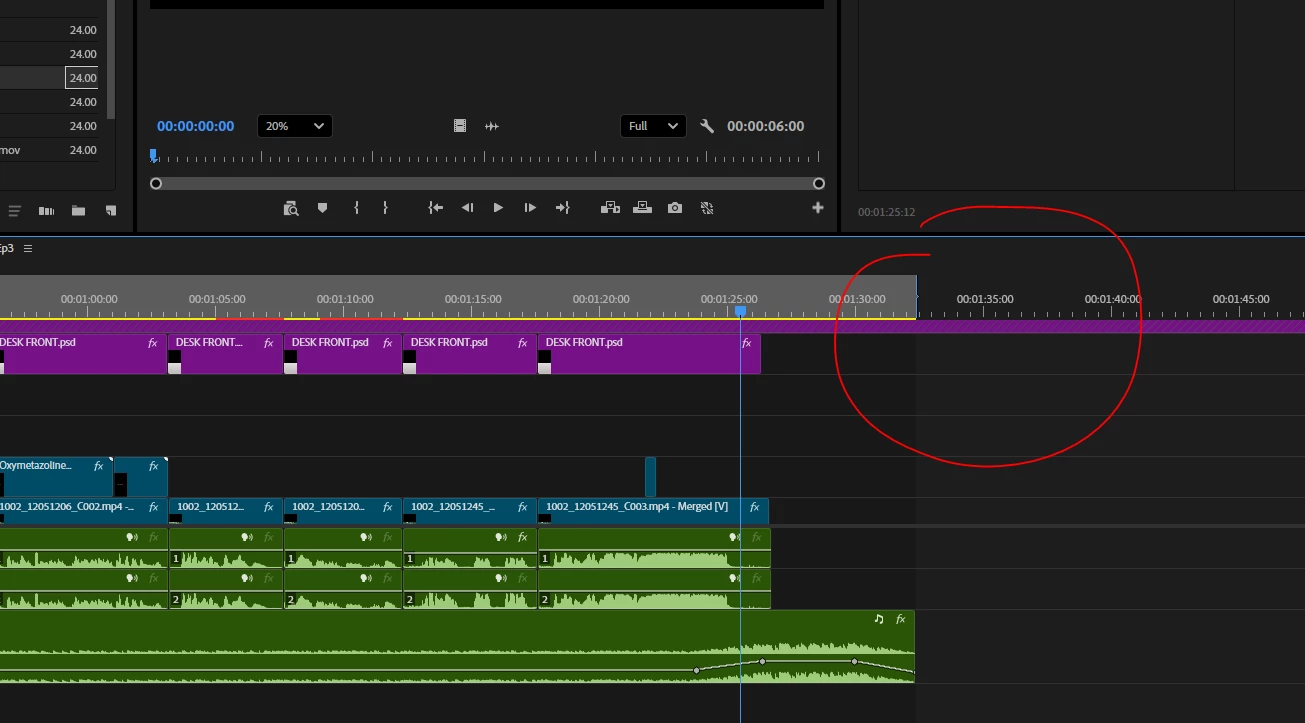
Export MP4 has 30sec of black add… but my out is marked!!!
 

    3 replies

    Ann Bens
    Community Expert
    Community Expert
    March 21, 2026

    I am guessing you exported the entire sequence instead of in to out.

    Check the range in the export settings.

    R Neil Haugen
    Legend
    March 21, 2026

    Not sure what is going on as there’s not enough details given. So I will simply add that going to the end of the sequence and hitting the out key will give you one black frame, as the CTI/playhead is always attached to the next frame, it is never between frames.

    If the CTI is at the right of your last frame, and you set the out point, you just told Premiere to set the out at the end of that frame, not the last frame of the last clip.

    So you can just go to the end of the sequence, tap left arrow to go back one space, hit O for Out … or use the keyboard shortcut to go to the last frame … which will park the CTI “in front of” the last frame. And tapping O then gives you the end at the end of that frame.

    Everyone's mileage always varies ...
    IanB_360
    Community Manager
    Community Manager
    March 20, 2026

    Hi ​@Todd_Morgan 

    Welcome to the Premiere community. Thank you for taking the time to report a problem. It would help us if you could use the link " How to Report a Problem," which provides steps to provide more information that can help us identify the issue. Can you share a screenshot of the export settings? So if your out point is 00:01:30:05, are you saying that exporting adds 30 seconds of black?  Resulting in an export duration of
    00:02:00:05 ?

    Here to help.  

    Ian
