
Export Button Greyed Out in Frame.io v4 Panel Until “Save as Separate Asset” Is Toggled
Product: Adobe Premiere Pro
Version: 25.6.1
Platform: macOS (Apple Silicon)
Summary
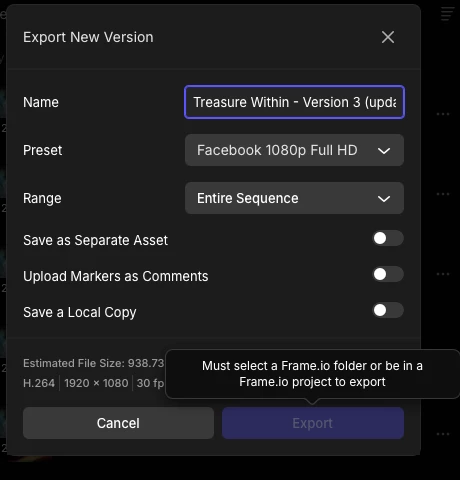
In the latest update, the Frame.io v4 integration blocks exports unless the user toggles “Save as Separate Asset”. Only after enabling that option does Premiere show the folder selection dialog. After selecting a folder, the user can disable “Save as Separate Asset” again and export normally. This behaviour is confusing and inconsistent with previous versions.
Problem
-
The Export button remains greyed out even when inside a Frame.io project.
-
The UI shows no way to select a Frame.io folder unless “Save as Separate Asset” is turned on first.
-
The folder-selection dialog should appear automatically when exporting a new version, but it does not.
-
There is no visible warning that a folder must be selected for versioning workflows.
-
The workflow forces a setting change that is not related to versioning, which suggests a UI logic bug.
Steps to Reproduce
Open any Premiere Pro project linked to Frame.io v4.
-
Select a sequence and choose Export New Version.
-
Ensure “Save as Separate Asset” is OFF.
-
Try to export. The Export button is disabled.
-
Toggle “Save as Separate Asset” ON.
-
Premiere suddenly displays the folder-selection dialog.
-
Select a folder.
-
Toggle “Save as Separate Asset” OFF again.
-
Export now works.
Expected Behaviour
-
When exporting a new version, Premiere should automatically prompt for a folder if one is not selected.
-
The ability to export should not depend on enabling “Save as Separate Asset.”
-
The UI should clearly show the required folder-selection state for versioning.
Actual Behaviour
-
Folder-selection prompt only appears after toggling an unrelated setting.
-
The export button stays disabled with no clear visual explanation.
-
The workflow is unintuitive and looks like a broken or unfinished UI path.
Impact
This blocks normal versioned exports and causes confusion, especially for editors managing high-volume client revisions through Frame.io.


 AdChoices