


Inspiring
June 8, 2026

export graphics to txt file does not export all text

  • June 8, 2026
  • 3 replies
  • 106 views

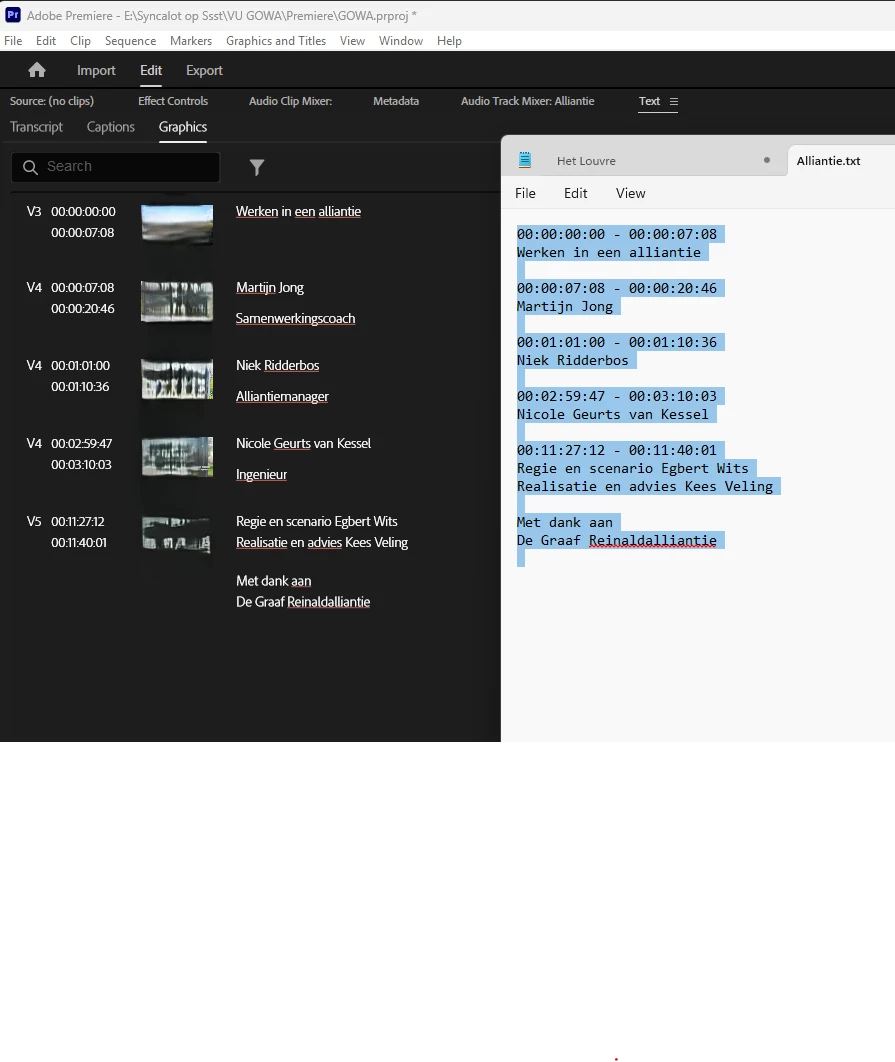
Normal behaviour: Before delivering the final edit to my clients, i usually export the txt from all graphics on the timeline and send them by email for them to check the correct names, titles and function descriptions. I use the graphics panel and the function under the top right three dots … This exports a .txt or a .csv file with all the text. 

Bug: The second line of the txt is not exported.

See screenshot. The words "Samenwerkingscoach, alliantiemanager, Ingenieur” are missing. These were all second lines. The are also missing in the .csv file
 

3 replies

Amy the Stuv
Community Manager
Community Manager
June 15, 2026

Hello ​@Kees Veling 


Welcome back. I did some digging into this issue and it does appear that if you have layered Text within one Graphic clip, it will default to only exporting the top layer. 


Example of a Graphic with Two Text Layers
Only “Amna Navaz is away” will export in the text file


As a work around, I would suggest breaking layered texts up into two separate graphics stacked on top of each other in the timeline. These will export together, but be mindful that it will read the highest track first, so it will list text in a graphic on track V3 before text in a graphic on V2.


Example of two text graphics stacked in the timeline


Currently the Text Panel / Graphics → Export to File feature cannot interpret layered text within one graphic, but I can put this conversation into Feature Requests.


Best,

Amy

Amy the Stuv
Community Manager
Community Manager
June 15, 2026

@Kees Veling thank you for reaching out and you’re right. This really should be considered a bug. I’ve submitted a ticket and hope to see this issue resolved. Thank you so much for circling back.


Best,

Amy Stuvland

Stan Jones
Community Expert
Community Expert
June 15, 2026

@Amy the Stuv,


Thanks for submitting a ticket for this. I decided to also submit a Beta bug report to focus the issue more clearly on the underlying fields issue. I worry that the 2 changes (omitting fields in 25.x and ignoring fields in 26.x) might leave room for a partial fix.


Stan


Stan Jones
Community Expert
Community Expert
June 9, 2026

@Kees Veling,


Upvoted.


@AnnikaKoenig 


I tested in 26.2.2, 25.6.4, 24.6.5, and Beta 26.5.0.24. I am on Win11. After testing csv and txt, I used only .csv, because it shows more information regarding fields used.


I see two different problems/bugs, one that would have prevented this working correctly in 25.6.4 and one that prevents it working in 26.2.2 and Beta build 24.


A hint to the cause, before I did my tests, is that your multi-line text in Video track 5 are okay. That text must be in a single graphics instance layer, and the other multi-lines must be typed with each line in a different layer within that graphics instance.


In 24.6.5, graphics text export included the fields Start Time, End Time, Text, Video Track, and Layer ID. Caption export included Start Time, End Time, Text, and Layer ID. Captions can only be exported one track at a time, so caption track number was not included. Captions can have more than one "block" in a single caption segment, and this requires the Layer ID. When such a caption is "upgraded to graphic," the additional block becomes an extra layer within that graphics instance. And it is placed on a video track, so Video track is required for graphics export for what were originally captions.


In 25.6.4, the fields became the same for caption export and graphics export: Speaker name, Start Time, End Time, and Text. Perhaps there was a plan to export speaker information to captions, but a) the Video Track and Layer ID fields should not have been removed and b) a further change was made the time of update to 26.2.2, now making the fields for caption and graphics export the same as the caption export in 24.6.5: Start Time, End Time, Text, and Layer ID.


In 25.6.4, multiple blocks for captions and multiple layers for graphics do not appear in the export because they are not even coded. In 26.2.2 and Beta 26.5.0.24, there must be a bug because even though the fields are available, the only exports are block 1 and layer 1.


I believe the correct fields to include in these exports are those from 24.6.5.


A workaround is to use only single layer graphics.


Stan


Inspiring
June 8, 2026

Version 26.2.2 (build3) Win 11 Pro 25H2 26200.8457 Windows Feature Experience Pack 1000.26100.304.0