

Export > Location still does not display full file path
Something that’s been around, and still not fixed, since the controversial “update” of the Export panel a few years ago:
No matter how much I embiggen the Settings column in the Export tab, the file path never extends to fill the available space, but remains truncated (see screen grab). The file path should take up all the available space.
Steps to reproduce:
Export something to a folder location that’s not really short, then drag the Settings column so it’s a bit wider.
Result:
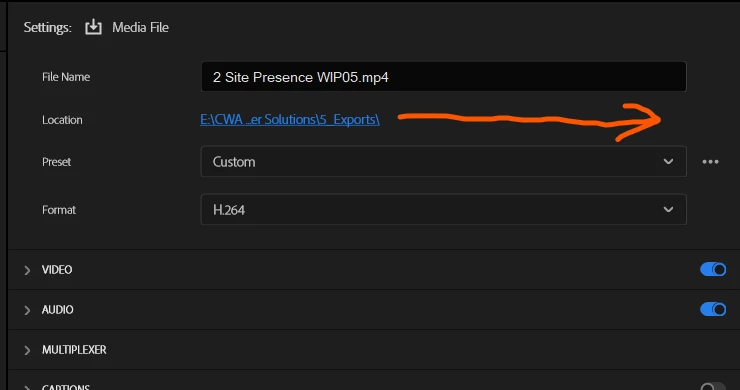
Expected: Full file path should be displayed if there’s available space.
System info
Application: Premiere Pro (Beta) v27.0.0.12
OS: Windows v10.0.26200, RAM: 127.91 GB GB, CPUs (logical): 32


 AdChoices