Kizzume
Inspiring
May 25, 2026

Export set for 15Mbps, exported file is 30Mbps. What gives?

  • May 25, 2026
  • 6 replies
  • 147 views

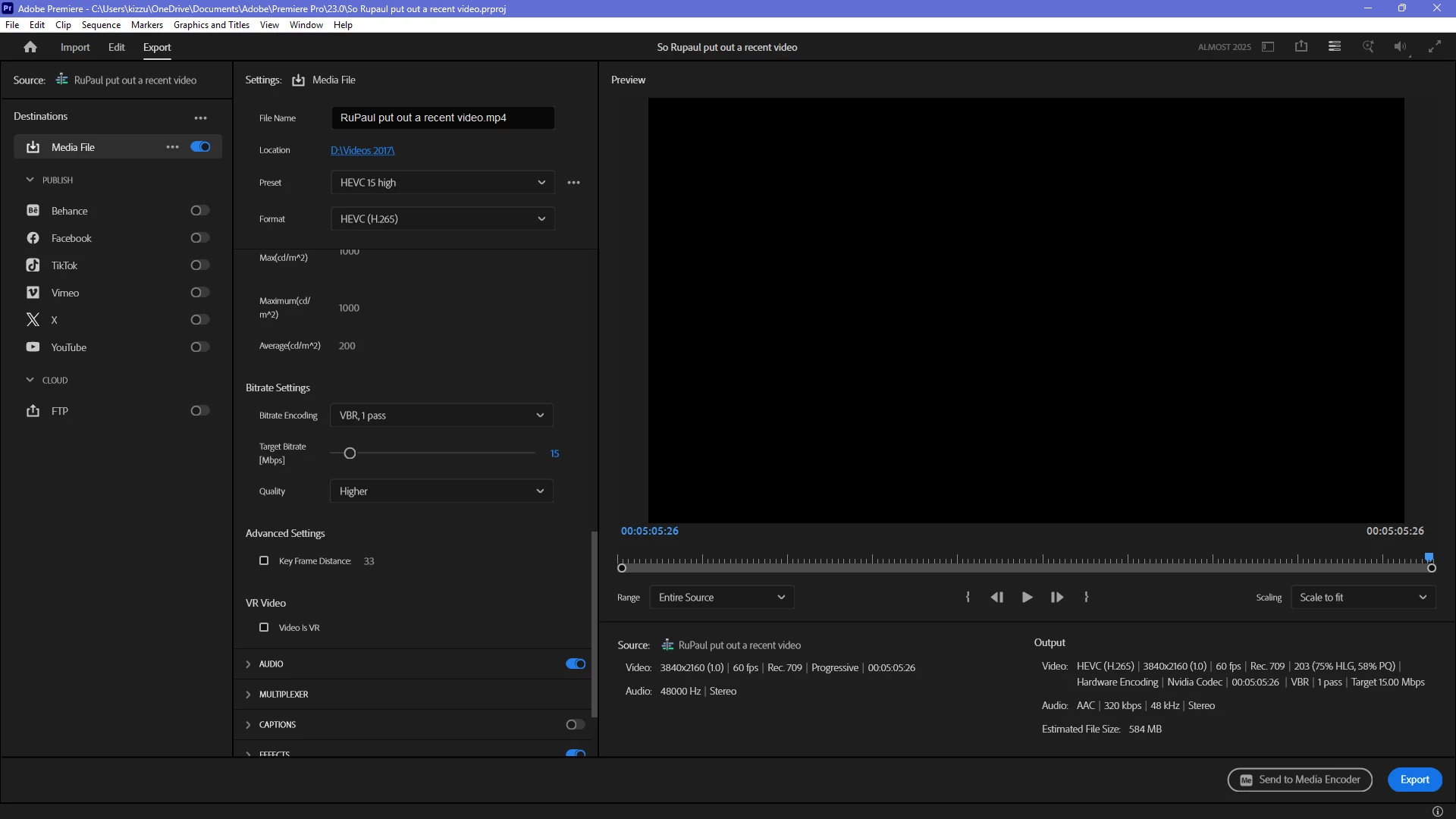
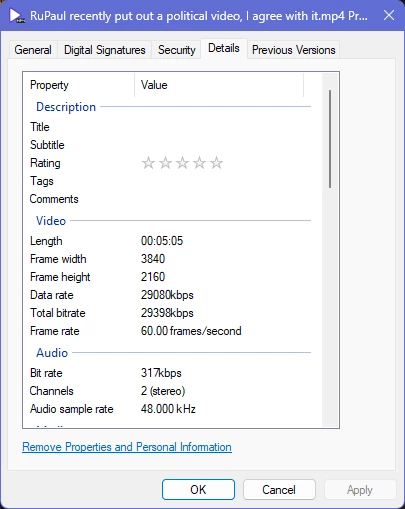
As you can see from the screenshots, I’ve set the target bitrate for 15Mbps.  When I actually render/export the video, the resulting file is 30Mbps.  I’m on version 26.2.2 (Build 3).  I got a new computer a few days ago.  On my old computer, I was using an older version which did not have this problem.


When I set it by hand for 14Mbps, the resulting file is 25Mbps.


What gives?
 

    6 replies

    Kizzume
    KizzumeAuthor
    Inspiring
    June 21, 2026

    After I installed the latest Nvidia drivers (from the 16th of this month) and updated Premiere, this problem no longer exists.

    Averdahl
    Community Expert
    Community Expert
    June 21, 2026

    Great, thanks for reporting back! :)

    Warren Heaton
    Community Expert
    Community Expert
    June 2, 2026

    @Kizzume:

    Change the Bitrate Encoding pop-up menu from “VBR, 1-pass” to “VBR, 2-pass” where there’s a setting for Maximum Bitrate.


    Kizzume
    KizzumeAuthor
    Inspiring
    June 2, 2026

    There is no VBR, 2 pass option.  And why would I want to wait TWICE the time to render?  That’s awful.


    Warren Heaton
    Community Expert
    Community Expert
    June 2, 2026

    Scroll up a little higher and change the Performance pop-up menu from Hardware Encoding to Software Encoding.
     

    Sometimes more processing time is required.  It's just the nature of video encoding.  When fast encode times are really important, hopefully we have figure out our hardware specifically for that purpose. 

    Kizzume
    KizzumeAuthor
    Inspiring
    June 2, 2026

    The forum says it needs more info.  What more information do you need?  I supplied the mediainfo files, and I explained that there ARE ways of making it work, but not variable bitrate using hardware encoding.

    Kizzume
    KizzumeAuthor
    Inspiring
    June 2, 2026

    Anything?  It’s been over a week now.

    Kizzume
    KizzumeAuthor
    Inspiring
    May 27, 2026

    Any updates on this?

    IanB_360
    Community Manager
    Community Manager
    May 25, 2026

    Hi ​@Kizzume 
    Thanks for including the screenshots.

    One thing that stands out is that the bitrate value is being read from Windows File Properties. Before concluding that Premiere is ignoring the bitrate setting, I'd recommend checking the exported file with MediaInfo, as Windows Properties can sometimes report HEVC stream information differently than the encoder settings would suggest.

    A few questions:

    • Does MediaInfo report a similar ~29 Mbps average bitrate?
    • Is the issue reproducible with both Hardware Encoding and Software Encoding?
    • Does the same behavior occur when exporting H.264 instead of HEVC?
    • If you switch from VBR 1 Pass to CBR, does the resulting bitrate still come out significantly above the target?

    From the screenshots I can see:

    • HEVC (H.265)
    • Hardware Encoding (NVIDIA Codec)
    • VBR 1 Pass
    • Target Bitrate: 15 Mbps
    • 3840x2160 at 60 fps

    If MediaInfo confirms that the actual average video bitrate is nearly double the requested target, that would certainly be worth investigating further. If you can provide some sample files we can check them out for you as well.

    Here to help
    Ian

    Kizzume
    KizzumeAuthor
    Inspiring
    May 25, 2026

    It gives the right filesize and bitrate when I do CBR, as well as when I do software encoding (which takes many times as long to process).   When I encode in h.264, hardware encoding, it creates a file that is 23.7Mbps, which is still far too much.


    Attached are the files MediaInfo created for the two video files in question.