

AndrewTheGreat
Known Participant
September 6, 2026

Exported audio has 1 frame without sound

  • September 6, 2026
  • 6 replies
  • 32 views

I have this big project with numerous files and sequences, and the sequences that go to render comprise nest-blocks (green). They are all placed together with no gaps, below is an mp3 music file cut in the parts where nests meet so every nest is exported with the corresponding part of the music (yellow). 
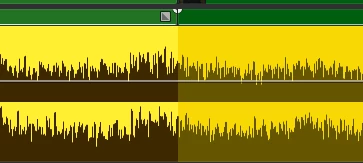
So, I am to export these blocks individually one by one using in and out points. I double-checked it - the markers are placed exactly in the cuts between the blocks - i do it with X hotkey. But in the end the exported videos all have 1 frame with no sound while retaining the full video:
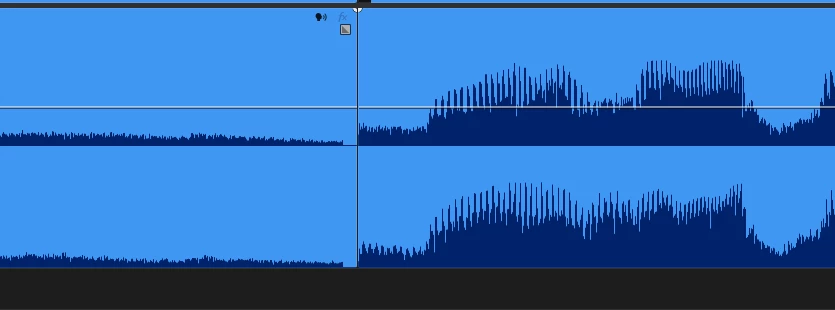
So when the clips are brought back to Premiere and placed next to each other you can clearly hear this 1 frame with no sound.

Why does it happen and how to correct it? I NEED A SOLUTION ASAP!

  • All the nests were created inside the sequences out of groups of media on the timeline. There was no gaps, the sound met the ends of all the clips. 
  • All nests and sequences are 25 fps. If I export the nests contents separately there’s no issue
  • All tracks have Premiere own audio effects on them. Removing those does not cure the issue
  • Clearing the cache does not solve the problem either

    6 replies

    AndrewTheGreat
    Known Participant
    September 7, 2026

    Another update: I saved the timeline to XML and imported it to Davinci Resolve and guess what, NO. Issue. There. I exported the files both in mov+prores and mp4 with h264, everything is fine. It’s clearly a Premiere issue

    Stop trying to edit and EDIT!
    AndrewTheGreat
    Known Participant
    September 6, 2026

    Update: exporting to mp4 leaves these cut ends. Exporting in mov has no issues. My question is WHY?

    Stop trying to edit and EDIT!
    Averdahl
    Community Expert
    Community Expert
    September 6, 2026

    Assuming that the other audio is 48000 Hz and the .mp3 is 44100 Hz and the timeline/export is 48000 Hz, i would try to convert the .mp3 to 48000 Hz/16-bit and use that instead of 44100 Hz/16-bit.

    Import the .mp3 in Audition and hit F11 and rock on from there!

    AndrewTheGreat
    Known Participant
    September 6, 2026

    Nope, it did not help. I transcoded to 48 and replaced the original file. In vain.

    Stop trying to edit and EDIT!
    Peru Bob
    Community Expert
    Community Expert
    September 6, 2026

    Try converting the mp3 to wav.