
Inspiring
August 15, 2025

Exporting AAF with Rendered Effects Shifts Volume Keyframes

  • August 15, 2025
  • 7 replies
  • 429 views

Hello Team!

We have a 42, stereo track sequence in Premiere 2024. Audio clips all have Parametric EQ and volume keyframing applied on a clip level.


We exported an AAF (embedded or otherwise) broken out to mono with effects rendered.
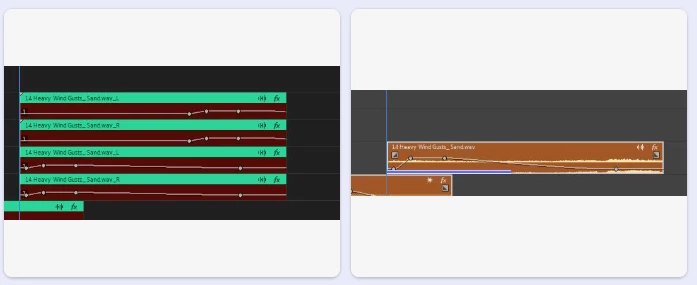
The resulting AAF when brought into Pro Tools or even back into Premiere has all the volume keyframing in the wrong place. I've attached a screenshot. On the left is the AAF, broken out to mono and with 'include un-rendered clips' checked. On the right is the Premiere project.

You can see the keyframes are completely off on the rendered clips in the AAF.

We have tried every possible combination of AAF and the only thing that works is not to render the effects. When we do that, the volume keyframing is fine.

Any idea why this is happening with this project?


7 replies

Inspiring
August 19, 2025

Hi @Ben Insler Thank you for your reply.
I have sent you a direct message with a link to a zip file that contains...

-Project File

-AAF

-Screenshot of AAF settings

For security, this is a stripped down Project/AAF with just one offending clip.

You can see from the screenshot that this AAF has effects rendered and includes un-rendered clips.
You can see the volume keyframing on the rendered clips has shifted compared to the project/unrendered clips.

Please note, I have tried every combination of AAF export imaginable and, as long as the 'render effects' box is checked, the keyframes shift.


Community Manager
August 18, 2025

Hi @Citizen_Sam,


I've been reading through this thread, and would like to look into this as well.  Unfortunately, it's a little difficult to discern the details from your screnshots alone.


Would it be possible to get your project file (with the sequence you're trying to export) and the AAF you expored of the sequence?  With those two items, we can hopefully dig a little deeper into the data contained within each.


Thanks,


Ben

Inspiring
August 18, 2025

Hi @Dani_V. Thank you for investigating this. Is there any progress? We are hoping to be able to move forward.

Inspiring
August 15, 2025

Hi @Dani_V.  Yes, the issue in the AAF appears both when I re-import into Premeire and in Pro Tools

Community Manager
August 15, 2025

Thank you for testing that out @Citizen_Sam. I believe I am seeing this issue on my end as well and will let the team know.

Does the keyframe shift look the same on Pro Tools as well?

Inspiring
August 15, 2025

Hi @Dani_V. 

Thanks so much for your reply. Just to be clear - the volume keyframing issue is on a clip level, not a track level.

I ran some tests. The issue happens no matter what effect I apply (as long as I 'render effects' in the AAF Export). BUT, it does NOT happen when the clip isn't trimmed.

You're on to something. What's our next move?

Community Manager
August 15, 2025

Hi @Citizen_Sam,

Thank you for reporting a problem and sorry you're experiencing issues. Are you seeing this happen in tracks without any effects as well or solely on the ones with the Parametric EQ? Any other effects being used at all?

Are you also trimming audio files, does it make a difference if they are not?

Sorry for the frustration,
Dani