
ExtendScript / Premiere Pro: insertClip works on first track but shifts clips when applied to second
Problem Description
I’m building a CEP panel to auto edit sequence in Premiere Pro.
1. I use createSubClip to generate sub-clips for those segments.
2. I call seq.insertClip(subItem, time, vidIdx, audIdx) to lay them down at their exact start times.
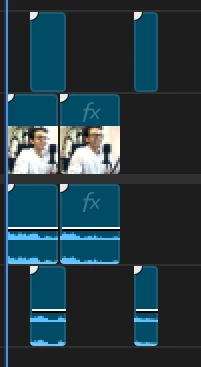
On Track 1, the sub-clips appear flawlessly, with gaps preserved and clips anchored correctly (see first image).
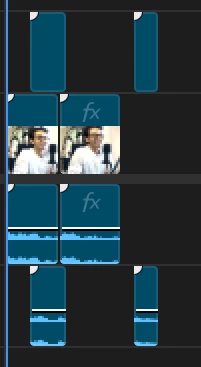
However, When I repeat the same process for Track 2, the newly inserted clips slide around: existing clips get pushed or overwritten, and gaps vanish (see second image).
What I’ve Tried
Using both seq.insertClip(...) and track.insertClip(...)
Wrapping each evalScript in a promise and awaiting it
“Safe-insert then move” logic to prevent overlaps
Clearing the tracks before insertion
Double-checking my Time objects and track indices
Nothing stops the Track 2 inserts from altering the already-inserted Track 1 clips.
Expected Behavior
Track 1 clips stay exactly where I put them.
Track 2 clips also appear at their specified start times, independently, without pushing or collapsing gaps on Track 1.
Actual Behavior
Inserting on Track 2 causes existing clips (on both tracks) to shift earlier or later, removing the spacing I created.
Screenshots
Track 1 insertion (works)
Track 2 insertion (clips move!)
Relevant Code Snippet
The first method is inserting at the start point of the segment
createSubClip: function (keepSegments, videoTrackIndex, audioTrackIndex) {
  try {
    $._PPP_.updateEventPanel("Creating subclips...");

    var seq      = app.project.activeSequence;
    if (!seq) {
      $._PPP_.updateEventPanel("No active sequence!");
      return;
    }

    var vTrack   = seq.videoTracks[videoTrackIndex - 1];
    var aTrack   = seq.audioTracks[audioTrackIndex - 1];
    var projItem = vTrack.clips[0].projectItem;

    // clear any existing clips
    while (vTrack.clips.numItems) vTrack.clips[0].remove(true, true);
    while (aTrack.clips.numItems) aTrack.clips[0].remove(true, true);

    // sort segments by start time
    keepSegments.sort(function(a, b) {
      return a.start - b.start;
    });

    // loop through each keep-segment
    for (var i = 0; i < keepSegments.length; i++) {
      var seg = keepSegments[i];
      if (seg.end <= seg.start) continue;  // skip invalid

      // build Time objects
      var inTime  = new Time(); inTime.seconds  = seg.start;
      var outTime = new Time(); outTime.seconds = seg.end;

      // name subclip
      var name = "Subclip_" + (i+1)
               + "_" + inTime.seconds.toFixed(2)
               + "-" + outTime.seconds.toFixed(2);

      // create the subclip from your source
      var subItem = projItem.createSubClip(name, inTime, outTime, 1);

      // **directly insert** at seg.start
      seq.insertClip(
        subItem,
        seg.start,                // ← use seg.start here
        videoTrackIndex - 1,
        audioTrackIndex - 1
      );

      $._PPP_.updateEventPanel(
        "Inserted '" + name + "' at " + inTime.seconds.toFixed(2) + "s"
      );
    }

    // final save
    $._PPP_.saveProject();
    $._PPP_.updateEventPanel(
      "Done! " + vTrack.clips.numItems + " clips on track V" + videoTrackIndex
    );
  }
  catch (e) {
    $._PPP_.updateEventPanel("Error in createSubClip: " + e.toString());
  }
},
The second method is inserting at end of last clip them moving it to its place.
createSubClip: function (keepSegments, videoTrackIndex, audioTrackIndex) {
  try {
    var seq       = app.project.activeSequence;
    var vTrack    = seq.videoTracks[videoTrackIndex - 1];
    var aTrack    = seq.audioTracks[audioTrackIndex - 1];
    var projItem  = vTrack.clips[0].projectItem;

    // clear old
    while (vTrack.clips.numItems) vTrack.clips[0].remove(true, true);
    while (aTrack.clips.numItems) aTrack.clips[0].remove(true, true);

    // sort & safe-insert cursor
    keepSegments.sort((a, b) => a.start - b.start);
    var lastSafeSec = 0;

    keepSegments.forEach((seg, i) => {
      if (seg.end <= seg.start) return;
      var inT   = new Time(); inT.seconds  = seg.start;
      var outT  = new Time(); outT.seconds = seg.end;
      var name  = "Subclip_" + (i+1) + "_" + inT.seconds.toFixed(2);

      var subItem = projItem.createSubClip(name, inT, outT, 1);

      // INSERT both video+audio at lastSafeSec
      seq.insertClip(subItem, lastSafeSec, videoTrackIndex-1, audioTrackIndex-1);

      // grab the just-inserted items
      var newV = vTrack.clips[vTrack.clips.numItems-1];
      var newA = aTrack.clips[aTrack.clips.numItems-1];

      // SHIFT by seg.start – lastSafeSec (relative move)
      var shift = new Time(); shift.seconds = seg.start - lastSafeSec;
      newV.move(shift);
      newA.move(shift);

      lastSafeSec += (seg.end - seg.start);
    });

    app.project.save();
  }
  catch (e) {
    $.writeln("Error in createSubClip:", e);
  }
},
Both of them show the same behaviour. The docs I followed was https://ppro-scripting.docsforadobe.dev/ .Can anyone point out what I’m missing, or suggest how to insert on a second track without disturbing the first? Thanks!


 AdChoices