
Participant
January 6, 2025

Feedback on Copy/Paste Volume Behavior in Premiere Pro 2025

  • January 6, 2025
  • 23 replies
  • 1638 views

I’d like to share feedback regarding a functionality change in Premiere Pro 2025 that has significantly impacted my workflow.

In the current version, I noticed that when I copy the volume level of an audio clip (e.g., -11dB) using the right-click menu on the volume effect and selecting "Copy," and then paste it with Ctrl+V onto other clips, the program now creates a new volume effect instead of simply adjusting the volume of the target clip. This results in compounded volume levels, as shown in the example below:
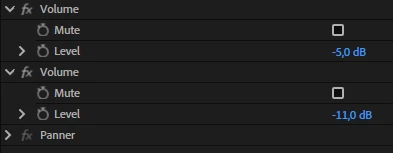


  • The target clip’s original volume is set to -5dB.
  • I copy the -11dB volume from another clip.
  • When I paste it, Premiere adds a new -11dB effect to the clip, resulting in a combined volume of -16dB.


In previous versions (up until 2024), pasting the volume level onto other clips replaced the existing volume value with the copied one, which was more intuitive and efficient. With this change, I now have to adjust the volume manually for each clip, which significantly slows down the process, especially when working with multiple audio clips.

This alteration negatively affects users who rely on this feature for quick adjustments in complex projects. I kindly request that you reconsider this functionality or provide an option to restore the previous behavior.


Thank you for your attention and for your ongoing dedication to improving Premiere Pro. I hope this feedback helps make the program better for everyone!


23 replies

Participant
October 9, 2025

It suddenly starting working for me.
It works every time I try to use it(so far).


Community Manager
October 8, 2025

Hi all,
Thanks for the videos. I've tried for a while now to replicate what you are seeing in the latest beta and still am unable to reproduce the issue. Would someone be willing to post one of their .proroj files so I can take a deeper look?

@Kent_SLA @nicholass30727825 @gideon106@gmail.com 

Participant
October 5, 2025

I too have been having this issue for the past year with Premiere 2025.  Why can't you guys fix this?  It's making me crazy!

nicholass30727825
Participant
October 1, 2025

Here's my example of it not functioning.  I'm on a Mac Studio M2 running Ventura.  Premiere 25.5.0 (13)


Community Manager
September 30, 2025

@Kent_SLA 
I tried this in both the current beta build and 25.5.0 gm release and cannot reproduce the issue.  There was a bug on this but it should be fixed. 

Participant
September 30, 2025

Here's one for you.

Community Manager
September 29, 2025

@nicholass30727825 

I just tried this bug again and find that it is still fixed. Can you provide detailed steps or a video showing it not working so I can investigate?

nicholass30727825
Participant
September 26, 2025

I can say the copy/paste of volume attributes is still not working.  Running 25.5.0.   It worked for years to easily adjust the volume of clips in a timeline, but has been broken for awhile now.  Very frustrating.

I need to be able to set the volume for one clip, and then copy and paste that attribute to the dozens of clips that follow.

Please fix this bug.  Especially since Adobe raises it's subscription price every year and brags about useless features.  Just make the ones you already have work.  

Community Manager
March 21, 2025

@Abhishek367333740d8r 
"hey man, it's march 21 and I still facing this issue in 25.1 "
"We fixed this issue now in the latest Premiere Pro 25.2 beta version".

The fix will be shipped when 25.2 is released.

Participant
March 21, 2025

hey man, it's march 21 and I still facing this issue in 25.1