
Participant
January 6, 2025

Feedback on Copy/Paste Volume Behavior in Premiere Pro 2025

  • January 6, 2025
  • 23 replies
  • 1673 views

I’d like to share feedback regarding a functionality change in Premiere Pro 2025 that has significantly impacted my workflow.

In the current version, I noticed that when I copy the volume level of an audio clip (e.g., -11dB) using the right-click menu on the volume effect and selecting "Copy," and then paste it with Ctrl+V onto other clips, the program now creates a new volume effect instead of simply adjusting the volume of the target clip. This results in compounded volume levels, as shown in the example below:
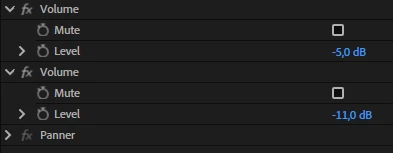


  • The target clip’s original volume is set to -5dB.
  • I copy the -11dB volume from another clip.
  • When I paste it, Premiere adds a new -11dB effect to the clip, resulting in a combined volume of -16dB.


In previous versions (up until 2024), pasting the volume level onto other clips replaced the existing volume value with the copied one, which was more intuitive and efficient. With this change, I now have to adjust the volume manually for each clip, which significantly slows down the process, especially when working with multiple audio clips.

This alteration negatively affects users who rely on this feature for quick adjustments in complex projects. I kindly request that you reconsider this functionality or provide an option to restore the previous behavior.


Thank you for your attention and for your ongoing dedication to improving Premiere Pro. I hope this feedback helps make the program better for everyone!


23 replies

Participant
January 7, 2025

@mstegner 

This has been happening to me in all projects created in versions 25 and 25.1. I am sending you a project that I just created and I confirmed that this problem is happening in it (I am sending it in a Mega link because I can't attach it to this message).


You said that this isn't happening to you. Maybe it's some setting in my Premiere that was changed when I updated to version 25? If you know anything, let me know.


https://mega.nz/file/ZkJDGb4a#zK-v353lkut6p1wNwaa7zQBXzgXc7w34miKT3a1nYVA


The way I'm doing it is by right-clicking on "volume" and clicking "copy" and then pasting using ctrl+v in the other clips (I've always done it this way in the other versions and never had this problem)


Another thing I noticed now is that when I press ctrl+v, in addition to it creating a new volume effect, it's also deleting the "channel volume" effect (you can see this in the print I put in the original post)

Community Manager
January 7, 2025

I just tried this with the latest beta, and I cannot reproduce it.  So this isn't a generic problem for all users. If you could provide a project file, I can investigate further.

Kevin J. Monahan Jr.
Community Manager
Community Manager
January 7, 2025

Hi @MS262331524689,
Thanks for the feature request. That really sounds a bit odd and might be a known issue. I hope the developer team will respond shortly. Perhaps @mstegner can weigh in. I up voted. Sorry for the frustration on this issue. Take care.
 
Cheers,

Kevin


Kevin Monahan - Sr. Community and Engagement Strategist – Adobe Pro Video and Audio