
Community Expert
November 20, 2025

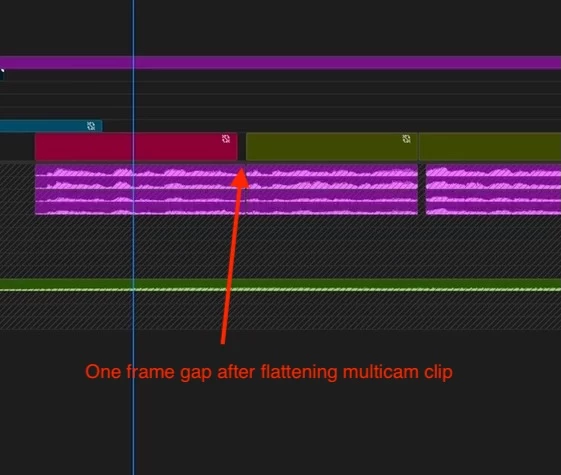
Flattening multicam clip leaves one frame gap

  • November 20, 2025
  • 3 replies
  • 36 views

Flattening a multicam clip leaves a one-frame gap. It has happened randomly in a 30-minute show timeline. 


  • Right click
  • Flatten multicam
  • The master clip has a 1-frame gap at the end of some clips. All other frames are correct so there is no slip happening.

An important note on the media: All media, multicam source sequences and edit timeline are at the same frame rate/timebase.  There is no mismatch that could cause this problem. 

Searching around, this happens to others sporadically. And when trying to finish a show on a tight deadline, it could be a show stopper. 
 

3 replies

jamieclarke
Community Manager
Community Manager
November 20, 2025

It appears that the multicam clip becomes corrupted in the sequence, and the issue only becomes visible once the clip is flattened.

As a workaround, if you match frame the clip and edit it back on top of the problematic section before flattening, the issue does not occur.

If anyone is able to identify steps that consistently reproduce the problem, please share them this would be extremely helpful.

We recognize that the workaround isn’t ideal, but it’s the best option available until we can gather more data.

Community Expert
November 20, 2025

Thanks @jamieclarke will do. 

25.5.0 (Build13)

Production

Mac

jamieclarke
Community Manager
Community Manager
November 20, 2025

Hi @ScottSimmons -  Can you email the project to jamiec@adobe.com so we can take a look.


What version of Premiere are you on?

Is this a production or regular project?

Are you on mac or windows?