
Participant
July 18, 2024

Folder dropdown arrow in bins not functioning

  • July 18, 2024
  • 3 replies
  • 232 views

Just updated to V 24.5

In the project window, I can no longer open a bin in list view mode by clicking the dropdown arrow. The only way I can get into a bin is to double-click, which opens the bin in a new pane and now there are 100 panes in my project window. I cannot drag and drop files and bins into other bins, either. Not ideal.

There's also a checkbox now to the left of each folder? 
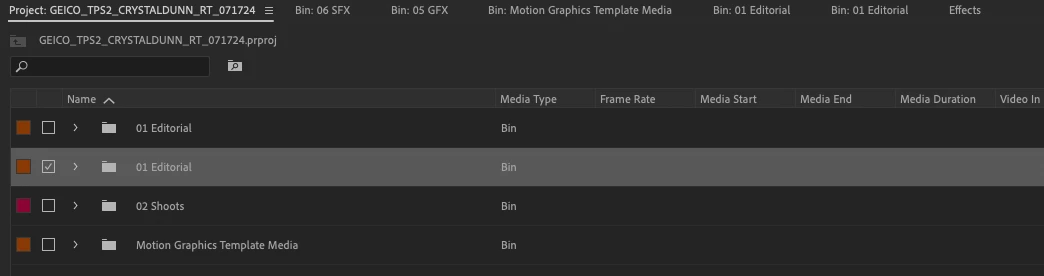
This topic has been closed for replies.

3 replies

Stan Jones
Community Expert
Community Expert
July 20, 2024

I cannot find any way to produce this. I keep thinking I'm missing a setting.


For any odd problem, I reset Workspace and then Preferences.


See this, including the cautions about losing custom settings:

https://helpx.adobe.com/premiere-pro/using/reset-preferences.html


Stan


Kevin-Monahan
Community Manager
Community Manager
July 19, 2024

The status of this bug report is updated.

Kevin Monahan - Sr. Community & Engagement Strategist – Pro Video and Audio
Kevin-Monahan
Community Manager
Community Manager
July 19, 2024

Hi Robbie,

I read your bug report. Thanks for the info and screenshot you provided. Can you give the team any other details? See, How do I write a bug report?


I hope the team can help you soon. Forgive all the hassles.


Thanks,
Kevin

Kevin Monahan - Sr. Community & Engagement Strategist – Pro Video and Audio