Participant
August 5, 2025

Generative Extend stuck at 'Preparing 1%'

  • August 5, 2025
  • 7 replies
  • 449 views

Hi, I am a university educator teaching Premiere Pro for my class and while preparing the material, I encountered this issue.

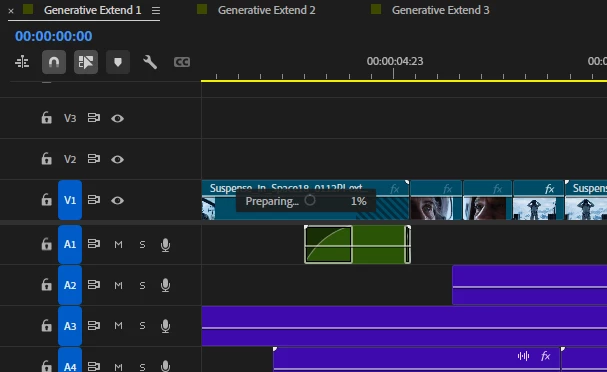
  • Issue – After trying out generative extend a couple of times, now whenever I try to use this tool, it will just be stuck at 'Preparing 1%' for video. Audio will generate but not video.
  • Steps to reproduce  Click on Generative Extend, then drag either the beginning or end of a clip.
  • Expected result  There should be an extension of the clip generated.
  • Actual result  The clip will be stuck at 'Preparing 1%' no matter how long time pass.
  • Adobe Premiere Pro version – 25.3
  • Operating system – Windows 11 Home
  • GPU driver version (Windows only) – GeForce RTX 4070 Ti
  • Comparative information helps us understand more about when the issue occurs: 
    • It is affecting new and old projects and both 25.3 version and the Beta version
    • I have tried uninstalling and reinstalling Premiere Pro and restarting to no avail
    • I am on the 'Adobe for Enterprise' university plan with 500 generative credits
    • It was working yesterday when I tried on a few clips but stopped working after awhile
 

Any help would be appreciated, thank you.

7 replies

Participant
October 31, 2025

Same issue. Has there been any resolution?

GoDiegoGo11
Participant
October 13, 2025

Encountering a similar issue. Does anyone know if a solution has been provided?

Flavio_St
Inspiring
August 28, 2025

Same problem here!

Participant
August 7, 2025

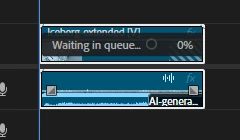
I have tried disabling Firewall and using a different Wifi connection, and also reinstalling Premiere Pro but the result is still the same:


Participant
August 6, 2025

Hi @Dani_V. 


Thank you for the reply. The Progress Dashboard remains stuck as well (see screenshot). I had an error message on some random HEIC file previously but it was gone when I deleted the file and reinstalled Premiere Pro.


And yes it was working before on the same computer and same account. The generative credit is 500 per month.


You can see from this screenshot, I was able to generate 5 clips and 1 audio before the video generation stopped working altogether:


Community Manager
August 5, 2025

Hi @loyal_Solace5FA7,


Welcome to the Premiere Pro forums and thank you for reporting a problem. Are you seeing this process being stuck in the Progress Dashboard on the top right as well, or have you gotten any dialog boxes or warnings showing up at all? Is this happening with different types of clips or are they all the same file type?

You mentioned this was working before, was it on the same computer and same account? Are the 500 generative credits the total you have a month, or is that the remaining amount?

Sorry for the frustration,
Dani

Peru Bob
Community Expert
Community Expert
August 5, 2025

Have you tried to restore default preferences?


Preference settings control how Photoshop Elements Editor displays images, cursors, and transparencies, saves files, uses plug‑ins and scratch disks, and so on. If the application exhibits unexpected behavior, the preferences file could be damaged. You can restore all preferences to their defaults.

Note: Deleting the preferences file is an action that cannot be undone.

Do one of the following:

Press and hold Alt+Control+Shift (Mac: Option+Command+Shift) immediately after Photoshop Elements begins launching. Click Yes to delete the Adobe Photoshop Elements settings file.
Go to Edit > Preferences (Mac: Photoshop Elements > Preferences > General), click the Reset Preferences on next launch button, and then click OK. When you restart Adobe Photoshop Elements, all preferences are reset to default settings.
A new preferences file is created the next time you start Photoshop Elements Editor. For information on a specific preference option, search for the preference name in Help.

from here:

https://helpx.adobe.com/photoshop-elements/kb/preference-file-locations-photoshop-elements.html