
Known Participant
August 15, 2026

GoPro Mission 1 Video Files Using Media Mod Are Shoing as Audio

  • August 15, 2026
  • 4 replies
  • 30 views

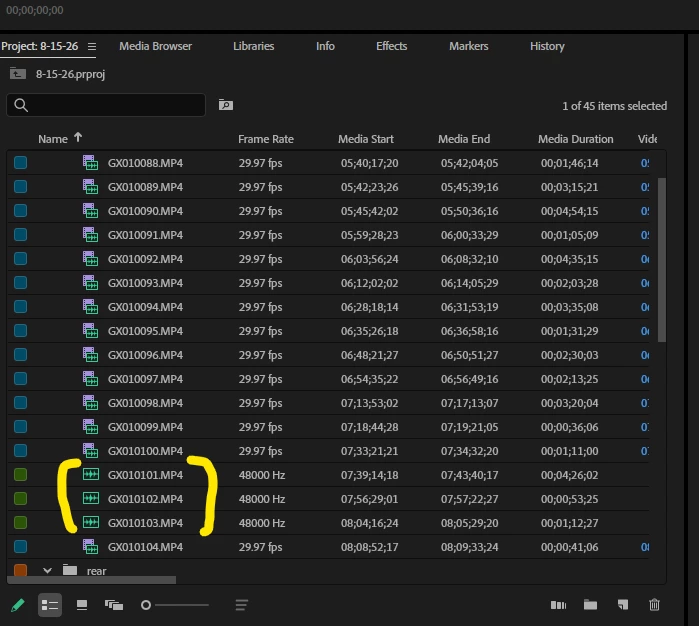
When importing gopro mission 1 video files that are using the new wmedia mod, if the file has been broken into multiple pieces by the camera (long), the first file shows as video in premiere, but subsequent files show as audio files.  When placing on the timeline they only show as audio.  The files when opened from the windows desktop are in fact video files with 2 audio tracks. 

 The files marked in yellow in the screenshot should show as video files like all the others.  
 

    4 replies

    Amy the Stuv
    Community Manager
    Community Manager
    August 17, 2026

    Hello ​@DanaF129 

    Thank you for filing your Bug Report. Would you mind sharing what Version of Premiere you are using and have you used previous versions of Premiere where this doesn’t occur? We would also appreciate a few system specs such as OS, CPU and GPU (and GPU driver if you are on windows). 


    I’m wondering if you would be willing to share those spanned files so our team can look and see if there’s a flag Go Pro started adding for spanned clips that is throwing off Premiere. I can DM you a private upload link I could share with our team. It would be much appreciated.


    In the meantime, I would suggest transcoding to another codec like Pro Res to resume work in Premiere. 


    Apologies for the inconvenience,

    Amy

    Ann Bens
    Community Expert
    Community Expert
    August 15, 2026

    Must be something slightly wrong with the files. Premiere is quite picky. Best is to convert to editable codec such as Prores.

    DanaF129Author
    Known Participant
    August 15, 2026

    Davinci didnt have an issue, nor any other program to play the videos. Curious why would this fall on the gopro file vs adobe?  

    DanaF129Author
    Known Participant
    August 15, 2026

    (I did submit a ticket for them to look at it as well)