
Inspiring
July 3, 2026

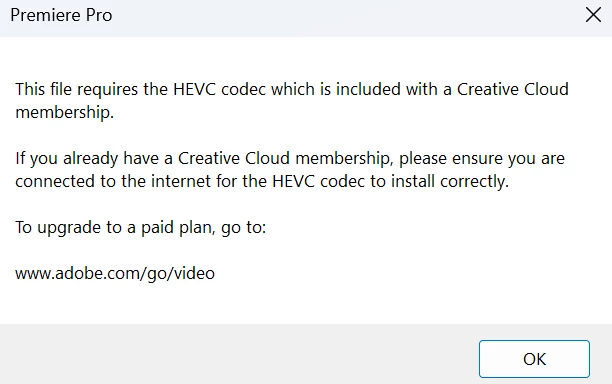
HEVC codec missing Pp 26.3 - WIN11 ???
  • July 3, 2026
  • 2 replies
  • 71 views


I get this error as in the title...what is happening with this latest version 26.3 when the same project was opened by previous versions without any problems.....and why does relinking take so long in the last version 26.3...I lose the will to work in Pp because of relinking...I can easily cook lunch during that time ;-) … My files are in this format and opened quite normally in previous versions.…

  • Video

    ID                                       : 1

    Format                                   : HEVC

    Format/Info                              : High Efficiency Video Coding

    Format profile                           : Main 10@L5.2@High

    Codec ID                                 : hvc1

    Codec ID/Info                            : High Efficiency Video Coding

    Duration                                 : 5 min 15 s

    Bit rate                                 : 192 Mb/s

    Width                                    : 3 840 pixels

    Height                                   : 2 160 pixels

    Display aspect ratio                     : 16:9

    Frame rate mode                          : Constant

    Frame rate                               : 50.000 FPS

    Color space                              : YUV

    Chroma subsampling                       : 4:2:0

    Bit depth                                : 10 bits

    Bits/(Pixel*Frame)                       : 0.463

    Stream size                              : 7.05 GiB (98%)

    Language                                 : English

    Encoded date                             : 2025-11-04 15:47:13 UTC

    Tagged date                              : 2025-11-04 15:47:13 UTC

    Color range                              : Limited

    Color primaries                          : BT.709

    Transfer characteristics                 : BT.709

    Matrix coefficients                      : BT.709

    Codec configuration box                  : hvcC


    2 replies

    Community Manager
    July 6, 2026

    Hi ​@STUDIO29K

    Thank you for those additional details about the CPU. The team is investigating this issue further.

    Best,

    Jonathan

    STUDIO29KAuthor
    Inspiring
    July 6, 2026

    No prob...

    Community Manager
    July 6, 2026

    Hi ​@STUDIO29K,

    Thank you for reporting this issue. The team understands how frustrating an occurrence like this can be.

    This may be a Microsoft support issue when working with HEVC (H.265) codec. With a Mac, it is part of the operating system, however with a Windows PC an extension may need to be installed. 

    Please some additional links here that may be helpful:

    Regarding the relinking, we will need more details to try to assist you:

    • Please let us know your video card driver version.
      • We recommend updating to the most recent version; for NVIDIA users, we strongly recommend the Studio version of the driver.
    • When did the relinking issues begin, or is this the first time? 
    • Does it affect new, empty projects?
    • Are you able to provide more details about the footage specs? (codec, resolution, import process, general workflow)
      • Where is the footage being stored? Locally or on an external drive?
      • Is the Premiere project file and the footage being saved in the same location?

    Best,

    Jonathan

    STUDIO29KAuthor
    Inspiring
    July 6, 2026

    ​​​​​1. Isn't the HEVC codec an integral part of Pp? Until version 26.3 there were no such problems...
    2. Relinking... video driver, latest STUDIO driver 610.62... at least you don't have to remind us...
    3. problems with relinking start from versions 26.2 - 26.2.2 and especially the last version 26.3... I forgot to tell you that during all the time of loading projects, i.e. relinking, the CPU goes up to 80% and when that icon in the upper right corner of Pp says that everything is loaded (which it is not)... the cpu stays at 50% for 15-20 minutes for sure... it never happened  and then there is a return to 26.0.2, which loads the same projects in 20 seconds and which is the most stable for now...
    4. All projects are on NVMe 2 and I can no longer tell you what my configuration is, you can find it in my previous posts...
    5. HEVC codec problem only happens with v.26.3.
    6. Pp is on one NVMe 2...projects on another NVMe 2, data and media cache on the third NVMe 2 and so on…

    The first image that the HEVC codec is not present occurs when I load the files with the description in the second image... it is the HEVC 10bit 4:2:0 format from my Panasonic CX 350 cameras and that HEVC error is displayed only in v. 26.3... in others never... and versions below 26.3 load those files normally without reporting the lack of HEVC codec


    finally, here is my configuration so you don't bother me anymore:

    RTX 3090TI 24GB
    Ryzen 9 3950X
    64GB memory
    1NVMe M.2 for Os
    1NVMe M.2 for video
    1NVMe M.2 for cache....ect

    Pp 26.0.2 rules... and give us back the Premiere Pro name...

    Community Manager
    July 6, 2026

    Hi ​@STUDIO29K,

    Regarding the HEVC codec, can you please try the following:

    • Logging out of your Creative Cloud and logging back in.
      • Perhaps there is a sync error that requires a full log-out and reauthentication. 
    • Are you logged-in across multiple devices?

    Best,

    Jonathan