
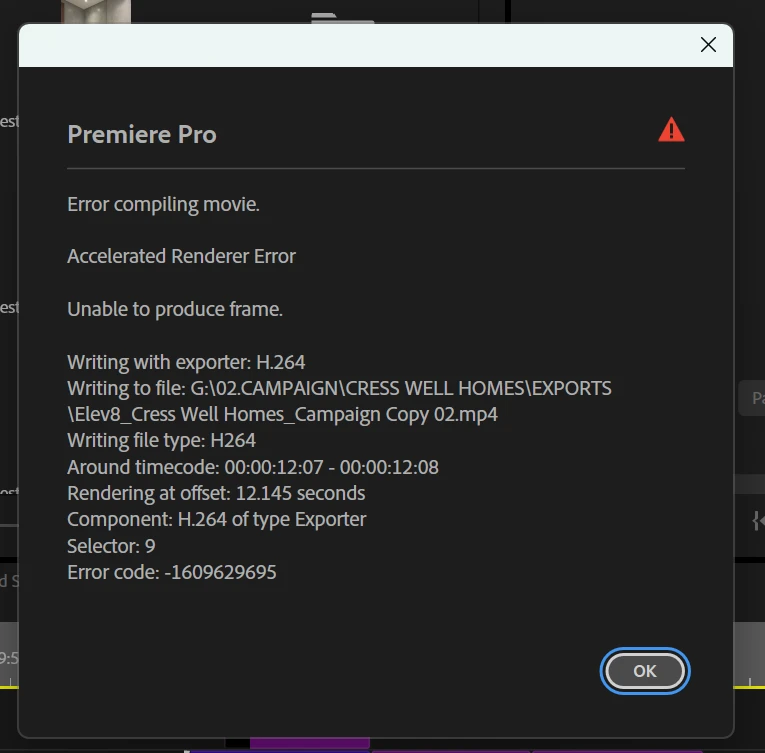
I am experiencing an issue in Adobe Premiere Pro where I am unable to render my timeline sequence. Whenever I try to render the sequence, the process does not complete successfully.
Bug Title: Unable to Render Sequence in Adobe Premiere Pro
Application: Adobe Premiere Pro
Issue Description:
I am experiencing an issue in Adobe Premiere Pro where I am unable to render my timeline sequence. Whenever I try to render the sequence, the process does not complete successfully.
Steps to Reproduce:
-
Open Adobe Premiere Pro.
-
Open the existing project.
-
Select the sequence in the timeline.
-
Go to Sequence > Render In to Out.
-
Attempt to render the sequence.
Expected Result:
Adobe Premiere Pro should successfully render the selected sequence without interruptions or errors.
Actual Result:
The sequence cannot be rendered, preventing me from previewing the timeline smoothly and continuing my editing workflow.
Impact:
This issue is affecting my editing workflow and delaying project completion.
Priority: High
Request:
Please investigate this issue and provide a solution to restore normal rendering functionality.
 AdChoices