
Known Participant
Nov 17, 2026 12:37 AM UTC
Needs More Info

I can't see all my menu items because they are off the screen

Great job on the new color page. Makes absolutely no sense, and the tips/tutorial for first time users is insane. 

Beyond that, the “add a LUT” concept fails immediately because the damn submenu is OFF THE SCREEN. It’s too long. I don’t even have a lot of LUTs installed on my system but the menu is literally miles off the screen. I can’t do anything about it. I can’t even scroll on it.

I can’t even edit the color on this project anymore.
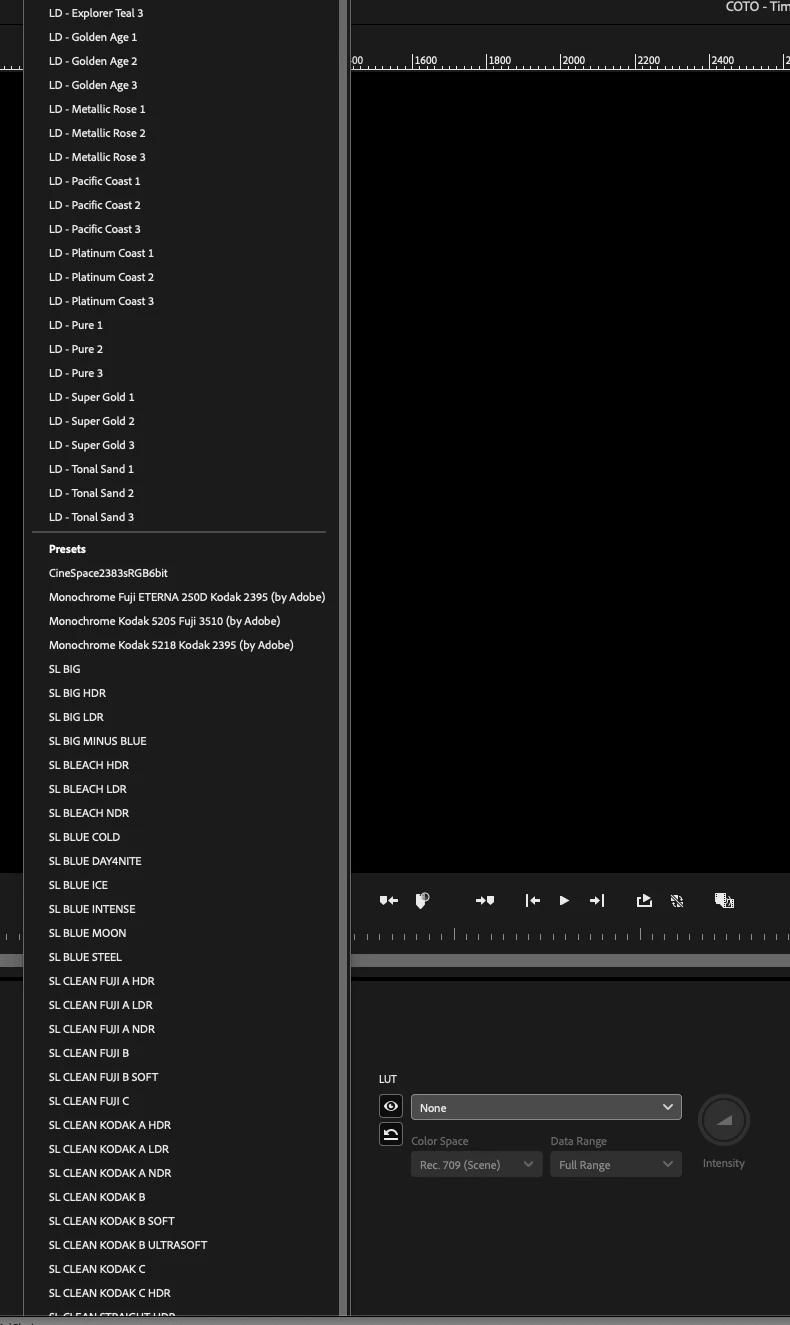
[Edited by moderator]

    1 reply

    Amy the Stuv
    Community Manager
    Community Manager
    Nov 17, 2026 2:31 PM UTC

    Hello ​@efficient_person1243 

    Welcome to the Premiere Forums. We need a little more information to help us understand the issue. 

    • Operating System: Specify Windows or macOS, along with the version.
    • Chip (Mac Only): Specify which M-series Chip or CPU/GPU combo.
    • GPU and Driver (Windows only): Please let us know your video card and driver version. We recommend updating to the most recent version; for NVIDIA users, we strongly recommend the Studio version of the driver.
    • Video Format: If the issue relates to playback or export, please specify the format (and ideally share a sample video).
    • Project Size: About how big is your project file? Is it in a Production? Approximately how many clips are involved in a rough estimate? In this case we may want to know about how many LUT’s you have installed. 

    In what Panel are you trying to install the LUT? What Panel / Process results in this menu issue? Screen recordings and more screenshots are always helpful.

    Hoping to help,

    Amy

    Translate