

matthewe47530596
Inspiring
September 4, 2026

In the last week I am repeatedly getting a CEPHtmlEngine.exe Application Error using Premiere Pro

  • September 4, 2026
  • 1 reply
  • 22 views

In the last week I am repeatedly getting a CEPHtmlEngine.exe Application Error using Premiere Pro.

The issue is happening 3-4 times an hour - getting sick of having to CLOSE everything and Restarting my PC. I have tried numerous suggested Fixes, updated my Graphics Driver etc… YET the problem persists. Issue is coinciding with the Last Premiere Update - I did not have this issue prior.
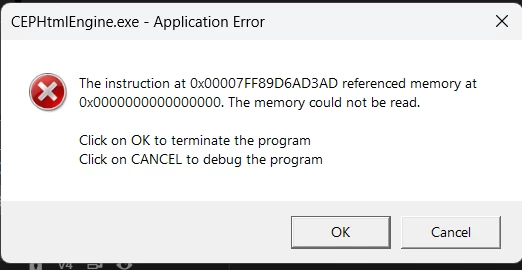


My PC is 6 months OLD 

I have a AMD Ryzen 9 9950X3D CPU 
ASROCK X870E Tachi Lite Motherboard 
64GB of RAM
NVIDIA GeForce RTX 5080 Video Card


1 reply

KatieToo
Community Manager
Community Manager
September 4, 2026

Hi ​@matthewe47530596 

Thanks for stopping by the Premiere forums and giving us those details about your setup and that CEPHtmlEngine issue happening. Yes, that sounds quite frustrating, our team will look into this. Sounds like this began after updating Premiere.

In the meantime, can you please let us know the following:
1) confirming you mean by “last premiere update”, that you’re using v26.3.2
2) which driver version and build (studio or game ready)
3) any third-party panels or extensions installed in Premiere
4) Is this error occurring in all projects since updating or just this one?

Next time that error happens, see if you can help identify which panel or workspace you were on in Premiere. Additionally, you can open up Task Manager ahead of time, begin working, and then when the error pops up, don’t close out of it and do the following:

  1. Swap over to Task Manager if open, if not then do Ctrl + Shift + Esc to directly open it.
  2. Click on the left hand side tab Details.
  3. Right-click any column heading, such as Name or PID, and choose Select Columns.
  4. Scroll down some until you reach Command line, enable it with checkmark, click OK.
  5. Find one or more processes named ‘CEPHtmlEngine.exe’ on the list. You may need to widen the Command line column itself for easier reading. You’re looking for something that may resemble “.com.adobe.PanelName” or “com.vendorname.ExtensionName”, and the panel or extension name would be more specific than these two examples.
  6. Copy or screenshot the full command line(s) for that and post a reply back to us.

This could be really useful details for further troubleshooting especially. Let me know if you have any issues getting that. 

Hope to help!
Katie