

Shebbe
Community Expert
Community Expert
August 19, 2025

Info Panel false reporting of frame rate

  • August 19, 2025
  • 3 replies
  • 218 views

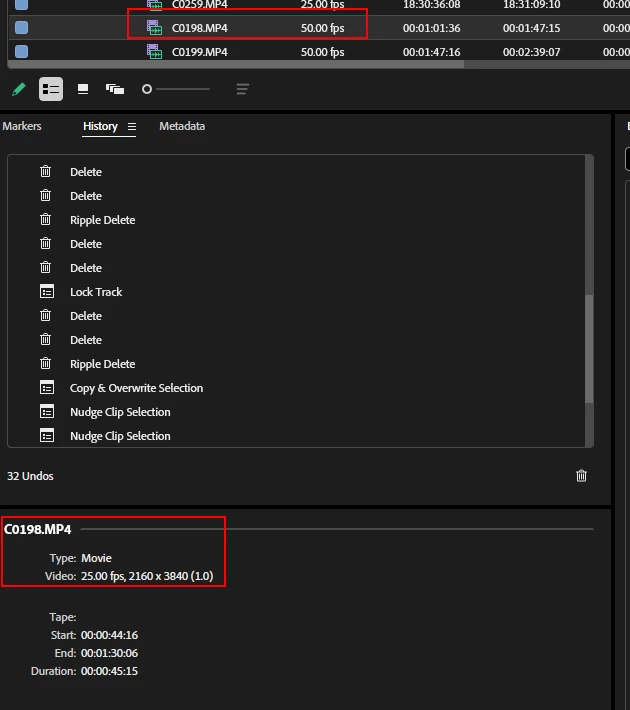
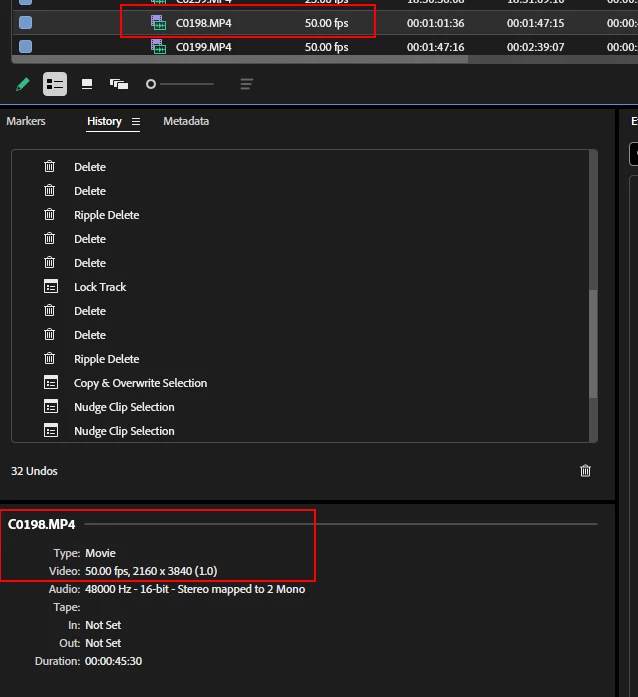
This one keeps me buggin for quite a while now. Whenever you work with media that doesn't match the sequence framerate, the info panel will always show the sequence frame rate for selected media rather than the media's frame rate. 

This is incredibly annoying because you need to verify the media framerate by revealing it in the project panel every time. After doing so the info also switches to reflect the actual source media's framerate. But back to sequence framerate whenever that panel is active.


Media info as shown from Sequence (false info):
 

Media info as shown from Project (correct info):
 

3 replies

Shebbe
Community Expert
ShebbeCommunity ExpertAuthor
Community Expert
August 20, 2025

@IanB_360 ,

Here are the results.

FX3 MP4 and it's Proxy ProRes file (loaded in as separate file)


Win 11, 25.2.1:

Displays as sequence framerate when selected in seq while being 50fps in project panel.

Mac OS, 25.2.1:

Same issue


Win 11, 25.6.0 beta 31

Issue seems to be resolved.


So maybe in the latest release version this was also addressed but we haven't updated our suites yet.

Shebbe
Community Expert
ShebbeCommunity ExpertAuthor
Community Expert
August 19, 2025

Ah sorry, I figured it's a global issue since I've been seeing it all the time accross devices and versions. Lemme get back to you on this when I'm back at the office tomorrow.

IanB_360
Community Manager
Community Manager
August 19, 2025

Hi @Shebbe 
What are your system specs, and which version of Premiere Pro have you seen this behavior in?  What types of video files have you seen this happen with? I am attempting to recreate this and have not encountered a problem similar to the one you shared.

Here to help

Ian