

Inserting/Overwriting a Multicam Sequences can result in null footage
If you use a hotkey to perform an insert or overwrite edit of a multicam sequence that does not have an in and out point set using a hotkey, you'd expect it to just put the whole thing in your sequence. Which it does. But, sometimes, it will add in a little bit of null footage (or whatever that diagonal stripey thing is called):
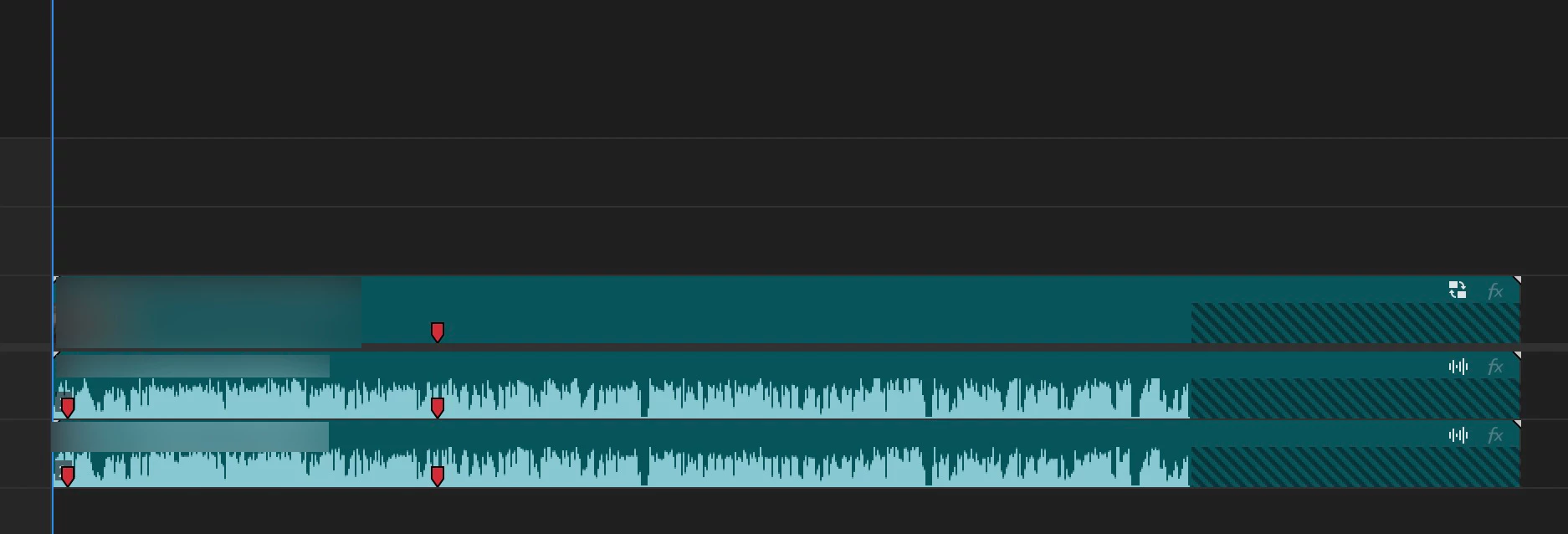
I've found that this happens when a multicam sequence was originally created at one duration and then has the duration changed. For instance, when creating MCs, our assistant editor generally creates one master MC that has everything from that day in it, and then splits that up into the individual scenes by duplicating and then cutting it down to just each scene. But, it's almost as if Premiere retains the memory of what the original duration was when I perform an insert or overwrite edit using a hotkey. Interestingly, the same issue does not occur if I drag it in from either the project panel or source monitor.
Steps to replicate:
1. Create a multicam sequence with multiple clips
2. Duplicate this sequnce and then trim it by removing some of the clips
3. Use a hotkey to insert or overwrite this multicam sequence (making sure no in or out is set) into your timeline.
Specs & Stuff (but it's happened to me in every version of Premiere and every computer since...well, awhile)
- PPro Version: 24.5.0 (though this behavior has been in previous versions as well)
- OS: Mac OS Ventura 13.6.6
- System: Mac Studio M2 Ultra
- RAM 64 GB
- Hard drive: USB 3 SSD
- Video Format: AVCI


 AdChoices