
Participant
March 28, 2025

Interpretation error in the pixel ratio of a MOV 100FPS file in Adobe Premiere Pro 25.1

  • March 28, 2025
  • 9 replies
  • 1457 views

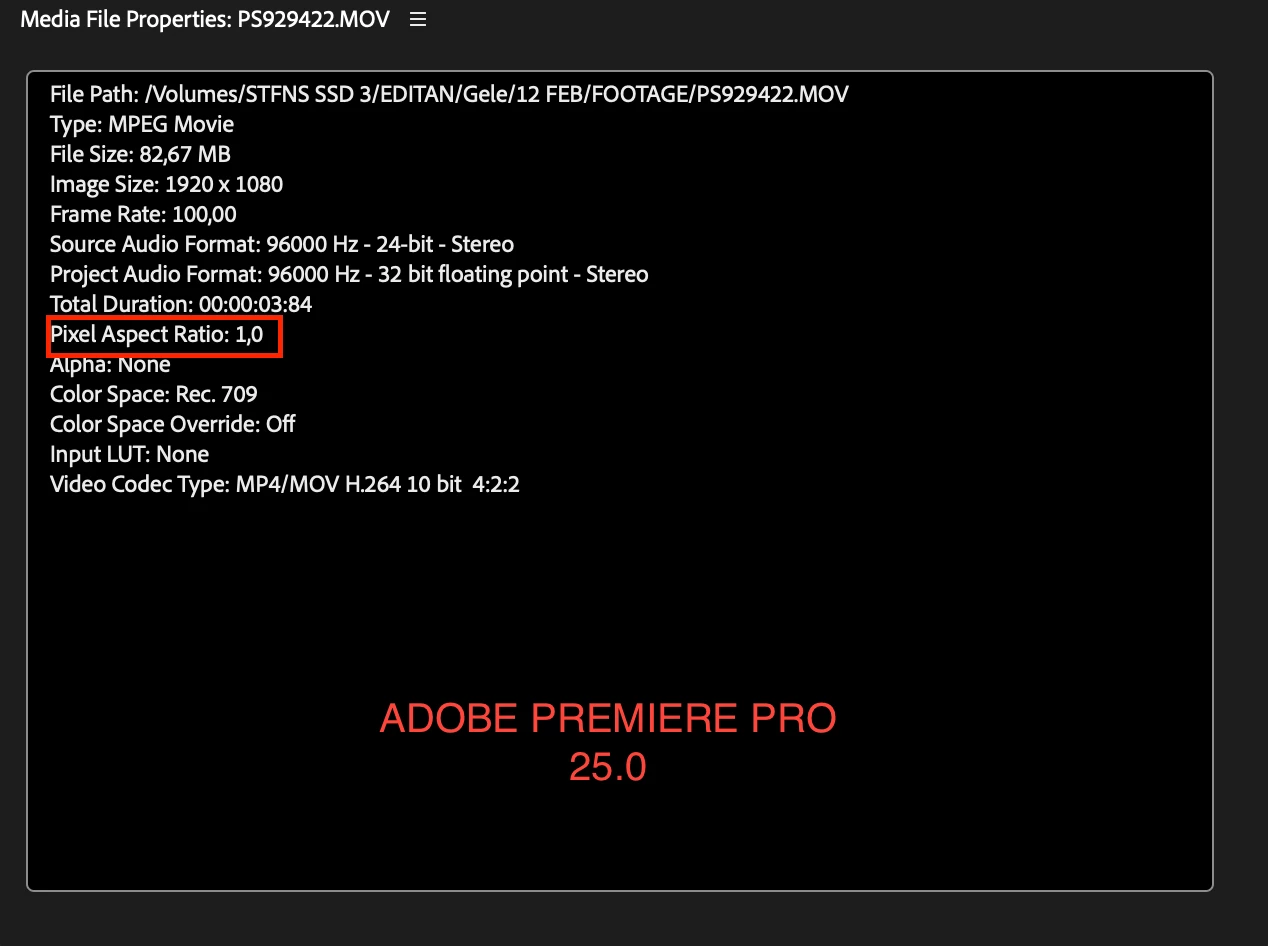
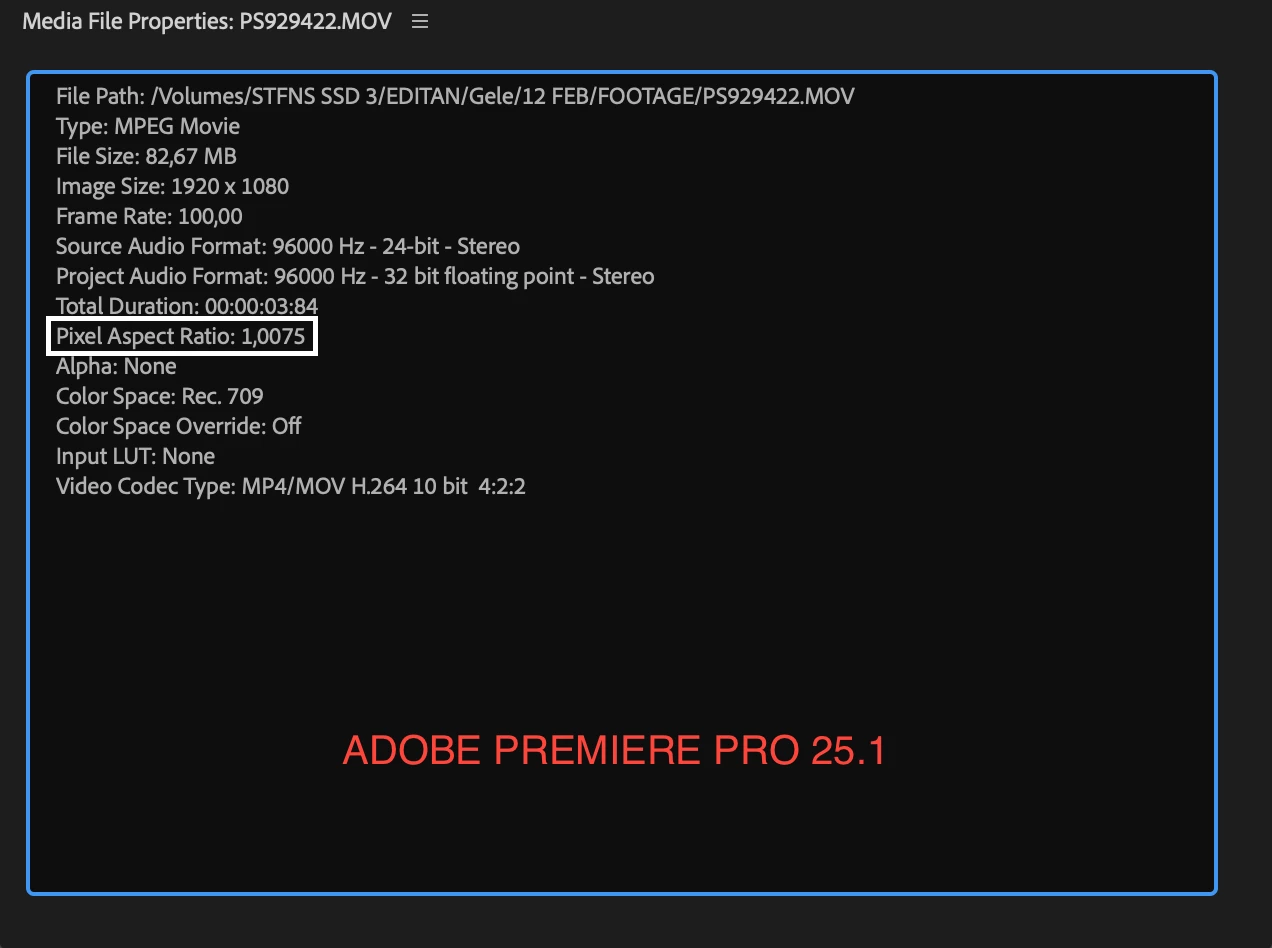
Hi, I have an issue in Premiere Pro 25.1. The Pixel Aspect Ratio of a Lumix 100FPS MOV 10-bit 4:2:2 file is different from Premiere Pro version 25.0. 

I can fix it by manually inputting the ratio through Project Panel, Right-click the file, Modify, Interpret Footage. However, it sometimes still leaves a small space on the left and right sides of the screen. This error also prevents Warp Stabilizer from being used.

Hopefully, this issue can be resolved in the next Premiere update.


9 replies

Participating Frequently
July 3, 2025

Hi All,

Thanks for highlighting this issue. We have fixed this in the latest beta builds (Premiere Pro 25.4.74 and newer).
If possible, please install the latest beta build and let us know how it goes there.

Thanks,
Mayjain

Participant
May 28, 2025

I found a strange issue with Lumix files in the MOV format. In older versions of Premiere, the aspect ratio was listed as Pixel Aspect Ratio: 1.0; however, in the latest version, it displays Pixel Aspect Ratio: 1.0075.


This problem can be fixed by disabling hardware acceleration or manually adjusting the aspect ratio. It’s a simple workaround, but quite frustrating, especially because effects like Warp Stabilizer can’t be used, even after nesting the clip.

I'm using a MacBook Pro 2021 M1 Pro

Download File:
Preview File 

MyerPj
Community Expert
Community Expert
May 28, 2025

Hey @STFNS 

Thanks for the file. I gave it a try in Beta 25.4 b25 and it looks correct.

I also tried it in 25.2.3 the released version and all was well.


Here's the Media File Properties

File Path: C:\T\PS929422.MOV
Type: MPEG Movie
File Size: 82.67 MB
Image Size: 1920 x 1080
Frame Rate: 100.00
Source Audio Format: 96000 Hz - 24-bit - Stereo
Project Audio Format: 96000 Hz - 32 bit floating point - Stereo
Total Duration: 00:00:03:84
Pixel Aspect Ratio: 1.0
Alpha: None
Color Space: Rec. 709
Color Space Override: Off
Input LUT: None
Video Codec Type: MP4/MOV H.264 10 bit 4:2:2

Participant
May 23, 2025

Ah, that's great, thanks!


Participant
May 23, 2025

Shot an event using a Sony FX3 and an A7SIII. Both cameras set to HD 25fps, XAVC S-I HD. 

Editing on PP 25.2.3 (Build 4)

MacOS Monterey v12.6.7, Mac Studio 2022, Apple M1 Ultra

Timeline settings: 1920x1080, 25fps,    square pixels.


So far, nothing unusual, camera and edit settings used 100x before.


Applying warp stabilizer to clips from both cameras: "Warp stabilizer requires clip pixel aspect ratio to match sequence (fix by nesting.)


Huh?


Check settings. All good. Check clip settings. All good.


No obvious reason why I'm getting the red band warning. So go back to the clips, right click on one and select New sequence from clip. Apply Warp Stabilizer and it's fine, blue band, does its thing, clip stabilized.


Go into sequence settings and the pixel aspect ratio is "unknown PAR (135/134)"

And the aspect ratio, instead of 16:9 is 120:67


Can anyone explain? Have never seen this before despite hundreds of edits using these cameras and settings. My suspicion is it's not the camera, it's Premiere.


(And I know I can fix it by nesting, but I'd rather just fix the bug!!)


TIA


TIA  

jamieclarke
Community Manager
Community Manager
May 23, 2025

Hi @MediaNatives - Can you right click on your media file and select "Media File Properties" and then post a screenshot.

Participant
May 23, 2025

Here you go

Participant
March 29, 2025

Thank you!

Community Manager
March 31, 2025

Thanks for your patience! We’re able to reproduce this issue. It seems to be happening because of hardware accelerated decoding. Disabling Hardware accelerated decoding (under Preferences > Media) can reverse the change to Pixel Aspect Ratio, but it might reduce the playback performance. For the time being, we recommend manually interpreting the Pixel Aspect Ratio to 1.0. We will update this thread once the issue is sorted.

-Sumeet

Participant
March 28, 2025
Community Manager
March 28, 2025

Thanks for the download links. Please allow us some time to get it checked. We will get back to you shortly.


-Sumeet

Participant
March 28, 2025

If I use a different format, such as MP4, the aspect ratio is normal, and there are no issues.

Download Sample Media 

Community Manager
March 28, 2025

Hi @stefanusdian,

Thanks for filing your bug report. Although I'm glad you can make it work in the Modify menu, I'd love to look into this more.  If possible could you send us this file to test with?  

Community Manager
March 28, 2025

Hi stefanusdian,

We're sorry to hear about this. If possible, could you please share a download link for the sample media with which you are experiencing this issue? It will help us to investigate the issue.


Thanks,

Sumeet