
Participant
February 16, 2024

Is VTDecoderXPCService Supposed To Be This High While Editing?

  • February 16, 2024
  • 5 replies
  • 1194 views

I've been having problems editing on my 2023 Mac Studio and i'm wondering if this could be the issue? 


For context i'm editing a 3 minute sequence with everything proxied and i cant even watch the sequence back because its too laggy. 
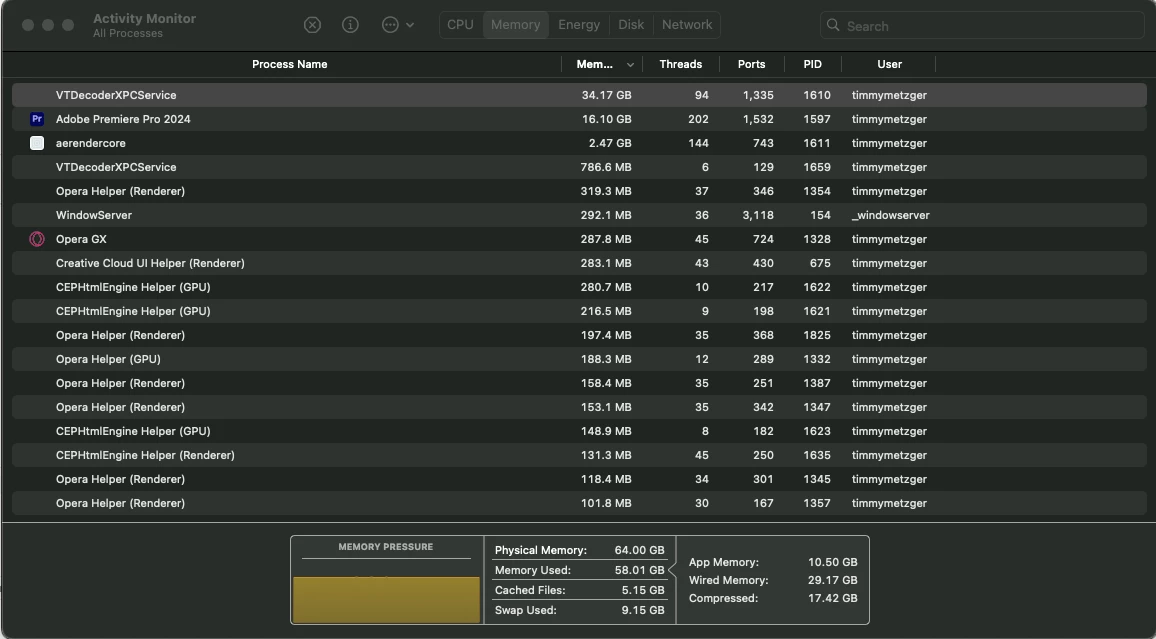
my specs are:
Chip: Apple M2 Ultra
Memory: 64 GB

Gpu: 60-core

Neural Engine: 32-core 

This topic has been closed for replies.

5 replies

Kevin-Monahan
Community Manager
Community Manager
July 29, 2024

The status of this bug report has been updated.

Kevin Monahan - Sr. Community and Engagement Strategist – Adobe Pro Video and Audio
MyerPj
Community Expert
Community Expert
July 29, 2024

Why do you suspect that? Can you kill the process just to see. Reboot after? Here's a Google Search for you.

Kevin-Monahan
Community Manager
Community Manager
July 29, 2024

Hello @BCS9292,

I am Kevin from support, one of the moderators here. Thanks for the bug report. I hope we can help you with this problem.


1. Do you use iCloud? In the Photos app, try switching off Settings > iCloud Photos.

2. Do you have any browser tabs open? Close all browsers and applications (such as Spotify) when troubleshooting this issue.
3. Are you a user of the Asana platform? The client has been known to generate this error.


Let the community know if any of these things might prevent your RAM from spiraling upward.


I hope the team, an Adobe Expert, or a community member will help you with this shortly.


Thanks,

Kevin

Kevin Monahan - Sr. Community and Engagement Strategist – Adobe Pro Video and Audio
BCS9292Author
Participant
July 29, 2024

Hi Sumeet,


Overall, I mostly work with .MP4 4k footage, which I know can be a strain on the mac, but with it proxied I would think it would run better. And to the point of something in the background slowing things down, when I'm working with premiere, I try not to have anything open in the background because I know it'll make it die faster. 

My nuclear option is to hard wipe my whole Mac so that anything I could've downloaded to ruin it dies with it.


Hope this helps,

BC


Community Manager
July 29, 2024

Hi BCS9292,


Sorry to hear about this. Generally, you should not be experiencing playback issues with proxies on that system. Do you have any other app playing or streaming any media in the background? If so, have you tried closing that to see if it's making any difference? Also, is this happening while working with any specific media type in Premiere Pro?


Thanks,

Sumeet

SMAKHOU VISUALS
Participant
February 16, 2024

Adobe Premiere Pro Version 24.1
macOS Sonoma Version 14.4 Beta

hello guys I have this problem when I open my project in Adobe Pr VTDecoderXPCService starts using high RAM wich effect my editing playback
i tried antivirus or deleting some apps may be affected & uninstall Adobe or uptading the system but no results